


Imagine a world where tasks flow seamlessly, deadlines are met with ease, and everyone knows exactly what to do next. It sounds like a dream, right? Well, it’s closer than you think! The key lies in how to document workflows effectively.
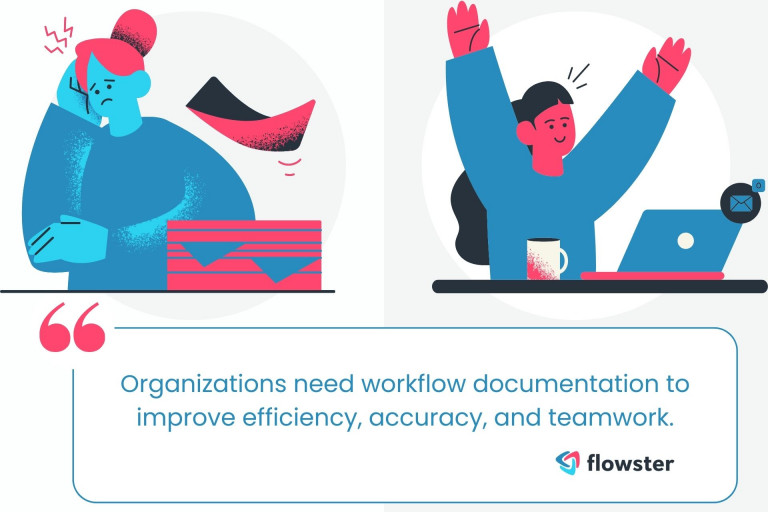
We all face workflow chaos. Processes get lost in verbal communication, tasks fall through the cracks, and confusion reigns supreme. This leads to wasted time, missed deadlines, and frustrated team members.
But fear not! By documenting your workflows, you can transform your messy reality into a well-oiled machine. This blog post will equip you with the knowledge and tools to conquer chaos and become a workflow mastermind.
Not-so-good workflows can lead to problems.
Have you ever wondered about the real impact of disorganized processes? Dane A. Donaldson sheds light on this in his thought-provoking piece, ‘The Impact of Poor Process on Organizations‘. It’s a must-read to understand the pitfalls of inefficient workflows and sets the stage for why proper documentation is not just beneficial but essential.
Article Outline
Benefits of Documenting Workflows: A Powerful Tool
So, why should you conquer the document-dation mountain? Here are just a few benefits:
- Increased efficiency: No more wasting time deciphering your own cryptic notes or rediscovering the same wheel each day. A documented workflow keeps everyone on the same page, streamlining tasks and minimizing wasted effort.
- Improved accuracy: Say goodbye to errors born of confusion! With a clear understanding of each step, the chances of mistakes plummet, leading to better-quality work and fewer headaches.
- Boosted accountability: When everyone knows who’s responsible for what, finger-pointing becomes a relic of the past. Clear documentation fosters ownership and ensures tasks don’t fall through the cracks.
- Enhanced collaboration: Working with others becomes a breeze when you have a shared understanding of the process. Documentation facilitates smooth handoffs and breaks down communication barriers.
- Greater adaptability: Change is inevitable, but your workflows don’t have to crumble with it. Documented processes are easier to adjust and optimize, allowing you to roll with the punches and stay ahead of the curve.
A case study on how workflow documentation helps.
Gain a deeper understanding of how effective workflow management influences work quality by exploring ‘Organizational Workflow and Its Impact on Work Quality‘. This comprehensive piece from NCBI offers valuable insights into the significant impact that well-designed workflows can have on the overall quality of work within organizations.
Convinced? Excellent! With that out of the way, let us get started on the process of documenting workflows.
Guide on How to Document Workflows: Free Template
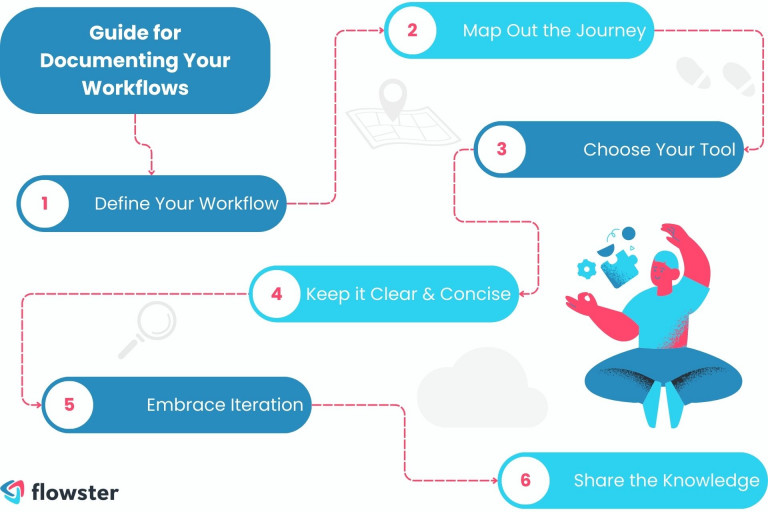
Now, let’s dive into the practical side. Documenting workflows can be straightforward with the right approach. Follow these six essential guide to transform your workflow process into a clear and effective system
- Define your workflow: Identify the process or business processes you want to document. Is it onboarding a new client, creating a marketing campaign, or developing a software feature? Once you know your target, you can start mapping the steps.
- Map out the journey: Break down the process flow into its individual tasks. List them in chronological order, making sure you capture every step, no matter how small. Don’t forget to include decision points and potential alternative paths.
- Choose your weapon: There’s no one-size-fits-all approach to documentation. Use the format that works best for you: a workflow diagram, flowcharts, checklists, written instructions, visual maps—the possibilities are endless!
- Keep it clear and concise: Avoid jargon and overly technical language. Remember, your documentation should be understandable to anyone who needs to follow the workflow, not just you.
- Embrace iteration: Your workflows are living documents, not set-in-stone sculptures. Don’t be afraid to update and revise them as your process evolves.
- Share the knowledge: Make your documentation easily accessible to everyone involved in the workflow. Consider using collaborative tools or a central repository for easy reference.
Create Workflow Documentation with Flowster’s Free Template
Feeling overwhelmed? Simplify your start with this free workflow document template. It’s a straightforward, practical tool to immediately begin organizing your processes. Simply click on the template and experience a quicker, clearer way to document your workflows.
Looking for more? Visit Flowster’s Marketplace for a diverse range of free templates, including ones tailored for human resources workflows. These ready-to-use templates provide excellent workflow documentation examples to inspire and guide you.
Whether you’re streamlining onboarding processes or refining team operations, you’ll find a template that fits your needs. Click on the button to explore these invaluable tools today!
Workflow Documentation Best Practices: Awesome Tips
Mastering the art of workflow documentation is the key to success. In this section, we’ll explore some awesome tips to elevate your documentation game, ensuring it’s not just functional but also top-notch.
- Keep it simple: Avoid jargon and technical terms. Use clear and concise language.
- Focus on the essentials: Don’t get bogged down in too much detail. Keep it relevant and actionable.
- Use visuals: Flowcharts, screenshots, and diagrams can make your documentation more engaging and easier to understand.
- Make it interactive: Consider using online tools that allow users to interact with your workflow documentation.
- Get feedback: Ask colleagues, team members, or even clients for their input on your documentation.
Tips to overcome workflow automation challenges.
Workflow automation can come with its own set of challenges. For a deeper dive into this topic, check out Flowster’s blog post, ‘How to Overcome the Top 5 Workflow Automation Challenges‘. It provides practical solutions to common obstacles, helping you streamline your automated workflow systems more effectively.
Workflow Documentation Tools: Get Ready for Success
Documenting workflows doesn’t mean resorting to endless Word documents and spreadsheets (unless those are your jams!). Here are some stellar Software documentation tools to make the process smoother, ensuring clarity, consistency, and easier collaboration across teams:
Flowcharting and Diagramming Tools:
- Lucidchart: Create professional-looking flowcharts, diagrams, and mockups with ease.
- Visio: A Microsoft offering for comprehensive diagramming and visualization.
- Draw.io: A free, open-source option for creating basic flowcharts and diagrams.
- Creately: A diagramming and visual collaboration platform capable of 10X faster results with AI diagrams.
Process Mapping Tools:
- Heflo: Map, automate, and analyze your workflows on one intuitive platform.
- Process Street: Create interactive checklists and procedures to guide your team through workflows.
- Flowster.app: Visualize, collaborate on, and automate your workflows with ease, using a user-friendly interface and no-code automation features.
Document Handling and Approval Tools:
- SignWell: sign pdf documents online quickly and securely, with legally binding eSignatures and an intuitive interface ideal for streamlining document approvals.
- DocuSign: Electronically complete and manage PDF agreements with secure, legally binding signatures, ideal for fast, paperless approvals.
- Adobe Acrobat: Prepare, send, and collect e-signatures with ease while managing PDF workflows in a centralized platform.
- document automation software: Automate repetitive documentation tasks such as generating contracts, reports, and standardised forms. These tools reduce manual input, ensure consistency across documents, and accelerate your workflow from creation to approval.
Knowledge Base and Wiki Tools:
- Confluence: A collaborative workspace for creating and sharing knowledge, perfect for documenting workflows and procedures.
- Notion: A versatile tool for organizing notes, tasks, wikis, and more, allowing for flexible workflow documentation.
- Tettra: A knowledge base platform designed for easy creation and sharing of internal documentation – company wiki software is ideal for centralizing workflow documentation, SOPs, and team knowledge in one accessible location, making it easier to keep information up-to-date and universally available.
Project Management Tools:
- ClickUp: Manage tasks, track progress, and collaborate on projects, with built-in features for documenting workflows.
- Asana: Organize tasks, assign responsibilities, and visualize progress, creating a workflow documentation trail along the way.
- Trello: Use boards, lists, and cards to visualize workflows and track tasks in a simple and visual manner.
Pro Tip: Experiment with different tools to find the workflow documentation software that best suits your team’s needs and preferences. And remember, the best tool is the one that you actually use!
Choose a workflow documentation software.
Delve deeper into making informed decisions about AI-powered workflow management with Flowster’s insightful guide, ‘AI-Powered Workflow Management Software: How to Make The Smart Choice‘.
This resource provides a comprehensive walkthrough on selecting the right AI tools, tailored to your business process documentation needs, to enhance efficiency and streamline your operations.
Transform Your Business with Flowster's AI-Driven Automation
Integrating Workflow Documentation with AI: Your Workflow Superhero
Don’t want to spend hours wrestling with flowcharts and deciphering messy notes? Enter the world of AI, your new workflow documentation superhero! These clever tools can:
- Automagically map your processes: No more painstakingly drawing diagrams. AI analyzes your entire workflow and generates clear, professional flowcharts in seconds.
- Extract data like a ninja: Ditch the manual data entry. AI can grab key information from emails, documents, and even voice recordings, populating your forms and reports with lightning speed.
- Clarify the confusion: Stuck on jargon or unclear instructions? AI can analyze your workflow and provide helpful annotations, ensuring everyone understands their role and next steps.
- Keep your docs in the know: Processes change, but your documentation shouldn’t be left behind. AI tools can monitor your workflows and automatically update your diagrams and forms in real-time.
So, ditch the documentation dread and embrace the AI revolution. With these powerful tools, you can turn your workflow documentation into a streamlined masterpiece, boosting efficiency, clarity, and collaboration across your team.
Effectively Document Workflow Using AI
As you embrace AI in your workflow documentation, you might find Flowster’s guide on ‘AI-Powered SOP Creation: How to Make Procedures‘ incredibly insightful. It delves deeper into leveraging AI for developing efficient Standard Operating Procedures (SOPs), a perfect next step after reading about AI’s role as your workflow superhero.
Conclusion: Clearly Document Your Workflows
Documenting your workflows is an investment that pays off in spades. By following the steps and tips in this blog post, you can create clear, concise, and effective documentation that will empower your team to achieve greatness.
So, what are you waiting for? Embrace smart documentation, unleash efficiency, and watch your team transform into productive powerhouses. Remember, clear workflows = clear wins. Now go forth and document like a champion!
Need an easy way to create workflow documents?
With Flowster, you can use AI to create any workflow document and automate tasks that you do repeatedly. There are also many pre-made workflow templates in our Flowster Marketplace that can be customized to meet any business need.
Looking for professional help? As part of our “Done for You” services, our experts in quality and improvement will make you unique workflows.


One Response
This guide is incredibly helpful! I love the practical tips on documenting workflows clearly and concisely. It’s about time we prioritize efficiency in our processes. Looking forward to implementing these strategies in my team!