

Skip to content
  • Next Steps
    • What is Flowster?
    • Process Management vs Project Management
    • Why Flowster vs MS or Google Docs?
    • Flowster vs Flowcharts
    • Customer Stories
    • Browse our Template Marketplace
    • 3 Minute Demo
    • Visit our Blog
  • Products
    • Capture Chrome Extension
    • Flowster Unlimited
    • Flowster Connect: LinkedIn Automation
    • Flowster Agency Success Tactics (FAST) Playbook
    • Amazon Seller Playbook
  • Marketplace
  • Pricing
  • Next Steps
    • What is Flowster?
    • Process Management vs Project Management
    • Why Flowster vs MS or Google Docs?
    • Flowster vs Flowcharts
    • Customer Stories
    • Browse our Template Marketplace
    • 3 Minute Demo
    • Visit our Blog
  • Products
    • Capture Chrome Extension
    • Flowster Unlimited
    • Flowster Connect: LinkedIn Automation
    • Flowster Agency Success Tactics (FAST) Playbook
    • Amazon Seller Playbook
  • Marketplace
  • Pricing
Log In
Get started for free

5 Workflow Management Mistakes and How to Quickly Fix Them

Image to illustrate 5 Biggest Workflow Management Mistakes Businesses Make (and How to Fix Them).
Picture of Liz Dyrsmid

Liz Dyrsmid

  • Published: Dec 15, 2023
  • Last updated: Jan 2, 2024

In today’s fast-paced business environment, efficient workflow management is essential for success. However, even the most well-intentioned businesses can fall prey to common workflow mistakes that can hinder their productivity and growth.

This article will identify the five biggest workflow management mistakes businesses make and provide practical solutions for fixing them. By implementing these tips, businesses can optimize their workflows, improve efficiency, and achieve their goals.

Article Outline

1. Not Defining Clear Objectives and Goals

Many businesses jump into implementing new workflow management tools and processes without clearly defining their objectives and goals. This can lead to wasted time and resources, as the implemented workflows may not be aligned with the overall business process.

How to fix it:

  1. Start by clearly defining your business goals and objectives. What do you hope to achieve by improving your workflow process?
  2. Identify key performance indicators (KPIs) to measure your progress. How will you know if your new workflows are successful?
  3. Develop a workflow map that outlines the steps involved in each process improvement. This will help you identify areas for improvement and ensure everyone is on the same page.

Workflow Management Tip: Utilize the SMART goal-setting framework:

  • Specific: Clearly define what you want to achieve.
  • Measurable: Identify measurable metrics to track progress.
  • Achievable: Set realistic and attainable goals.
  • Relevant: Ensure your goals align with your overall business strategy.
  • Time-bound: Set deadlines for achieving each goal.

Example:

  • Goal: Increase sales by 20% in the next quarter.
  • Strategies:improve lead generation processes,automate customer onboarding, and implement a CRM system.

Are your goals calling you to take action now? Here is an article with free, ready-made workflow templates for setting quarterly goals and other business templates that you can use right away: 3 Free SOP Templates for Business Strategies to Help You Grow Your Business
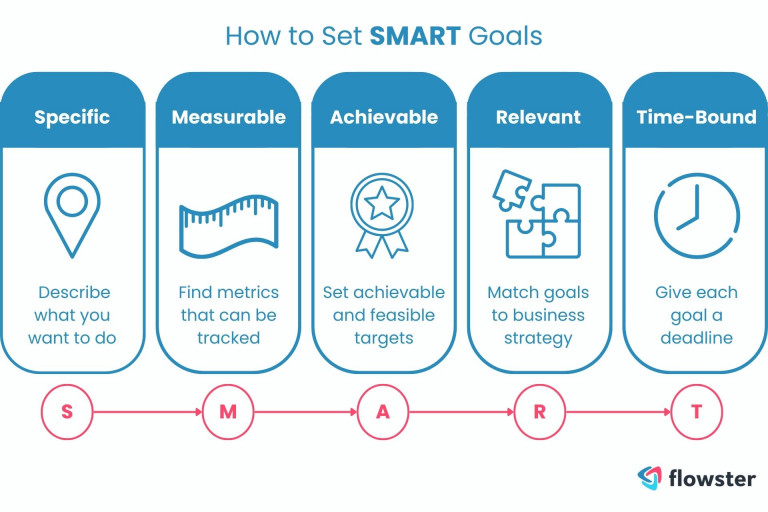
This image is to illustrate how to create SMART goals to avoid workflow management mistakes.

2. Lack of Communication and Collaboration

Effective communication and collaboration are essential for smooth workflow management. When team members are not aware of their roles and responsibilities, or when there is a lack of transparency in the business processes, it can lead to confusion, delays, and errors.

How to fix it:

  1. Establish clear communication channels and expectations for all workflow users. Make sure everyone knows who to contact for questions and how to report issues.
  2. Encourage regular team meetings and updates. This will help everyone stay informed and on track.
  3. Utilize tools that facilitate multiple workflows, enhancing collaboration across different departments.

Workflow Management Tip: Implement communication channels for regular team updates, including:

  • Daily stand-up meetings
  • Project management tools with communication features
  • Collaborative platforms for sharing documents and ideas
  • Scheduled team check-ins

Example:

  • Utilize Slack or Microsoft Teams for real-time communication.
  • Implement project management tools like Asana or Trello for task collaboration.
  • Use Google Docs for shared document editing and feedback.

Feeling buried under a mountain of collaboration tools? You’re not alone. This article dives right into why these tools might be overwhelming your team and what you can do about it: “Are Collaboration Tools Overwhelming Your Team?”

3. Over-Reliance on Manual Processes

Many businesses still rely on manual processes for tasks that could be easily automated workflows. This can lead to inefficiencies, errors, and wasted time.

How to fix it:

  1. Identify tasks that are repetitive and time-consuming. These are the tasks that are most likely to benefit from automation.
  2. Research and invest in workflow automation tools. There are a variety of tools available that can automate a wide range of tasks.
  3. Start small and scale gradually. Don’t try to automate too many processes at once. This can overwhelm your team and lead to problems.

Workflow Management Tip: Identify and automate repetitive tasks with workflow automation tools, such as:

  • Zapier excels at connecting various apps and automating tasks between them, making it a versatile tool for integrating different parts of your workflow.
  • ClickUp shines as a comprehensive project management and workflow management platform, offering features like task management, collaboration tools, reporting, and customization, making it ideal for managing complex projects and teams.
  • Flowster simplifies complex processes, automates repetitive tasks, and facilitates collaboration, making it a powerful workflow management tool for businesses of all sizes.

Example:

  • Automate email follow-ups for sales leads.
  • Schedule social media posts in advance.
  • Generate reports automatically.

Read this article to learn about the different ways AI can help you manage your workflow: 10 Ways to Use AI-Powered Workflow Management Software to Save Time and Money

Transform Your Business with Flowster's AI-Driven Automation

You can streamline your business process and complete more tasks with the sophisticated app Flowster, which uses AI technology. Experience the future of workflow management with Flowster's free 7-day trial. Start optimizing your business processes today!
Start 7-Day Free Trial

4. Lack of Flexibility and Adaptability

In today’s dynamic business environment, it is important to be flexible and adaptable. Businesses that are stuck in their ways and unwilling to change their existing processes are likely to fall behind their competitors.

How to fix it:

  1. Be open to feedback and suggestions. Encourage your team to share their ideas for improvement and editing active workflows.
  2. Be willing to experiment with new workflows and technologies. Don’t be afraid to try new things and see what works best for your business.
  3. Regularly review and update your workflows. Adjust conflicting workflows to ensure optimal performance. As your business grows and changes, so too should your workflows.

Workflow Management Tip: Encourage feedback and suggestions from team members, and regularly review your workflows.

  • Be open to experimenting with new tools and technologies.
  • Conduct periodic workflow audits to identify areas for improvement.

Example:

  • Conduct monthly team meetings to discuss workflow improvements.
  • Encourage employees to submit feedback and suggestions through surveys or suggestion boxes.
  • Use project management tools with Kanban boards to visualize and adapt workflows easily.

For information on how to set up an agile workflow in your business, read this article: Using agile workflows for fun & profit

5. Inadequate Training and Support

Even the best workflow management tools and processes will be ineffective if employees are not properly trained on how to use custom workflows. This is particularly true for managing a complex process, where understanding each step is crucial for overall efficiency.

How to fix it:

  1. Provide comprehensive training for all employees on new workflows and technologies.
  2. Offer ongoing support and resources to help employees troubleshoot any problems they encounter.
  3. Foster a learning environment that supports ongoing development in managing complex processes.

Workflow Management Tip: Provide comprehensive training on new workflows and tools, including:

  • Onboarding sessions for new employees
  • Hands-on tutorials and demonstrations
  • Access to knowledge base and FAQs
  • Dedicated support team for technical assistance

Example:

  • Create detailed user guides for different workflow tools.
  • Offer online training modules and webinars.
  • Establish a buddy system for new employees to receive peer support.
  • Provide access to a help desk or support chat for troubleshooting.

Looking for help making your training guides and other support materials? Read this article: How to Make Business Procedures Easy to Understand and Follow
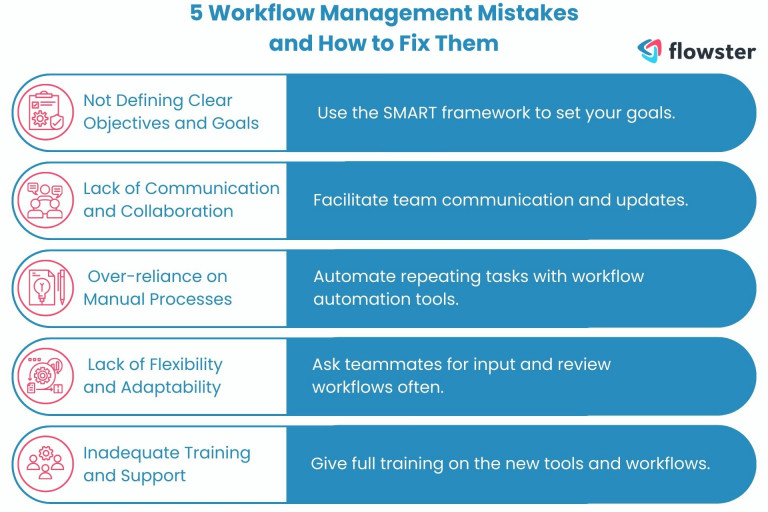
This image is to illustrate the five workflow management mistakes and how to fix them.

Ending Notes: Streamline Workflows, Elevate Results

By avoiding these five common workflow management mistakes, businesses can improve their efficiency, productivity, and competitiveness. Effective workflow management is essential for achieving success in today’s fast-paced business environment. By investing in the right tools and processes and by fostering a culture of communication and collaboration, businesses can create successful workflows that support their growth and success.

Want an easy way to create workflows and automate processes?

It is easy to use AI to make workflows and automate tasks that you do over and over again with Flowster. Our Flowster Marketplace also has a lot of workflow templates that have already been made.

Need professional help? As part of our “Done for You” services, our experts in quality and improvement will make you unique workflows.

Show Me Automated Workflow Templates

Check out our other interesting posts.

  • How a Social Media Video Agency Helps Brands Stand Out Online

    Read More
  • Automating Credit Risk Management: What Finance Teams Gain with Modern Software

    Read More
  • Making Your Digital Space Inclusive: A Must-Have For Modern Businesses

    Read More
  •  Categories: Artificial Intelligence, Business, Productivity, Software
  •  Tags: AI, Artificial Intelligence, business process, business processes, process management, Productivity, SOP builder, SOPs, Standard Operating Procedure, Standard Operating Procedures, Workflow, Workflows

Leave a Reply Cancel reply

Your email address will not be published. Required fields are marked *

3827 S Carson St, 505-25 Unit #3040
Carson City, NV 89701, USA

© Copyright – Flowster, LLC

Linkedin Twitter Youtube Facebook Instagram
  • About
  • Careers
  • Blog
  • Contact Us
  • About
  • Careers
  • Blog
  • Contact Us
1% For The Planet

RESOURCES

  • Help Docs
  • Integrations
  • Affiliates
  • Virtual Assistant Placement Program
  • Training Videos
  • Partner Webinars
  • Content Partner Program

LEGAL

  • Privacy Policy
  • Terms of Service

Stay up to date on the latest from Flowster

We use cookies on our website to give you the most relevant experience by remembering your preferences and repeat visits. By clicking “Accept”, you consent to the use of ALL the cookies.
Do not sell my personal information.
Cookie settingsACCEPT
Manage consent

Privacy Overview

This website uses cookies to improve your experience while you navigate through the website. Out of these, the cookies that are categorized as necessary are stored on your browser as they are essential for the working of basic functionalities of the website. We also use third-party cookies that help us analyze and understand how you use this website. These cookies will be stored in your browser only with your consent. You also have the option to opt-out of these cookies. But opting out of some of these cookies may affect your browsing experience.
Necessary
Always Enabled
Necessary cookies are absolutely essential for the website to function properly. This category only includes cookies that ensures basic functionalities and security features of the website. These cookies do not store any personal information.
Functional
Functional cookies help to perform certain functionalities like sharing the content of the website on social media platforms, collect feedbacks, and other third-party features.
CookieDurationDescription
akavpau_ppsdsessionThis cookie is provided by Paypal. The cookie is used in context with transactions on the website.
nsidsessionThis cookie is set by the provider PayPal. This cookie is used to enable the PayPal payment service in the website.
tsrce3 daysThis cookie is set by the provider PayPal. This cookie is used to enable the PayPal payment service in the website.
x-pp-ssessionThis cookie is set by the provider PayPal. This cookie is used to process payments from the site.
Performance
Performance cookies are used to understand and analyze the key performance indexes of the website which helps in delivering a better user experience for the visitors.
CookieDurationDescription
ac_enable_tracking1 monthThis cookie is set by the Active Campaign. This cookie is used to keep track of the site usage.
YSCsessionThis cookies is set by Youtube and is used to track the views of embedded videos.
Analytics
Analytical cookies are used to understand how visitors interact with the website. These cookies help provide information on metrics the number of visitors, bounce rate, traffic source, etc.
CookieDurationDescription
_ga2 yearsThis cookie is installed by Google Analytics. The cookie is used to calculate visitor, session, campaign data and keep track of site usage for the site's analytics report. The cookies store information anonymously and assign a randomly generated number to identify unique visitors.
_gcl_au3 monthsThis cookie is used by Google Analytics to understand user interaction with the website.
_gid1 dayThis cookie is installed by Google Analytics. The cookie is used to store information of how visitors use a website and helps in creating an analytics report of how the website is doing. The data collected including the number visitors, the source where they have come from, and the pages visted in an anonymous form.
_hjFirstSeen30 minutesThis is set by Hotjar to identify a new user’s first session. It stores a true/false value, indicating whether this was the first time Hotjar saw this user. It is used by Recording filters to identify new user sessions.
_omappvp11 yearsThe cookie is set to identify new vs returning users. The cookie is used in conjunction with _omappvs cookie to determine whether a user is new or returning.
_omappvs20 minutesThe cookie is used to in conjunction with the _omappvp cookies. If the cookies are set, the user is a returning user. If neither of the cookies are set, the user is a new user.
_uetsid1 dayThis cookies are used to collect analytical information about how visitors use the website. This information is used to compile report and improve site.
Advertisement
Advertisement cookies are used to provide visitors with relevant ads and marketing campaigns. These cookies track visitors across websites and collect information to provide customized ads.
CookieDurationDescription
_fbp3 monthsThis cookie is set by Facebook to deliver advertisement when they are on Facebook or a digital platform powered by Facebook advertising after visiting this website.
fr3 monthsThe cookie is set by Facebook to show relevant advertisments to the users and measure and improve the advertisements. The cookie also tracks the behavior of the user across the web on sites that have Facebook pixel or Facebook social plugin.
IDE1 year 24 daysUsed by Google DoubleClick and stores information about how the user uses the website and any other advertisement before visiting the website. This is used to present users with ads that are relevant to them according to the user profile.
MUID1 year 24 daysUsed by Microsoft as a unique identifier. The cookie is set by embedded Microsoft scripts. The purpose of this cookie is to synchronize the ID across many different Microsoft domains to enable user tracking.
test_cookie15 minutesThis cookie is set by doubleclick.net. The purpose of the cookie is to determine if the user's browser supports cookies.
uidThis cookie is used to measure the number and behavior of the visitors to the website anonymously. The data includes the number of visits, average duration of the visit on the website, pages visited, etc. for the purpose of better understanding user preferences for targeted advertisments.
VISITOR_INFO1_LIVE5 months 27 daysThis cookie is set by Youtube. Used to track the information of the embedded YouTube videos on a website.
Others
Other uncategorized cookies are those that are being analyzed and have not been classified into a category as yet.
CookieDurationDescription
_fw_crm_v1 yearNo description
_gat_UA-124464104-11 minuteNo description
_gat_UA-182261587-11 minuteNo description
_hjAbsoluteSessionInProgress30 minutesNo description
_hjid1 yearThis cookie is set by Hotjar. This cookie is set when the customer first lands on a page with the Hotjar script. It is used to persist the random user ID, unique to that site on the browser. This ensures that behavior in subsequent visits to the same site will be attributed to the same user ID.
_hjIncludedInPageviewSample2 minutesNo description
_hjIncludedInSessionSample2 minutesNo description
_hjTLDTestsessionNo description
_lfa2 yearsThis cookie is set by the provider Leadfeeder. This cookie is used for identifying the IP address of devices visiting the website. The cookie collects information such as IP addresses, time spent on website and page requests for the visits.This collected information is used for retargeting of multiple users routing from the same IP address.
_seg_uid1 yearNo description
_seg_uid_35361 yearNo description
_seg_visitor_35361 yearNo description
_uetvid16 days 6 hoursNo description
CONSENT16 years 8 months 2 days 6 hoursNo description
cookielawinfo-checkbox-functional1 yearThe cookie is set by GDPR cookie consent to record the user consent for the cookies in the category "Functional".
cookielawinfo-checkbox-others1 yearNo description
DO-LBNo description
enforce_policy1 yearNo description
hyperise_session2 hoursNo description
l7_az30 minutesNo description
LANG9 hoursNo description
prism_7995608311 monthNo description
RUL1 yearNo description
whr_nov1 yearNo description
x-cdnNo description
SAVE & ACCEPT
Powered by CookieYes Logo
  • Next Steps
    • What is Flowster?
    • Process Management vs Project Management
    • Why Flowster vs MS or Google Docs?
    • Flowster vs Flowcharts
    • Customer Stories
    • Browse our Template Marketplace
    • 3 Minute Demo
    • Visit our Blog
  • Products
    • Capture Chrome Extension
    • Flowster Unlimited
    • Flowster Connect: LinkedIn Automation
    • Flowster Agency Success Tactics (FAST) Playbook
    • Amazon Seller Playbook
  • Marketplace
  • Pricing
Login
Get started for free