
Skip to content
  • Next Steps
    • What is Flowster?
    • Process Management vs Project Management
    • Why Flowster vs MS or Google Docs?
    • Flowster vs Flowcharts
    • Customer Stories
    • Browse our Template Marketplace
    • 3 Minute Demo
    • Visit our Blog
  • Products
    • Capture Chrome Extension
    • Flowster Unlimited
    • Flowster Connect: LinkedIn Automation
    • Flowster Agency Success Tactics (FAST) Playbook
    • Amazon Seller Playbook
  • Marketplace
  • Pricing
  • Next Steps
    • What is Flowster?
    • Process Management vs Project Management
    • Why Flowster vs MS or Google Docs?
    • Flowster vs Flowcharts
    • Customer Stories
    • Browse our Template Marketplace
    • 3 Minute Demo
    • Visit our Blog
  • Products
    • Capture Chrome Extension
    • Flowster Unlimited
    • Flowster Connect: LinkedIn Automation
    • Flowster Agency Success Tactics (FAST) Playbook
    • Amazon Seller Playbook
  • Marketplace
  • Pricing
Log In
Get started for free

5-Step Guide to Mastering Process Maps for Task Management

Image to suggest busy office discussing creating process maps for task management.
Picture of Liz Dyrsmid

Liz Dyrsmid

  • Published: Nov 21, 2024
  • Last updated: Nov 21, 2024

Ever felt overwhelmed by a mountain of tasks, unsure where to start or how to prioritize? This chaotic feeling is a common challenge, especially in fast-paced work environments. But fear not, there’s a powerful tool to bring order to your workflow: process maps for task management.

Process maps are visual representations of workflows, breaking down complex processes into simpler, manageable steps. By mapping out your tasks, you can gain a clearer understanding of the big picture, identify potential bottlenecks, and streamline your operations.

In this guide, we’ll walk you through the step-by-step process of creating effective process maps. By the end, you’ll be equipped with the knowledge and tools to transform your chaotic workflow into a well-organized system.

Article Outline

Understanding Process Maps for Task Management

Before diving into the creation process, let’s solidify our understanding of process maps in the context of task management.

What are Process Maps?

Imagine a tangled web of tasks—that’s what an unmanaged workflow can feel like. Process maps act like a roadmap, untangling the web by visually depicting your workflow step-by-step. They typically use flowcharts or diagrams to illustrate the sequence of actions required to achieve a specific goal.

Benefits of Using Process Maps for Task Management

Process maps don’t just sit pretty; they offer a multitude of advantages:

  • Enhanced Clarity: By visualizing your workflow, process maps bring clarity to complex tasks. Each step is laid out explicitly, eliminating confusion and ensuring everyone involved is on the same page.
  • Improved Efficiency: Identifying bottlenecks and redundancies becomes easier with a process map in hand. This allows you to optimize your workflow, eliminate unnecessary steps, and ultimately get tasks done faster.
  • Streamlined Communication: Process maps act as a shared language, fostering clear communication between team members. With a visual reference, everyone understands the process, facilitating smoother collaboration and reducing the need for constant clarification.

Ready to unlock the power of process maps for task management? Learn more about the specific strategies and applications in our comprehensive guide: Understanding Business Process Mapping.
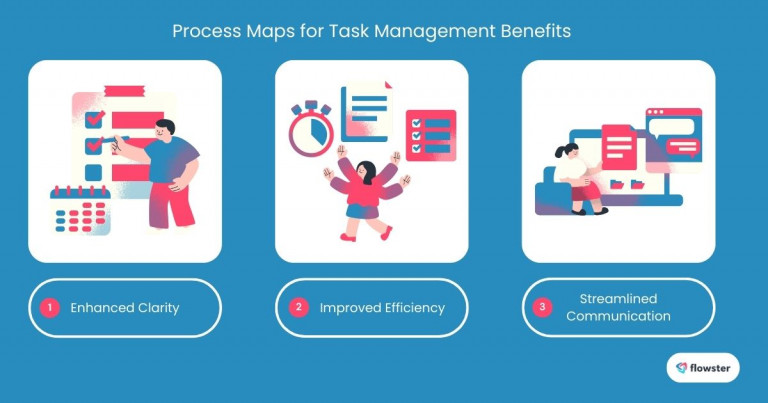
Image to illustrate the benefits of process mapping to help readers understand the importance of process maps for task management.

Preparing to Create Your Process Maps for Task Management

Before diving into the creation process, it’s crucial to lay the groundwork. Here’s how to get ready to map your workflows:

Identify the Areas of Focus

Not every process needs a map. Prioritize areas that are complex, time-consuming, or prone to errors. Common targets include:

  • Project Management: Map out the stages of a project, from initiation to completion.
  • Customer Onboarding: Visualize the customer journey, from initial contact to becoming a loyal client.
  • Sales Process: Map the sales funnel, from lead generation to closing deals.

Gather Necessary Tools

With the right tools, creating process maps becomes a breeze. Consider using:

  • Dedicated Process Mapping Software: Tools like Lucidchart and Microsoft Visio offer a wide range of templates and features for creating professional-looking diagrams.
  • Workflow Automation Tools: Tools like Flowster Capture can help you automatically create process maps from your existing workflows.

Now that you’re prepared, let’s explore the steps involved in creating your own process maps.

Capture Your Processes in Minutes!

Say goodbye to tedious documentation and hello to efficiency! Capture lets you document 50-100 steps in under 5 minutes.
Start Capturing Now!

Step-by-Step Guide to Creating Process Maps for Task Management

Now that you’re prepared, let’s dive into the practical steps of creating your process map.

Step 1: Identify Tasks

The first step is to break down your process into its individual tasks. To ensure a comprehensive list:

  • Brainstorming: Take some time to brainstorm and list all the tasks, no matter how small they may seem.
  • Involve Team Members: Collaborate with your team members to get diverse perspectives and capture all relevant tasks.

Step 2: Define the Sequence of Steps

Once you have a list of tasks, the next step is to arrange them in a logical sequence. Consider:

  • Flow of Work: Determine the natural flow of the process, starting from the initial step and moving towards the final outcome.
  • Decision Points and Feedback Loops: Identify any decision points where the process might branch off, and incorporate feedback loops to account for potential adjustments.

Step 3: Choose a Mapping Format

The format you choose will depend on the complexity of your process and the level of detail required. Popular options include:

  • Flowcharts: Ideal for simple, linear processes.
  • Swimlane Diagrams: Useful for visualizing processes that involve multiple teams or departments.
  • Data Flow Diagrams: Suitable for processes that involve data input, processing, and output.

To enhance clarity, use a consistent set of shapes and colors to represent different types of activities, decisions, and documents.

Step 4: Create the Process Map

Now it’s time to bring your process map to life. Use your chosen tool to:

  • Utilize Templates: Many tools offer pre-built templates to speed up the process.
  • Iterate and Refine: Don’t be afraid to revisit and refine your map as you gain more insights.

Step 5: Create Business Process Workflows

Once you have a solid process map, the next step is to transform it into efficient workflows. Check out this helpful guide: 5 Steps to Create Business Process Workflows.
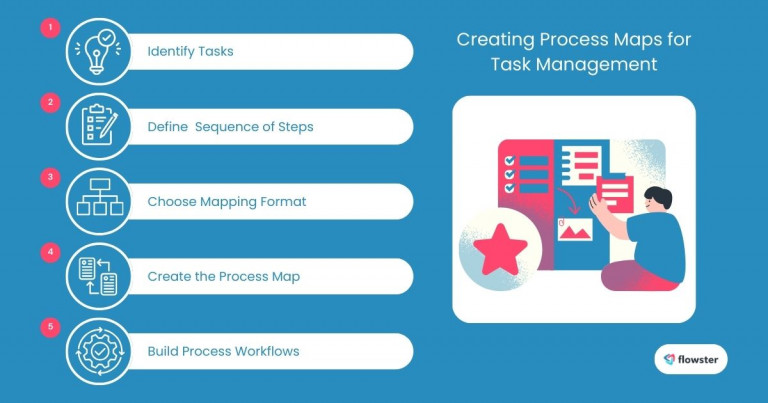
Image to illustrate the steps in creating process maps for task management.

Implementing Your Process Map for Task Management

Now that you have a visual representation of your workflow, it’s time to put it into action.

Share with Your Team

Once your process map and workflow are finalized, share them with your team members. This ensures everyone is aligned and understands their role in the process.

Training and Feedback

To maximize the effectiveness of your process map, consider:

  • Training Sessions: Conduct training sessions to walk your team through the map and explain any complex steps or decision points.
  • Gathering Feedback: Regularly seek feedback from your team to identify areas for improvement and make necessary adjustments to the map.

By sharing and training your team, you can foster a shared understanding of the process and empower everyone to work efficiently.

Taking Collaboration Further:

For a deeper dive on strategies to effectively involve your team in the process management cycle, check out this insightful article: Process Documentation: Effectively Involve Your Team

To ensure your process maps remain relevant and effective, it’s important to continuously monitor and improve them. Let’s explore how to do that in the next section.
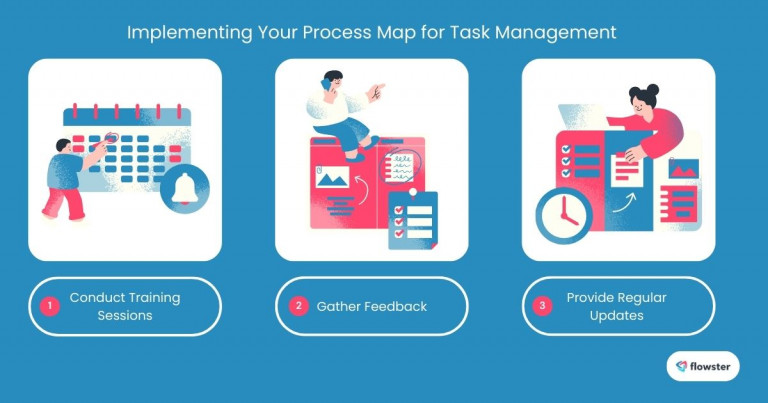
process maps for task management 2

Continuously Improve Your Process Maps for Task Management

A process map is a living document, not a static one. To ensure it remains a valuable tool for your team, it’s essential to continuously monitor and improve it.

Regular Reviews

Schedule regular reviews of your process map to:

  • Identify Bottlenecks: Look for areas where the process slows down or gets stuck.
  • Spot Inefficiencies: Pinpoint tasks that are redundant or unnecessary.
  • Assess Compliance: Ensure the process aligns with company policies and industry standards.

Adapt to Changes

As your business evolves, so too should your processes. Be prepared to:

  • Update the Map: Make necessary changes to the map to reflect new tasks, procedures, or technologies.
  • Train Your Team: Communicate changes to your team and provide any necessary training.

By staying proactive and continuously refining your process maps, you can unlock their full potential and drive efficiency and productivity within your organization.

Deepen Your Improvement Efforts:

For an even more comprehensive approach to process improvement, explore this insightful guide: How to Identify Areas for Process Improvement. This article dives deeper into strategies for analyzing your workflows and pinpointing areas for optimization.

Flowster's AI-Driven Automation

Experience the Future of Workflow & Process Management
Start FREE Trial Today!

Conclusion: Elevate Your Task Management with Process Maps

Process maps are a game-changer for task management. By providing a clear visual representation of your workflows, they enhance clarity, improve efficiency, and streamline communication.

Ready to take the next step?

Start mapping your business processes today. To help you get started, check out the free workflow templates available on the Flowster Marketplace. With these templates, you can quickly and easily create professional-looking process maps tailored to your specific needs.

Don’t let chaos reign in your workflow. Embrace the power of process maps and unlock a more efficient and productive future.

Get FREE Workflow Templates

Check out our other articles.

1

How a Social Media Video Agency Helps Brands Stand Out Online

Read Now »
122989

Automating Credit Risk Management: What Finance Teams Gain with Modern Software

Read Now »
lee campbell DtDlVpy vvQ unsplash

Making Your Digital Space Inclusive: A Must-Have For Modern Businesses

Read Now »
  •  Categories: Business, Productivity, Software, Workflows
  •  Tags: business process, business processes, process management, Productivity, Standard Operating Procedure, Standard Operating Procedures, Workflow, Workflows

Leave a Reply Cancel reply

Your email address will not be published. Required fields are marked *

3827 S Carson St, 505-25 Unit #3040
Carson City, NV 89701, USA

© Copyright – Flowster, LLC

Linkedin Twitter Youtube Facebook Instagram
  • About
  • Careers
  • Blog
  • Contact Us
  • About
  • Careers
  • Blog
  • Contact Us
1% For The Planet

RESOURCES

  • Help Docs
  • Integrations
  • Affiliates
  • Virtual Assistant Placement Program
  • Training Videos
  • Partner Webinars
  • Content Partner Program

LEGAL

  • Privacy Policy
  • Terms of Service

Stay up to date on the latest from Flowster

We use cookies on our website to give you the most relevant experience by remembering your preferences and repeat visits. By clicking “Accept”, you consent to the use of ALL the cookies.
Do not sell my personal information.
Cookie settingsACCEPT
Manage consent

Privacy Overview

This website uses cookies to improve your experience while you navigate through the website. Out of these, the cookies that are categorized as necessary are stored on your browser as they are essential for the working of basic functionalities of the website. We also use third-party cookies that help us analyze and understand how you use this website. These cookies will be stored in your browser only with your consent. You also have the option to opt-out of these cookies. But opting out of some of these cookies may affect your browsing experience.
Necessary
Always Enabled
Necessary cookies are absolutely essential for the website to function properly. This category only includes cookies that ensures basic functionalities and security features of the website. These cookies do not store any personal information.
Functional
Functional cookies help to perform certain functionalities like sharing the content of the website on social media platforms, collect feedbacks, and other third-party features.
CookieDurationDescription
akavpau_ppsdsessionThis cookie is provided by Paypal. The cookie is used in context with transactions on the website.
nsidsessionThis cookie is set by the provider PayPal. This cookie is used to enable the PayPal payment service in the website.
tsrce3 daysThis cookie is set by the provider PayPal. This cookie is used to enable the PayPal payment service in the website.
x-pp-ssessionThis cookie is set by the provider PayPal. This cookie is used to process payments from the site.
Performance
Performance cookies are used to understand and analyze the key performance indexes of the website which helps in delivering a better user experience for the visitors.
CookieDurationDescription
ac_enable_tracking1 monthThis cookie is set by the Active Campaign. This cookie is used to keep track of the site usage.
YSCsessionThis cookies is set by Youtube and is used to track the views of embedded videos.
Analytics
Analytical cookies are used to understand how visitors interact with the website. These cookies help provide information on metrics the number of visitors, bounce rate, traffic source, etc.
CookieDurationDescription
_ga2 yearsThis cookie is installed by Google Analytics. The cookie is used to calculate visitor, session, campaign data and keep track of site usage for the site's analytics report. The cookies store information anonymously and assign a randomly generated number to identify unique visitors.
_gcl_au3 monthsThis cookie is used by Google Analytics to understand user interaction with the website.
_gid1 dayThis cookie is installed by Google Analytics. The cookie is used to store information of how visitors use a website and helps in creating an analytics report of how the website is doing. The data collected including the number visitors, the source where they have come from, and the pages visted in an anonymous form.
_hjFirstSeen30 minutesThis is set by Hotjar to identify a new user’s first session. It stores a true/false value, indicating whether this was the first time Hotjar saw this user. It is used by Recording filters to identify new user sessions.
_omappvp11 yearsThe cookie is set to identify new vs returning users. The cookie is used in conjunction with _omappvs cookie to determine whether a user is new or returning.
_omappvs20 minutesThe cookie is used to in conjunction with the _omappvp cookies. If the cookies are set, the user is a returning user. If neither of the cookies are set, the user is a new user.
_uetsid1 dayThis cookies are used to collect analytical information about how visitors use the website. This information is used to compile report and improve site.
Advertisement
Advertisement cookies are used to provide visitors with relevant ads and marketing campaigns. These cookies track visitors across websites and collect information to provide customized ads.
CookieDurationDescription
_fbp3 monthsThis cookie is set by Facebook to deliver advertisement when they are on Facebook or a digital platform powered by Facebook advertising after visiting this website.
fr3 monthsThe cookie is set by Facebook to show relevant advertisments to the users and measure and improve the advertisements. The cookie also tracks the behavior of the user across the web on sites that have Facebook pixel or Facebook social plugin.
IDE1 year 24 daysUsed by Google DoubleClick and stores information about how the user uses the website and any other advertisement before visiting the website. This is used to present users with ads that are relevant to them according to the user profile.
MUID1 year 24 daysUsed by Microsoft as a unique identifier. The cookie is set by embedded Microsoft scripts. The purpose of this cookie is to synchronize the ID across many different Microsoft domains to enable user tracking.
test_cookie15 minutesThis cookie is set by doubleclick.net. The purpose of the cookie is to determine if the user's browser supports cookies.
uidThis cookie is used to measure the number and behavior of the visitors to the website anonymously. The data includes the number of visits, average duration of the visit on the website, pages visited, etc. for the purpose of better understanding user preferences for targeted advertisments.
VISITOR_INFO1_LIVE5 months 27 daysThis cookie is set by Youtube. Used to track the information of the embedded YouTube videos on a website.
Others
Other uncategorized cookies are those that are being analyzed and have not been classified into a category as yet.
CookieDurationDescription
_fw_crm_v1 yearNo description
_gat_UA-124464104-11 minuteNo description
_gat_UA-182261587-11 minuteNo description
_hjAbsoluteSessionInProgress30 minutesNo description
_hjid1 yearThis cookie is set by Hotjar. This cookie is set when the customer first lands on a page with the Hotjar script. It is used to persist the random user ID, unique to that site on the browser. This ensures that behavior in subsequent visits to the same site will be attributed to the same user ID.
_hjIncludedInPageviewSample2 minutesNo description
_hjIncludedInSessionSample2 minutesNo description
_hjTLDTestsessionNo description
_lfa2 yearsThis cookie is set by the provider Leadfeeder. This cookie is used for identifying the IP address of devices visiting the website. The cookie collects information such as IP addresses, time spent on website and page requests for the visits.This collected information is used for retargeting of multiple users routing from the same IP address.
_seg_uid1 yearNo description
_seg_uid_35361 yearNo description
_seg_visitor_35361 yearNo description
_uetvid16 days 6 hoursNo description
CONSENT16 years 8 months 2 days 6 hoursNo description
cookielawinfo-checkbox-functional1 yearThe cookie is set by GDPR cookie consent to record the user consent for the cookies in the category "Functional".
cookielawinfo-checkbox-others1 yearNo description
DO-LBNo description
enforce_policy1 yearNo description
hyperise_session2 hoursNo description
l7_az30 minutesNo description
LANG9 hoursNo description
prism_7995608311 monthNo description
RUL1 yearNo description
whr_nov1 yearNo description
x-cdnNo description
SAVE & ACCEPT
Powered by CookieYes Logo
  • Next Steps
    • What is Flowster?
    • Process Management vs Project Management
    • Why Flowster vs MS or Google Docs?
    • Flowster vs Flowcharts
    • Customer Stories
    • Browse our Template Marketplace
    • 3 Minute Demo
    • Visit our Blog
  • Products
    • Capture Chrome Extension
    • Flowster Unlimited
    • Flowster Connect: LinkedIn Automation
    • Flowster Agency Success Tactics (FAST) Playbook
    • Amazon Seller Playbook
  • Marketplace
  • Pricing
Login
Get started for free