

Skip to content
  • Next Steps
    • What is Flowster?
    • Process Management vs Project Management
    • Why Flowster vs MS or Google Docs?
    • Flowster vs Flowcharts
    • Customer Stories
    • Browse our Template Marketplace
    • 3 Minute Demo
    • Visit our Blog
  • Products
    • Capture Chrome Extension
    • Flowster Unlimited
    • Flowster Connect: LinkedIn Automation
    • Flowster Agency Success Tactics (FAST) Playbook
    • Amazon Seller Playbook
  • Marketplace
  • Pricing
  • Next Steps
    • What is Flowster?
    • Process Management vs Project Management
    • Why Flowster vs MS or Google Docs?
    • Flowster vs Flowcharts
    • Customer Stories
    • Browse our Template Marketplace
    • 3 Minute Demo
    • Visit our Blog
  • Products
    • Capture Chrome Extension
    • Flowster Unlimited
    • Flowster Connect: LinkedIn Automation
    • Flowster Agency Success Tactics (FAST) Playbook
    • Amazon Seller Playbook
  • Marketplace
  • Pricing
Log In
Get started for free

5 Steps to Create a Powerful Workflow Checklist for Your Small Business

Image to suggest creating a workflow checklist.
Picture of Liz Dyrsmid

Liz Dyrsmid

  • Published: Aug 29, 2024
  • Last updated: Aug 29, 2024

Feeling overwhelmed by a mountain of tasks? Struggling to keep your team on track and deadlines met? If so, you’re not alone. Many small businesses face the daily challenge of juggling multiple responsibilities and maintaining efficiency. The solution? A workflow checklist.

A workflow checklist is a step-by-step guide that outlines a specific process, providing a clear roadmap for your team to follow. By implementing workflow checklists, you can streamline operations, boost productivity, and reduce errors. In this blog post, we’ll delve into what a workflow checklist is, how to create one, and the benefits it can bring to your small business.

Article Outline

What is a Workflow Checklist?

A workflow checklist is a structured, step-by-step guide that outlines a specific process or task. It serves as a visual aid, ensuring that all necessary steps are completed in the correct order and nothing is overlooked. By implementing workflow checklists, businesses can streamline operations, improve efficiency, and enhance overall productivity.

Key Benefits of Using Workflow Checklists:

  • Increased Efficiency & Productivity: By providing a clear roadmap, workflow checklists help teams stay focused and avoid distractions. This leads to increased efficiency and improved productivity.
  • Improved Task Management: Workflow checklists break down complex tasks into smaller, more manageable steps, making it easier to track progress and identify areas for improvement.
  • Reduced Errors & Missed Deadlines: By following a standardized process, businesses can minimize the risk of errors and ensure that deadlines are met consistently.
  • Enhanced Team Collaboration: Workflow checklists can be shared and accessed by team members, promoting collaboration and ensuring everyone is on the same page.
  • Standardized Operations: By creating and implementing consistent workflow checklists, businesses can establish standardized procedures, ensuring quality and consistency across the organization.

As you can see, workflow checklists offer a multitude of benefits for businesses of all sizes. In the next section, we’ll explore the five essential steps involved in creating a successful workflow.
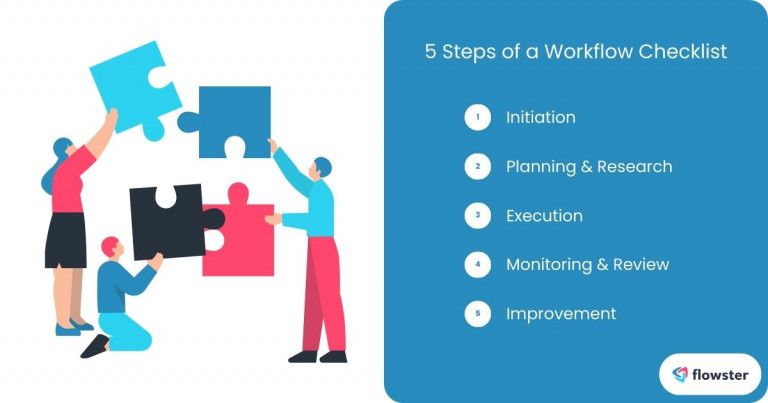
Image to list and illustrate the five steps of a successful workflow checklist.

The 5 Steps of a Workflow Checklist

Creating a comprehensive workflow checklist involves five key steps. Let’s explore each step in detail:

1. Initiation:

  • Define the Goal: The first step is to clearly define the desired outcome or goal of the workflow. What problem are you trying to solve, or what process are you looking to improve?
  • Identify Stakeholders: Determine who will be involved in the workflow and what their roles and responsibilities will be.

2. Planning & Research:

  • Outline Tasks: Break down the workflow into smaller, more manageable tasks. Consider the sequence of these tasks and any dependencies between them.
  • Gather Information: Research any necessary resources, tools, or information required to complete the tasks. This may involve consulting experts, reviewing existing processes, or conducting market research.

3. Execution:

  • Follow the Checklist: Once the checklist is created, ensure that team members follow the steps in the correct order. Provide necessary training or support to ensure understanding and compliance.
  • Track Progress: Monitor the progress of the workflow and address any issues or challenges that may arise.

4. Monitoring & Review:

  • Track Performance: Regularly review the checklist to assess its effectiveness. Track key metrics such as completion time, error rates, and overall satisfaction.
  • Identify Bottlenecks: Look for any bottlenecks or areas where the workflow is slowing down. Analyze these areas to determine how they can be improved.

5. Improvement:

  • Analyze Data: Use data collected during the monitoring and review phase to identify areas for optimization. Analyze trends, patterns, and feedback to identify opportunities for improvement.
  • Make Adjustments: Based on your analysis, make necessary adjustments to the workflow checklist. This may involve adding new steps, removing unnecessary steps, or modifying existing steps.

By following these five steps, you can create effective workflow checklists that help streamline your operations and improve efficiency. In the next section, we’ll discuss the three basic components that every workflow checklist should include.

How to Easily Create A Workflow Checklist in Flowster

How to Use the Checklist Section

The 3 Basic Components of a Workflow Checklist

A well-structured workflow checklist typically consists of three essential components:

1. Tasks:

  • Clear Instructions: Each step in the process should be clearly defined and accompanied by detailed instructions. Use concise and easy-to-understand language to avoid confusion.
  • Task Breakdown: Break down complex tasks into smaller, more manageable subtasks. This makes it easier to track progress and assign responsibilities.

2. Checkboxes:

  • Visual Indicator: Checkboxes provide a visual indicator of progress. As tasks are completed, they can be checked off, creating a sense of accomplishment and satisfaction.
  • Tracking Progress: Checkboxes make it easy to track the overall progress of the workflow and identify any tasks that may be falling behind.

3. Assignees (Optional):

  • Accountability: Assigning tasks to specific team members can increase accountability and ensure that everyone knows their responsibilities.
  • Collaboration: Assignees can help facilitate collaboration and communication within the team, ensuring that everyone is working towards the same goal.

By incorporating these three components into your workflow checklists, you can create a valuable tool for improving efficiency and productivity. Now that you understand the basics of workflow checklists, let’s explore how to create your own step-by-step guide.
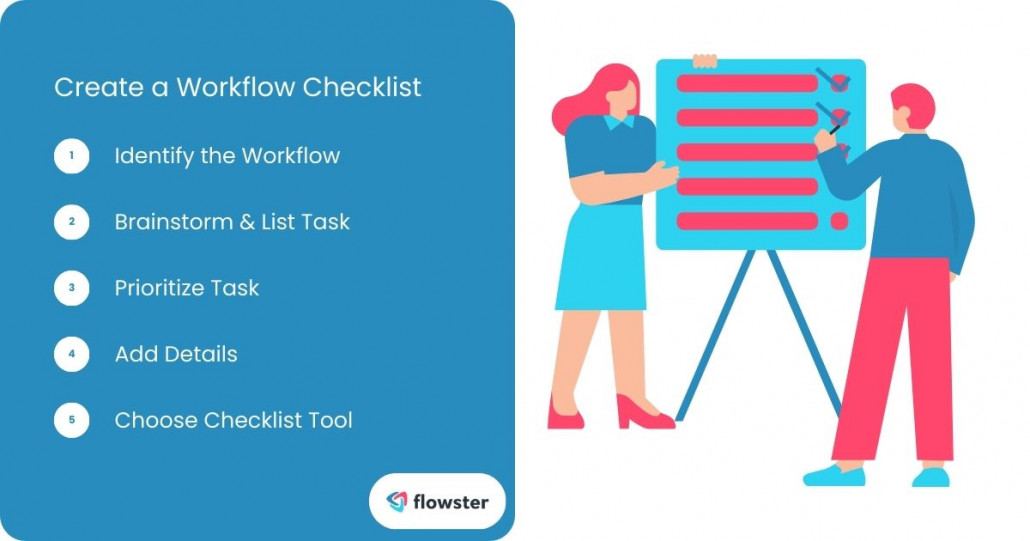
Image to list the steps in creating a workflow checklist.

How to Create a Workflow Checklist (Step-by-Step Guide)

Ready to take control of your business processes with custom workflow checklists? Let’s walk through the steps involved in creating an effective checklist:

1. Identify the Workflow:

  • Choose a Bottleneck: Start by identifying a specific process or task that feels cumbersome or inefficient. This could be anything from onboarding new clients to managing social media content creation.

2. Brainstorm & List Tasks:

  • Gather Team Input: Involve team members familiar with the process. Brainstorm and list all the individual steps involved, capturing as much detail as possible.

3. Prioritize Tasks:

  • Organize for Efficiency: Once you have a comprehensive list of tasks, order them chronologically or by importance. This ensures a logical flow and avoids confusion.

4. Add Details:

  • Clear Instructions: For each step, provide clear and concise instructions that are easy to understand. You can also include relevant deadlines or resources for each task. (Optional: Assignees)
  • Assign Ownership (Optional): Consider assigning specific tasks to team members to increase accountability and ownership.

5. Choose a Checklist Creation Tool:

  • Effortless Organization: Creating your workflow checklist electronically will allow for easy editing, sharing, and collaboration. There are a variety of tools available, but we recommend Flowster for its user-friendly interface.

Introducing Flowster:

Flowster simplifies the process of creating and managing workflow checklists. With its intuitive interface and customizable templates, you can build professional checklists in minutes. Key features include:

  • Drag-and-Drop Functionality: Easily add, remove, and rearrange tasks with a simple drag-and-drop function.
  • Customizable Templates: Utilize pre-built templates to jumpstart your checklist creation or build your own from scratch.
  • Collaboration Features: Share your checklists with team members and allow for real-time collaboration, ensuring everyone is on the same page.

Ready to Streamline Your Workflows?

Head over to Flowster today and sign up for a free trial to experience the benefits of workflow checklists firsthand. In the next section, we’ll explore some best practices for using workflow checklists effectively to maximize their impact on your business.

Flowster's AI-Driven Automation

Experience the Future of Workflow & Process Management
Start FREE Trial Today!

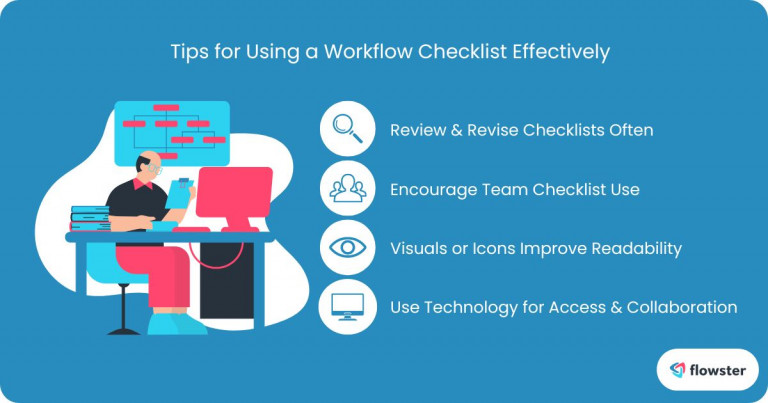
Tips for Using a Workflow Checklist Effectively

To get the most out of your workflow checklists, consider these best practices:

1. Tailor Checklists to Specific Workflows:

  • Customization is Key: Create checklists that are tailored to the specific needs of your team and the tasks at hand. Avoid generic templates that don’t address the unique challenges of your business.

2. Regularly Review and Update Checklists:

  • Stay Relevant: Processes evolve over time. Regularly review your checklists to ensure they remain accurate and up-to-date. Make necessary adjustments to reflect changes in procedures or team dynamics.

3. Promote Checklist Usage Within Your Team:

  • Encourage Adoption: Foster a culture where checklists are valued and used consistently. Provide training and support to ensure team members understand the benefits of using checklists and how to implement them effectively.

4. Use Visuals or Icons to Enhance Readability:

  • Visual Appeal: Incorporate visuals or icons to make your checklists more visually appealing and easier to understand. This can help improve engagement and retention.

5. Leverage Technology for Easy Access and Collaboration:

  • Digital Tools: Utilize digital tools like Flowster to create, share, and collaborate on checklists. This ensures easy access, real-time updates, and seamless teamwork.

By following these tips, you can maximize the effectiveness of your workflow checklists and drive efficiency and productivity within your organization. In the next section, we’ll conclude by summarizing the key benefits of using workflow checklists and encouraging you to start implementing them in your business.
workflow checklist 2

Conclusion: Take Control of Your Workflows Today

Feeling overwhelmed by operational inefficiencies? Workflow checklists can be your secret weapon for streamlining processes, boosting productivity, and achieving success in your small business. By implementing clear, well-defined checklists, you can ensure that tasks are completed consistently and accurately, while minimizing errors and missed deadlines.

Ready to experience the transformative power of workflow checklists? Head over to Flowster today and explore the vast collection of free workflow checklist templates and other task templates available at the Flowster Marketplace to get started quickly. 

Additionally, Flowster offers “Done-for-You” services where their team can create custom workflow checklists tailored to your specific needs. Don’t let inefficiencies hold your business back. Take control of your workflows with Flowster.app and unlock a new level of productivity and success!

Check out our other articles.

1

How a Social Media Video Agency Helps Brands Stand Out Online

Read Now »
122989

Automating Credit Risk Management: What Finance Teams Gain with Modern Software

Read Now »
lee campbell DtDlVpy vvQ unsplash

Making Your Digital Space Inclusive: A Must-Have For Modern Businesses

Read Now »
  •  Categories: Business, Free SOPs, Productivity, Software
  •  Tags: AI, business process, business processes, change management model, managing change process, process change management, process management, Productivity, Standard Operating Procedure, Standard Operating Procedures, Workflow, Workflows

Leave a Reply Cancel reply

Your email address will not be published. Required fields are marked *

3827 S Carson St, 505-25 Unit #3040
Carson City, NV 89701, USA

© Copyright – Flowster, LLC

Linkedin Twitter Youtube Facebook Instagram
  • About
  • Careers
  • Blog
  • Contact Us
  • About
  • Careers
  • Blog
  • Contact Us
1% For The Planet

RESOURCES

  • Help Docs
  • Integrations
  • Affiliates
  • Virtual Assistant Placement Program
  • Training Videos
  • Partner Webinars
  • Content Partner Program

LEGAL

  • Privacy Policy
  • Terms of Service

Stay up to date on the latest from Flowster

We use cookies on our website to give you the most relevant experience by remembering your preferences and repeat visits. By clicking “Accept”, you consent to the use of ALL the cookies.
Do not sell my personal information.
Cookie settingsACCEPT
Manage consent

Privacy Overview

This website uses cookies to improve your experience while you navigate through the website. Out of these, the cookies that are categorized as necessary are stored on your browser as they are essential for the working of basic functionalities of the website. We also use third-party cookies that help us analyze and understand how you use this website. These cookies will be stored in your browser only with your consent. You also have the option to opt-out of these cookies. But opting out of some of these cookies may affect your browsing experience.
Necessary
Always Enabled
Necessary cookies are absolutely essential for the website to function properly. This category only includes cookies that ensures basic functionalities and security features of the website. These cookies do not store any personal information.
Functional
Functional cookies help to perform certain functionalities like sharing the content of the website on social media platforms, collect feedbacks, and other third-party features.
CookieDurationDescription
akavpau_ppsdsessionThis cookie is provided by Paypal. The cookie is used in context with transactions on the website.
nsidsessionThis cookie is set by the provider PayPal. This cookie is used to enable the PayPal payment service in the website.
tsrce3 daysThis cookie is set by the provider PayPal. This cookie is used to enable the PayPal payment service in the website.
x-pp-ssessionThis cookie is set by the provider PayPal. This cookie is used to process payments from the site.
Performance
Performance cookies are used to understand and analyze the key performance indexes of the website which helps in delivering a better user experience for the visitors.
CookieDurationDescription
ac_enable_tracking1 monthThis cookie is set by the Active Campaign. This cookie is used to keep track of the site usage.
YSCsessionThis cookies is set by Youtube and is used to track the views of embedded videos.
Analytics
Analytical cookies are used to understand how visitors interact with the website. These cookies help provide information on metrics the number of visitors, bounce rate, traffic source, etc.
CookieDurationDescription
_ga2 yearsThis cookie is installed by Google Analytics. The cookie is used to calculate visitor, session, campaign data and keep track of site usage for the site's analytics report. The cookies store information anonymously and assign a randomly generated number to identify unique visitors.
_gcl_au3 monthsThis cookie is used by Google Analytics to understand user interaction with the website.
_gid1 dayThis cookie is installed by Google Analytics. The cookie is used to store information of how visitors use a website and helps in creating an analytics report of how the website is doing. The data collected including the number visitors, the source where they have come from, and the pages visted in an anonymous form.
_hjFirstSeen30 minutesThis is set by Hotjar to identify a new user’s first session. It stores a true/false value, indicating whether this was the first time Hotjar saw this user. It is used by Recording filters to identify new user sessions.
_omappvp11 yearsThe cookie is set to identify new vs returning users. The cookie is used in conjunction with _omappvs cookie to determine whether a user is new or returning.
_omappvs20 minutesThe cookie is used to in conjunction with the _omappvp cookies. If the cookies are set, the user is a returning user. If neither of the cookies are set, the user is a new user.
_uetsid1 dayThis cookies are used to collect analytical information about how visitors use the website. This information is used to compile report and improve site.
Advertisement
Advertisement cookies are used to provide visitors with relevant ads and marketing campaigns. These cookies track visitors across websites and collect information to provide customized ads.
CookieDurationDescription
_fbp3 monthsThis cookie is set by Facebook to deliver advertisement when they are on Facebook or a digital platform powered by Facebook advertising after visiting this website.
fr3 monthsThe cookie is set by Facebook to show relevant advertisments to the users and measure and improve the advertisements. The cookie also tracks the behavior of the user across the web on sites that have Facebook pixel or Facebook social plugin.
IDE1 year 24 daysUsed by Google DoubleClick and stores information about how the user uses the website and any other advertisement before visiting the website. This is used to present users with ads that are relevant to them according to the user profile.
MUID1 year 24 daysUsed by Microsoft as a unique identifier. The cookie is set by embedded Microsoft scripts. The purpose of this cookie is to synchronize the ID across many different Microsoft domains to enable user tracking.
test_cookie15 minutesThis cookie is set by doubleclick.net. The purpose of the cookie is to determine if the user's browser supports cookies.
uidThis cookie is used to measure the number and behavior of the visitors to the website anonymously. The data includes the number of visits, average duration of the visit on the website, pages visited, etc. for the purpose of better understanding user preferences for targeted advertisments.
VISITOR_INFO1_LIVE5 months 27 daysThis cookie is set by Youtube. Used to track the information of the embedded YouTube videos on a website.
Others
Other uncategorized cookies are those that are being analyzed and have not been classified into a category as yet.
CookieDurationDescription
_fw_crm_v1 yearNo description
_gat_UA-124464104-11 minuteNo description
_gat_UA-182261587-11 minuteNo description
_hjAbsoluteSessionInProgress30 minutesNo description
_hjid1 yearThis cookie is set by Hotjar. This cookie is set when the customer first lands on a page with the Hotjar script. It is used to persist the random user ID, unique to that site on the browser. This ensures that behavior in subsequent visits to the same site will be attributed to the same user ID.
_hjIncludedInPageviewSample2 minutesNo description
_hjIncludedInSessionSample2 minutesNo description
_hjTLDTestsessionNo description
_lfa2 yearsThis cookie is set by the provider Leadfeeder. This cookie is used for identifying the IP address of devices visiting the website. The cookie collects information such as IP addresses, time spent on website and page requests for the visits.This collected information is used for retargeting of multiple users routing from the same IP address.
_seg_uid1 yearNo description
_seg_uid_35361 yearNo description
_seg_visitor_35361 yearNo description
_uetvid16 days 6 hoursNo description
CONSENT16 years 8 months 2 days 6 hoursNo description
cookielawinfo-checkbox-functional1 yearThe cookie is set by GDPR cookie consent to record the user consent for the cookies in the category "Functional".
cookielawinfo-checkbox-others1 yearNo description
DO-LBNo description
enforce_policy1 yearNo description
hyperise_session2 hoursNo description
l7_az30 minutesNo description
LANG9 hoursNo description
prism_7995608311 monthNo description
RUL1 yearNo description
whr_nov1 yearNo description
x-cdnNo description
SAVE & ACCEPT
Powered by CookieYes Logo
  • Next Steps
    • What is Flowster?
    • Process Management vs Project Management
    • Why Flowster vs MS or Google Docs?
    • Flowster vs Flowcharts
    • Customer Stories
    • Browse our Template Marketplace
    • 3 Minute Demo
    • Visit our Blog
  • Products
    • Capture Chrome Extension
    • Flowster Unlimited
    • Flowster Connect: LinkedIn Automation
    • Flowster Agency Success Tactics (FAST) Playbook
    • Amazon Seller Playbook
  • Marketplace
  • Pricing
Login
Get started for free
