


In today’s interconnected world, virtual teams have become increasingly prevalent. With advances in technology and globalization, businesses are leveraging the power of virtual teams to collaborate across different time zones and geographical boundaries.
Virtual teams are groups of individuals who collaborate and work together towards a common goal despite being geographically dispersed. This flexible work arrangement offers numerous benefits, including access to diverse talent, reduced costs, and increased flexibility.
However, managing and using parallel teams and maximizing the potential of virtual teams can present unique challenges. This article explores strategies and best practices for unlocking the potential of virtual teams and fostering effective collaboration.
Article Outline
Understanding Virtual Teams
Virtual teams, or remote teams,” are groups of individuals who collaborate and work together towards a common goal despite being geographically dispersed. Unlike traditional teams that are located in the same office or physical space, virtual teams rely on digital communication and collaboration tools to connect team members who may be located in different parts of the world.
These virtual teams can be formed within an organization where employees from different departments or branches collaborate on a project. They can also be cross-organizational teams or networked teams, where individuals from various organizations come together to work on a specific task or project.
The key characteristic of virtual teams is the absence of face-to-face interactions. Instead, team members rely on technology such as video conferencing for business, email, instant messaging, and project management tools to communicate, collaborate, and share information. This virtual environment presents both challenges and opportunities for effective collaboration.
In virtual teams, members may come from diverse backgrounds, cultures, and time zones. This diversity can bring a wealth of perspectives and ideas to the table, enhancing creativity and problem-solving.
However, it also introduces potential challenges such as language barriers, cultural differences, and variations in work styles and expectations. To overcome these challenges and maximize the potential of virtual teams, it is essential to establish strong connections and foster a sense of belonging among team members.
Virtual team leaders should focus on building trust, promoting open and transparent communication, and creating a collaborative work culture.
Building Trust and Communication in Virtual Teams
Trust and communication are critical factors for the success of any team, and they become even more vital in virtual teams where face-to-face interactions are limited. Establishing trust and maintaining open lines of communication among team members is essential for fostering collaboration, engagement, and a sense of belonging.
Establishing Trust
In virtual teams, building trust may require additional effort compared to traditional teams, where team members have the advantage of regular face-to-face interactions. Without the ability to observe body language or rely on informal conversations, virtual team members must rely on other means to establish trust.
To build trust in virtual teams, it is important to prioritize open and transparent communication. Virtual team leaders should encourage regular communication channels, such as video conferences, team meetings, and one-on-one check-ins.
These interactions provide opportunities for team members to get to know each other on a personal level, share updates, and discuss any challenges or concerns they may have with the same organization.
Effective Communication
Active and attentive listening is crucial in virtual team communication. Each team member should feel heard and valued, even in the absence of physical proximity.
Encourage an environment where team members can openly express their opinions, ideas, and suggestions. Virtual team leaders should foster a culture that promotes psychological safety, ensuring that team members feel comfortable speaking up and sharing their thoughts.
Establishing clear and consistent communication norms and guidelines is essential for virtual teams. This includes setting expectations for response times, preferred communication channels, and etiquette. By providing clarity on how and when team members should communicate, misunderstandings can be minimized, and collaboration can flow smoothly.
Effective Communication Strategies in Virtual Teams
Effective communication is the lifeblood of virtual teams. Since virtual teams lack the advantage of face-to-face interactions, employing robust communication strategies becomes essential for fostering collaboration, exchanging information, and building strong relationships among team members.
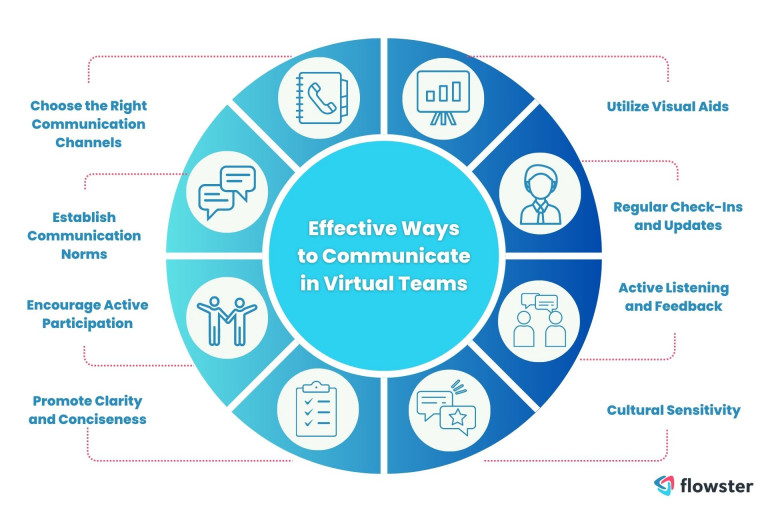
Here are some effective communication strategies to consider for virtual teams:
Choose the Right Communication Channels
Selecting appropriate communication channels is crucial for efficient and effective virtual team communication. Utilize a combination of synchronous communication tools, such as video conferencing and instant messaging, for real-time interactions.
Asynchronous communication tools, like email and project management platforms, are ideal for exchanging non-urgent information and updates that can be accessed at convenient times across different time zones.
Establish Communication Norms
Setting clear communication norms helps streamline virtual team interactions. Define expectations for response times, availability, and preferred communication methods.
Establish guidelines for when to use email, when to schedule video conferences, and when to utilize instant messaging platforms. By establishing these norms, team members can align their communication practices and reduce confusion.
Encourage Active Participation
Actively encouraging all team members to participate in virtual team discussions is vital for maintaining engagement and collaboration. Create a supportive environment where everyone feels comfortable expressing their opinions, ideas, and concerns. Virtual team leaders should actively seek input from all team members and ensure that everyone has an opportunity to contribute to discussions and decision-making processes.
Promote Clarity and Conciseness
Clear and concise communication is essential in virtual teams to minimize misunderstandings. Encourage team members to communicate their thoughts and ideas in a concise manner while ensuring clarity. Use bullet points, headings, and numbered lists to structure information and make it easier to comprehend. Avoid jargon and technical terms that may be unfamiliar to all team members.
Utilize Visual Aids
In virtual teams, visual aids can enhance communication and understanding. Utilize visual tools such as charts, diagrams, and presentations to convey complex information in a more accessible format. Visual aids can facilitate comprehension, particularly when dealing with abstract or technical concepts.
Regular Check-Ins and Updates
Schedule regular check-in meetings or video conferences to keep virtual team members connected and informed. These sessions provide an opportunity to discuss project progress, address any challenges, and provide updates on individual tasks. Regular communication fosters a sense of connection and ensures that remote team members are aware of ongoing developments.
Active Listening and Feedback
Actively listening to team members and providing constructive feedback is crucial for virtual teams. Engage in active listening by focusing on what others are saying, asking clarifying questions, and demonstrating empathy.
Provide timely feedback to acknowledge contributions, address concerns, and offer guidance for improvement. Regular feedback helps keep virtual team members motivated and aligned with project objectives.
Cultural Sensitivity
Virtual teams often comprise individuals from diverse cultural backgrounds. Be mindful of cultural differences in communication styles, norms, and expectations. Foster a culture of respect and inclusivity, promoting understanding and appreciation of different perspectives.
By implementing these effective communication strategies, virtual teams can overcome the challenges of distance and achieve productive collaboration. Strong communication fosters trust, engagement, and synergy among team members, enabling them to work together seamlessly despite physical separation.
Using Technology to Facilitate Collaboration in Virtual Teams
In virtual teams, technology plays a crucial role in facilitating communication, coordination, and collaboration among team members. By leveraging the right tools and platforms, virtual teams can overcome the challenges of distance and achieve seamless collaboration. Here are some key ways technology can be utilized:
Communication Tools
Virtual teams heavily rely on communication tools to connect team members. Video conferencing platforms, such as Zoom or Microsoft Teams, enable face-to-face interactions, allowing team members to see and hear each other in real time.
These platforms foster better rapport, engagement, and a sense of connection. Instant messaging apps, like Slack or Microsoft Teams Chat, provide quick and informal communication channels for real-time discussions, questions, and updates.
Collaboration Platforms
Online collaboration platforms, such as Google Workspace, Microsoft 365, or Trello, offer a centralized space for team members to collaborate on documents, share files, and manage tasks. These platforms enable simultaneous editing and commenting on documents, ensuring that team members can work together efficiently. They also provide visibility into project progress, task assignments, and deadlines, enhancing coordination and accountability.
Create and Implement SOPs with Flowster's AI-Driven Automation
Document Sharing
Cloud storage services, such as Google Drive, Dropbox, or Microsoft OneDrive, allow virtual team members to easily store, access, and share documents and files. This eliminates the need for physical file transfers and enables real-time collaboration on shared documents. Team members can work on the same document simultaneously, track revisions, and ensure everyone has access to the latest version.
Project Management Tools
Project management tools, like Asana, Basecamp, or Jira, help virtual teams organize and track tasks, milestones, and deadlines. These tools provide a centralized view of project progress, allowing team members to allocate tasks, set priorities, and monitor timelines. They also enable team members to communicate and collaborate on specific tasks within the context of a larger project.
Virtual Whiteboards
Virtual whiteboard tools, such as Miro or Mural, replicate the experience of physical whiteboards in a digital environment. These tools allow team members to brainstorm, visualize ideas, and collaborate on concepts even when physically apart. Virtual whiteboards provide a shared space for team members to contribute, organize information, and create visual representations of their ideas.
Task and Workflow Automation
Automation tools, like Zapier or Flowster, can streamline repetitive tasks and workflows in virtual teams. These tools enable the integration of different apps and platforms, allowing for automated data transfers, notifications, and updates. By automating routine tasks, virtual teams can save time, reduce errors, and focus on higher-value activities.
Virtual Teamwork Apps
Various apps and platforms are specifically designed for virtual teamwork. For example, Sococo provides a virtual office environment where team members can interact and collaborate in a virtual space.
Team-building apps, such as Donut or Icebreaker, facilitate virtual team bonding activities and icebreaker conversations. These dedicated apps enhance engagement and create a sense of community among virtual team members.
Security and Data Privacy
When leveraging technology for various collaboration and communication tools, it is crucial to prioritize security and data privacy. Ensure that the chosen tools and platforms have robust security measures in place to protect sensitive information.
Encourage team members to follow best practices for data protection, such as using strong passwords, enabling two-factor authentication, and being mindful of sharing confidential information.
By leveraging technology effectively, virtual teams can enhance their collaboration, streamline workflows, and improve productivity. The right tools and platforms empower team members to communicate, coordinate tasks, share information, and work together seamlessly, regardless of their physical locations.
Overcoming Challenges in Virtual Team Collaboration
Collaborating in virtual teams presents unique challenges that can hinder effective communication, coordination, and collaboration. However, by recognizing and addressing these challenges, virtual teams can find ways to overcome them and achieve successful collaboration.
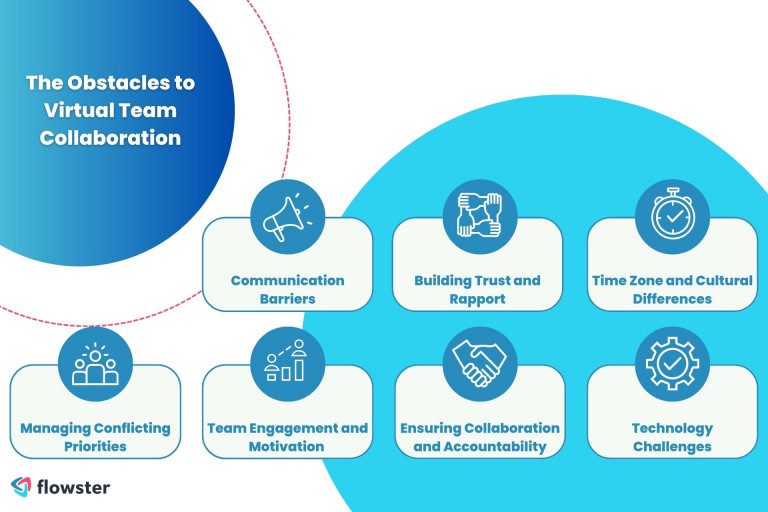
Here are some key challenges in virtual team collaboration and strategies to overcome them:
Communication Barriers
Virtual teams often face communication barriers due to the lack of face-to-face interaction. To overcome this challenge, virtual team members should utilize various communication tools and channels effectively.
Regularly schedule video conferences to enhance personal connections, encourage active participation, and promote clarity. Utilize chat platforms for quick and informal discussions.
Establish clear communication norms, including response times and preferred communication methods, to ensure effective and timely information exchange.
Building Trust and Rapport
Trust and rapport are crucial for effective collaboration in virtual teams. To build trust, virtual team members should engage in regular and transparent communication.
Encourage open discussions, active listening, and respect for diverse perspectives. Virtual team managers and leaders should foster a supportive and inclusive virtual team performance a culture where trust can flourish. Encourage virtual team members to share their expertise, contribute ideas, and collaborate on projects.
Regular team-building activities and informal interactions can also help strengthen rapport and create a sense of camaraderie.
Time Zone and Cultural Differences
Virtual teams often consist of members from different time zones and cultural backgrounds. This can pose challenges when scheduling meetings, coordinating tasks, and understanding communication styles.
To overcome these challenges, virtual team members should establish clear communication protocols that accommodate different time zones. Schedule meetings at times that are reasonable for all team members, and rotate meeting times to ensure fairness.
Foster cultural sensitivity and promote understanding of diverse cultural norms and communication styles.
Managing Conflicting Priorities
Virtual team members may have different priorities or work on multiple projects simultaneously. This can lead to conflicts in task allocation, deadlines, and resource allocation.
To manage conflicting priorities, virtual teams should establish clear project plans, task assignments, and deadlines. Regularly communicate project priorities and expectations to ensure alignment.
Utilize project management tools to track progress, assign tasks, and manage resources effectively. Encourage open communication among team members to address conflicts proactively and find mutually beneficial solutions.
Team Engagement and Motivation
Maintaining high levels of team engagement and motivation in virtual teams can be challenging due to the lack of in-person interactions and physical presence. To address this challenge, virtual team leaders should provide regular feedback, recognize achievements, and create opportunities for skill development.
Encourage team members to set individual and team goals, fostering a sense of purpose and commitment. Utilize virtual team-building activities to boost engagement, build relationships, and create a positive team culture.
Ensuring Collaboration and Accountability
Collaboration and accountability can be challenging in virtual teams where team members are physically dispersed. To ensure collaboration, utilize online collaboration platforms that provide a centralized space for document sharing, task management, and progress tracking.
Clearly define roles and responsibilities within the team and establish a culture of accountability. Regular check-ins and progress updates can help ensure that team members are aligned and working towards shared goals.
Technology Challenges
Technical issues and limitations can hinder virtual team collaboration. To address technology challenges, ensure that all virtual team members have access to reliable internet connections and the necessary software or tools.
Provide technical support and resources to troubleshoot any issues that may arise. Explore and utilize technology solutions specifically designed for virtual team collaboration, such as video conferencing platforms, project management tools, and document-sharing platforms.
By recognizing and actively addressing these challenges, virtual teams can overcome obstacles to collaboration and achieve successful outcomes. Effective communication, trust-building, clear expectations, and utilizing appropriate technology tools and platforms are key to overcoming these challenges and fostering effective collaboration in virtual teams.
Conclusion
In conclusion, virtual teams have emerged as a powerful and flexible way of collaborating in today’s interconnected world. With advancements in technology and the changing nature of work, virtual teams are becoming increasingly prevalent across various industries and organizations.
Throughout this article, we have explored several key aspects of virtual team collaboration. We started by talking about the different product development teams and the importance of maximizing the potential of virtual teams for effective collaboration.
We talked about topics like trust, effective communication, and leveraging technology for collaboration. We also discussed the challenges of virtual team collaboration and strategies for overcoming them.
It is evident that virtual teams offer numerous benefits, including increased flexibility, access to diverse talent, and the ability to overcome geographical limitations. However, they also come with unique challenges that need to be addressed.
By implementing the strategies and best practices outlined in this article, organizations can optimize virtual team collaboration and maximize their potential.
Looking for the best virtual assistant services?
If you want to harness the power of virtual assistants but lack the time or resources to go through the hiring and training process, Flowster Virtual Assistant Placement Services can assist.
With Flowster, you can find and train a virtual assistant who is specifically tailored to your business processes, allowing you to offload tasks and focus on what is most important. Flowster’s dedicated team will handle the entire process of finding, hiring, and training a virtual assistant for you.
Over the course of three weeks, they will look for the best candidate and ensure they are a good fit for your company’s needs. Once hired, the virtual assistant will go through several hours of in-depth training based on the processes you specify.
Now comes the exciting part: Flowster is offering a special promotion to our readers only. Take advantage of this offer to receive one week of excellent virtual assistant service for free!
Click the link below to take advantage of the special offer!
Note: Flowster’s special offer is subject to terms and conditions. Please visit their website for more details.
Recent Articles
Would you like to learn more? See our other informative articles.



