
Are you looking for ways to create high quality traffic from both social media and search engines so you can increase the number of visitors to your website from your target audience?
Would you like to learn some easy-to-use best practices for search engine optimization that you don’t have to be a guru with Google analytics to perform?
Well, look no further, because in today’s post, I’m going to share with you the details of our ongoing SEO Ride-Along, the results we have achieved so far, and how you can join in on the fun (and learning)!
Overview of Our Organic Traffic Experiment
As the founder of a bootstrapped SaaS business, I’m constantly thinking about ways to increase our website traffic from our target audience of other small business owners.
In particular, I’m most interested in learning about specific methods to quickly increase traffic to our web pages, and as of today, my skill level with SEO is not yet where it needs to be.
To help me with this, I’ve decided to produce this public SEO-Ride-Along as a way to force myself to learn SEO best practices, while also sharing what I’m learning with other people that are interested in increasing their own traffic from SEO.
Over the next few months, I’m going to be conducting a variety of micro-experiments and sharing our results, along with everything I’ve learned along the way.
What this SEO Ride-Along Will Be
The entire purpose of this ride along is to share my journey with you, including extremely detailed information on what my team and I are doing.
What this SEO Ride-Along Won’t Be
The web is already full of extensive SEO tutorials like this one from Brian Dean. Brian is an SEO wizard and his tutorial is comprehensive, to say the least.
However, what Brian and many others have done is to provide you with a comprehensive list of everything you could do and every tool that you could try to use along the way.
I actually didn’t find their approach as helpful as I would have liked, largely because it was too theoretical for me. I’m a very linear thinker and love nothing more than to have a good checklist to follow; especially if the items on the checklist are proven to work by the results being shared!
What You’ll Get
If you choose to follow my work along this journey to SEO success, I want to do my utmost to make it worth your while by providing as much value as I can so that you can use what I’m sharing to increase website traffic to your own blog posts, or simply as a part of your small business guest blogging activities.
With that in mind, here’s a summary of what you’ll get from me:
In each of the highly detailed blog posts I publish sharing the results of each micro-test, I will be describing in detail what we did to accomplish the results, along with the tools that we used to increase web traffic.
In each blog post, I will also include links to the SEO workflows (checklists) that I created while I was conducting the micro-test.
Armed with each workflow, you will be able to easily replicate every step my team performed to achieve the result we have achieved using this content marketing strategy.
In addition to the blog posts and workflow templates, I’ll also be providing you with free access to a Slack online community that I have created to facilitate discussion among all the folks that have chosen to follow the SEO Ride-Along.
How to Join the Ride
If you’d like to receive updates in your inbox, contact us.
Why SEO vs Paid Traffic for Content Marketing?
As the host of the Bright Ideas podcast, I have had the opportunity to interview a large number of other business owners. Many of my past guests operate eCommerce stores and SaaS businesses.
Regardless of the type of business they run, they all seem to love buying traffic. I suspect this is because ads on Google and other platforms are known for delivering faster results; especially when compared to organic social media marketing on your favorite social media platform.
With that said, the commonality that I have seen for the really successful companies is that in addition to paid web traffic, they have placed a significant focus on SEO because of the long term benefits of evergreen traffic.
While we do plan to invest in Google ads, Facebook ads, influencer marketing, guest posts, email marketing, video marketing, ads on social networks, etc to attract the right people to become potential customers… I think it would be foolish to skip SEO for our website and blog content because doing so would mean that we would not achieve the same long-term benefits as many of the companies that I have interviewed on my show.
One of my recent interviewees shared with me some actionable strategies that, if used correctly, should allow us to achieve some quick ways to get some SEO wins from long-tail keywords by focusing on what he called the “blog content low hanging fruit” of SEO.
Once he explained to me how to do what he was describing, I realized that perhaps SEO didn’t have to be as complex as I, and many others, thought it would be. In fact, research shows that just the opposite is true.
To sum up, I strongly believe that we’d be nuts not to do everything we can to quickly increase our organic website traffic!
Results Achieved So Far
As of the time of this writing, our results from organic traffic have actually been relatively good compared to the small amount of effort we have put into optimizing our website content.
For example, up to this point in Flowster’s evolution, it really hasn’t had much in the way of dedicated marketing efforts.
Instead, all we have tried to do is use a few basic keyword research tools to help us publish relevant content as well as rely on the traffic that my Bright Ideas podcast generates.
Despite this, the growth in our 7-day weekly active users has been higher than I would have expected. Here’s the numbers since the beginning of 2020.

At the beginning of 2020, our weekly active user number was just 395 and as of this writing (Sept 29th), that has increased to about 1,000, a percentage increase of 153%!
Not bad considering we haven’t spent even $1 on social media advertising for brand awareness, guest posting, and a host of other digital marketing activities that would be the norm for this point in our evolution.
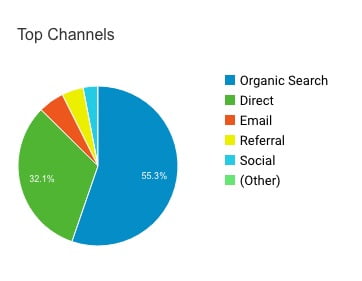
Over the same period, as you can see in the chart below, our top source of traffic, with 55.3% of the total, has been organic search.
So that all of the people who have elected to join us in this ride along can monitor the growth of our traffic over time from the experiments we perform, let me share a few other base-level data points.
Domain Overview
According to SEMRush, our current organic traffic number is 1.4K with a very positive traffic trend, coming primarily from the US. Our domain score currently sits at 38. 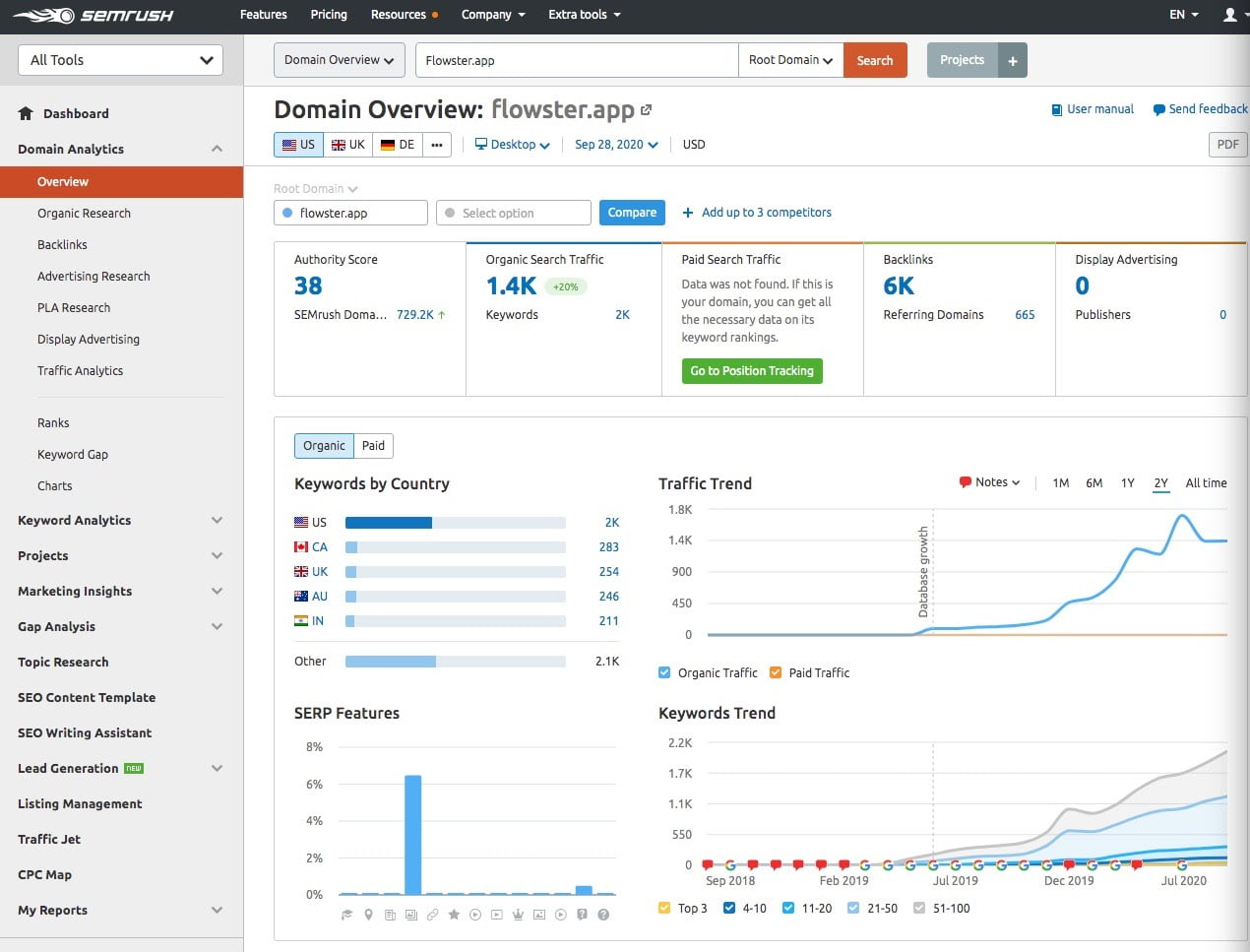
Organic Traffic Keyword Research Report
As you can see in the organic traffic report below, we currently rank #1 for 15 different long tail keywords. Over time, we obviously hope to increase the number of #1 rankings we have.
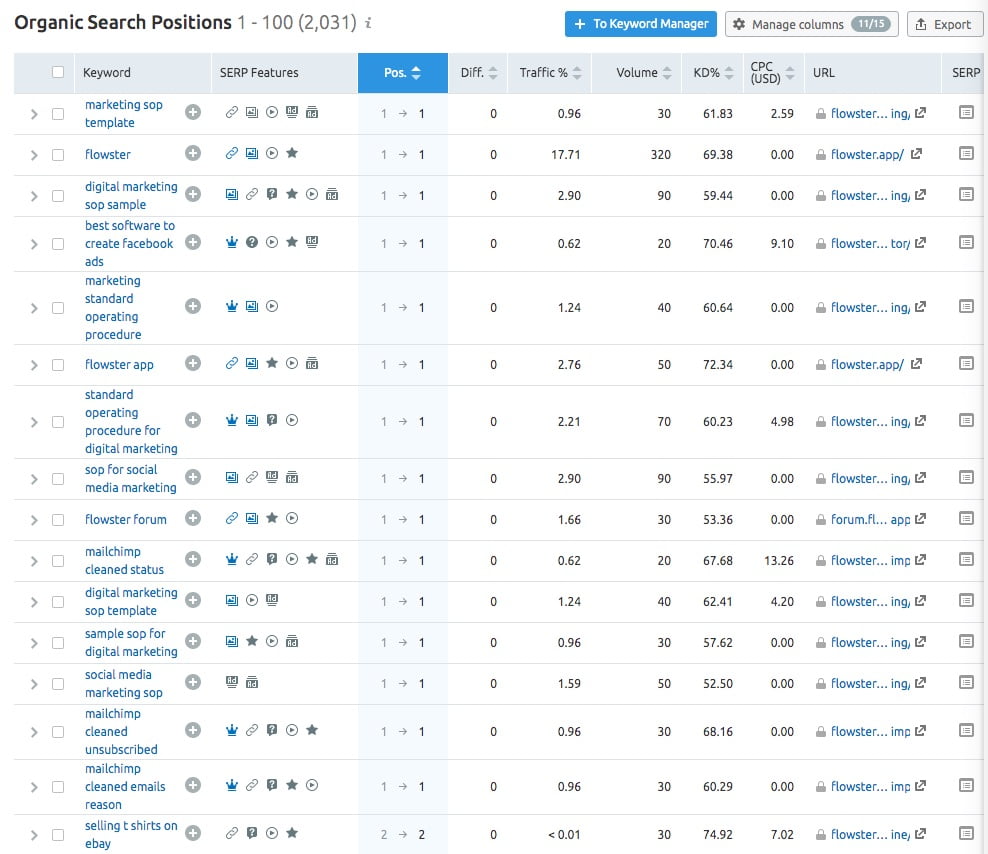
When I sorted this SEMrush report by percentage of traffic from each keyword, you can see that we are getting 25% of our traffic from the keyword freight class calculator which sends traffic to this page.
Targeting the keyword freight class calculator was one of our earliest experiments and it was done before we decided to focus the bulk of our energy targeting keywords that are relevant to eCommerce and digital marketing. As such, it really doesn’t do us that much good, but it was a solid experiment, nonetheless.
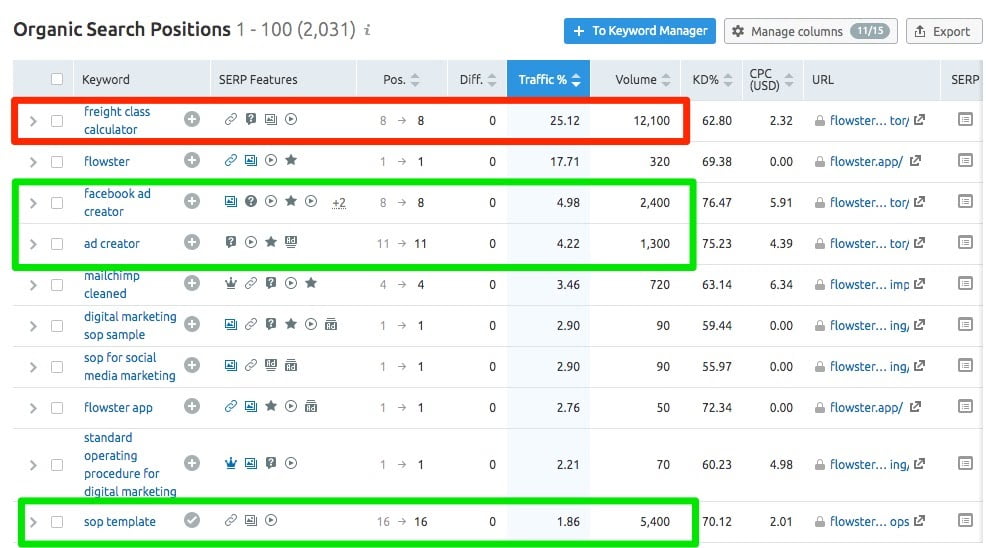
Going forward, our focus will continue to be on more relevant keywords, like those highlighted in green in the image above as the page that receives the traffic from the keyword sop template now produces a steady stream of leads that sign up for our free trial.
Details of Our First Experiment
When I interviewed SEMRush engineer Rich Barnett on my Bright Ideas podcast, I asked him to teach me how to get results from SEO quickly.
He told me that was a fairly easy thing to do if I followed this simple process.
First, find the keywords where we rank on page 2 of Google. Next, study the competitor pages that rank higher than we do.
Once we have studied the higher ranking pages to better understand what people want, start to work on making similar improvements to our own long-form content.
Voila…that was his ‘quick-win’ process in a nutshell.
How We Used SEMRush to Make It Easier!
My SEO tool of choice is SEMRush. I’ve been using it for years and it has a huge number of really valuable features.
To ensure we have a consistent process across our content team, we have a highly detailed workflow that provides our writers (and me!) with a checklist that covers everything we need to do to knock out a high quality, SEO-optimized post.
Here’s the process in a nutshell. If you can the workflow, you can get it here (link to workflow lander)
Topic Research
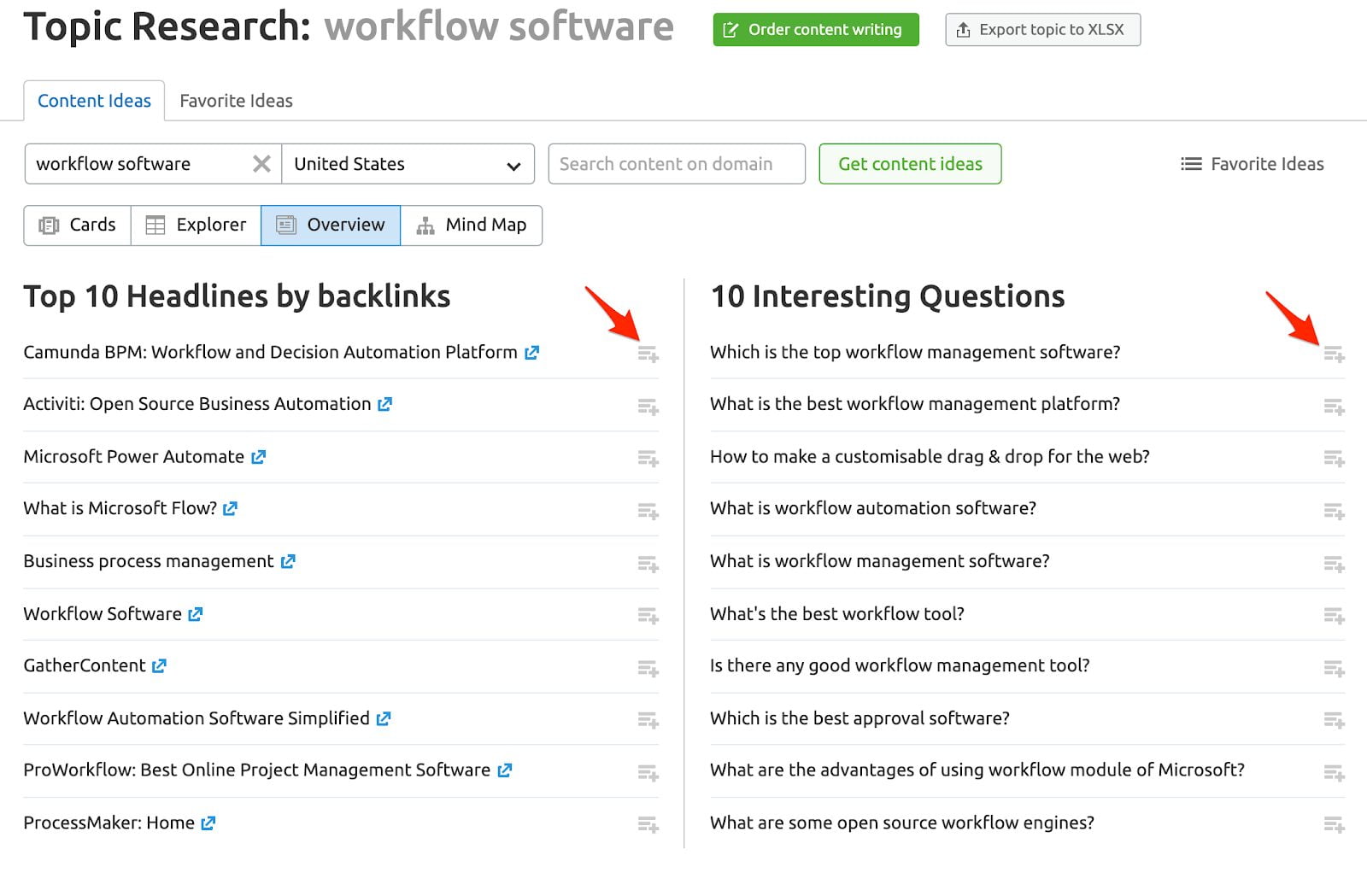
Once you have an idea of what topics you might want to cover, use SEMrush’s Topic Research tool to help you come up with more ideas for a given topic.

After waiting for results to load, you will have the option to view results as Cards, tables (Explorer), condensed reporting (Overview), or visually (Mindmap).
All views will show top headlines, questions, and related searches.
In all views, next to Headlines and Questions you will see an Add to List icon. Add the headlines and questions you’d like to cover to your Favorites so you can begin to plan the most engaging pieces.
Keyword Research
Now that you have an idea of the topics you’d like to cover in your post, it’s time to determine the keyword you will target.
Typically, unless you have a site with significant domain authority, you should search for less competitive long tail keywords.
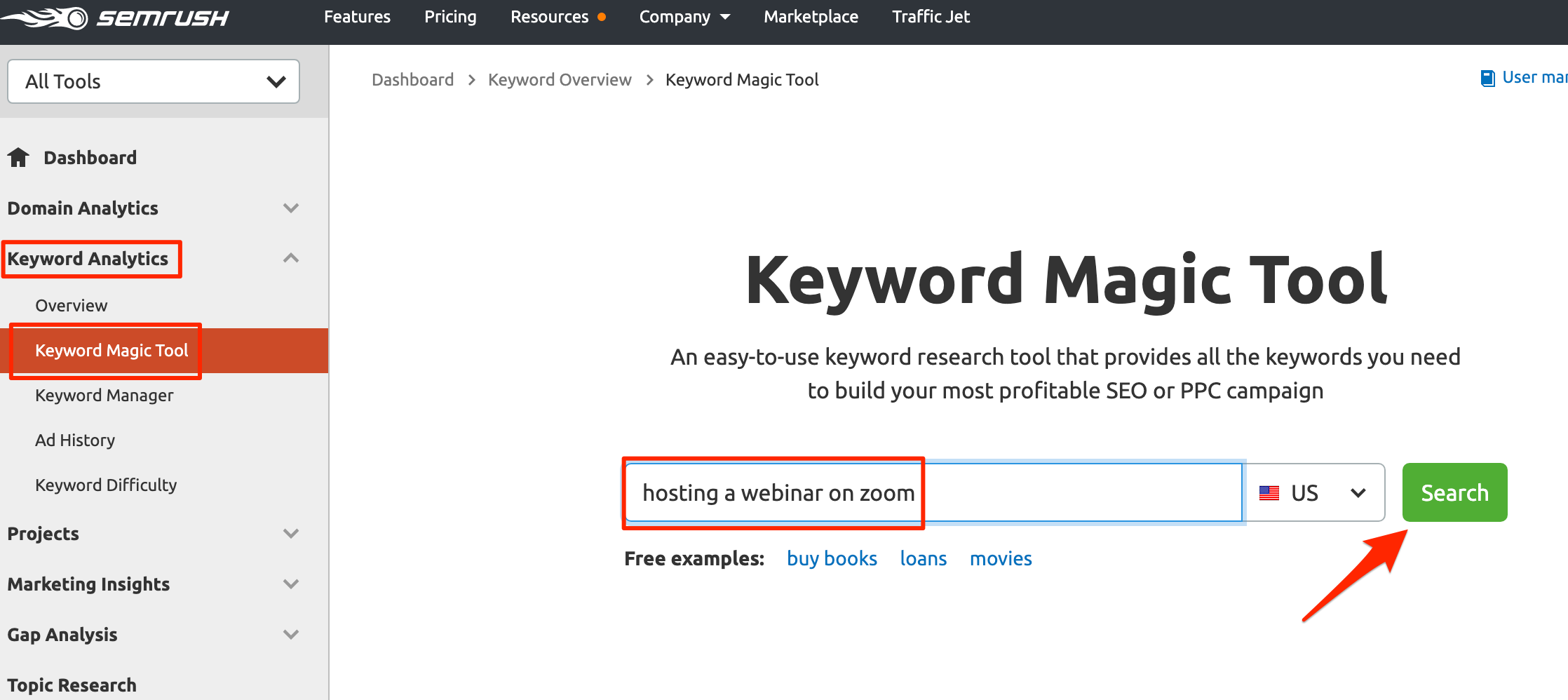
Under Keyword Analytics, locate the Keyword Magic tool.
Enter your keyword of interest, then click Search.
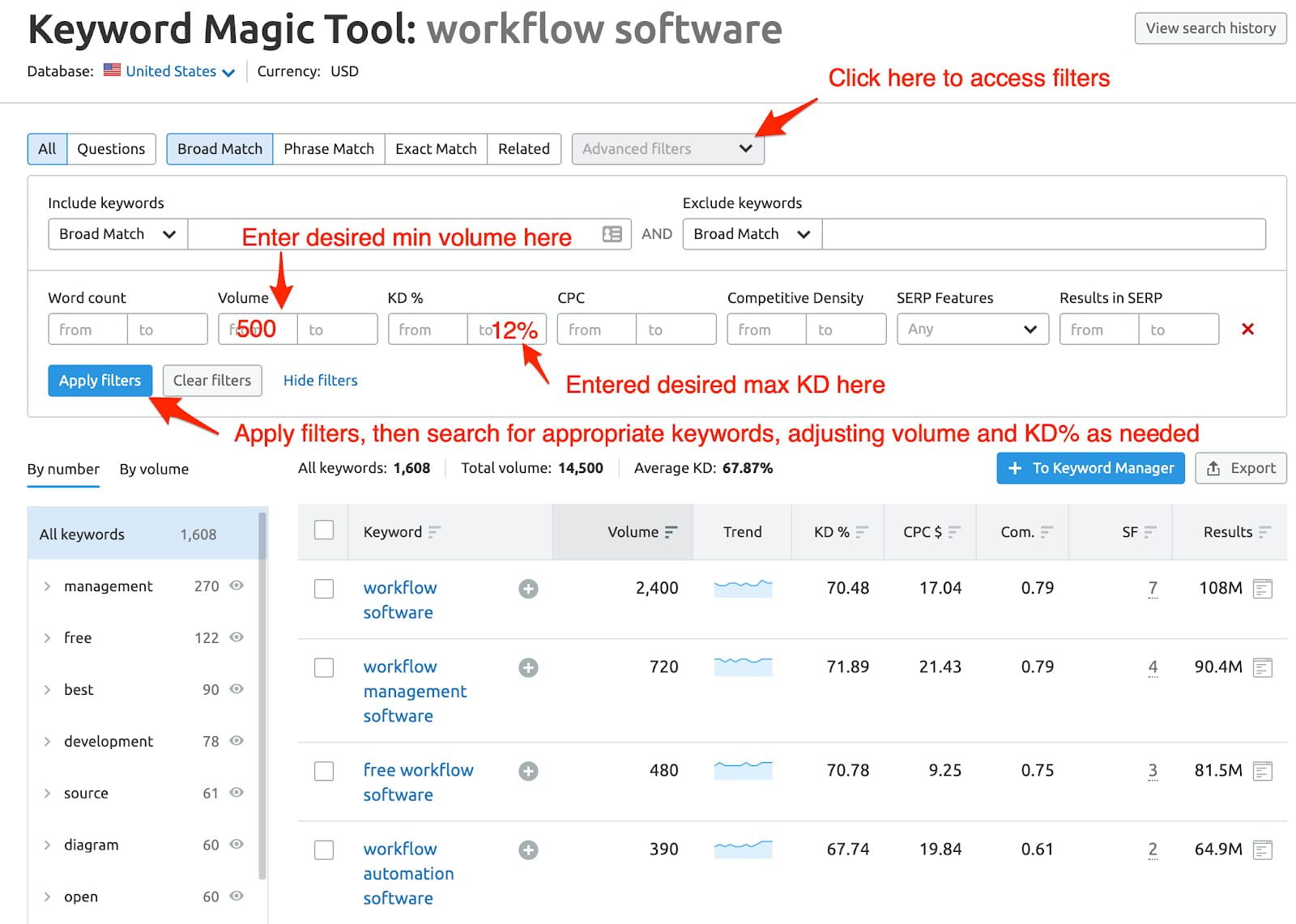
Determine your desired search volume and KD%. SEMrush recommends KD <60% as keywords that have lower ranking difficulties. Ideally you’ll find difficulty numbers as low as possible. Start with lower difficulty levels for the most general content (e.g., 12%) and then work your way up. A premium piece is a good place to target higher difficulty keywords.
Depending on the results of your keyword research, and on what you want from this post, determine whether it makes sense to create a traditional blog post.
If you can’t find a low KD keyword with any significant search volume, it may not be. Granted, even 50 searches per month will add up in aggregate, but if your best options are something like:
Search Volume = 10; KD = 8
Search Volume = 1,000; KD = 75
Then you’re unlikely to be able to get your content to pull enough traffic to make it worthwhile to create a traditional blog post.
Create a Post Title
Research has now proven that exact match keywords in the title and description do not correlate with ranking position.
So, should you use your primary keyword in the title and description? It depends.
The most important thing about the title is that it entices a click. If you find that you are having to stuff the keyword for the sake of inclusion, don’t worry about including it. Instead, focus on what will entice the click.
We shoot for a minimum score of 70 using CoSchedule’s Headline Analyzer.
If you’re having a difficult time finding good titles, search for your keyword on Google and scan the titles of search results.
Here’s the titles and scores we considered for this post:
- SEO Ride Along: How to Quickly Increase Website Traffic – 69
- SEO Case Study: How to Quickly Increase Website Traffic – 69
- SEO Case Study: 5 Ways to Quickly Increase Website Traffic – 64
- SEO Hacks Ride Along: How to Quickly Increase Website Traffic – 67
- SEO Ride Along: How to Quickly Increase Organic Website Traffic – 67
- How to Quickly Increase Organic Website Traffic – 75
- How to Quickly Increase Organic Website Traffic From SEO – 74
- Quickly Increase Organic Website Traffic – A Public Case Study – 59
- How to Quickly Increase Organic Website Traffic – Free Checklist – 73
- How to Quickly Increase Organic Website Traffic – SEO Workflow – 69
Create the Post Body First
The purpose of this step isn’t to write a perfect post that everyone is going to love. Instead, it is to get your thoughts on screen and into full sentences.
If you have created an outline, it’s just a matter of looking at your bullet points and making them flow together.
When writing, try using the Pomodoro Technique. To use this technique, set a 25 minute timer and a goal you want to achieve in that time.
For example, if your average typing speed is around 115 wpm, you would set a goal to hit 20% of this level of efficiency, or about 575 words.
The key to succeeding using the Pomodoro Technique when writing blog posts is to not hit the back button because of spelling mistakes, or to reword your sentence 15 times before you find the perfect phrasing.
After your first 25 minutes are up, take a 3-5 minute break and rinse and repeat until complete.
Begin a Topic Content Brief
Once the post is written, on page SEO is critical, and in order to accomplish this, we use a tool called Topic (we use Topic to create content optimized for organic search; 50% off your first month with discount code BITOPIC).
If there’s already a Content Brief run for this keyword, simply Open that one versus run another one.
Click Create Brief+, then Create New Content. Enter your keyword, then click Create Brief.
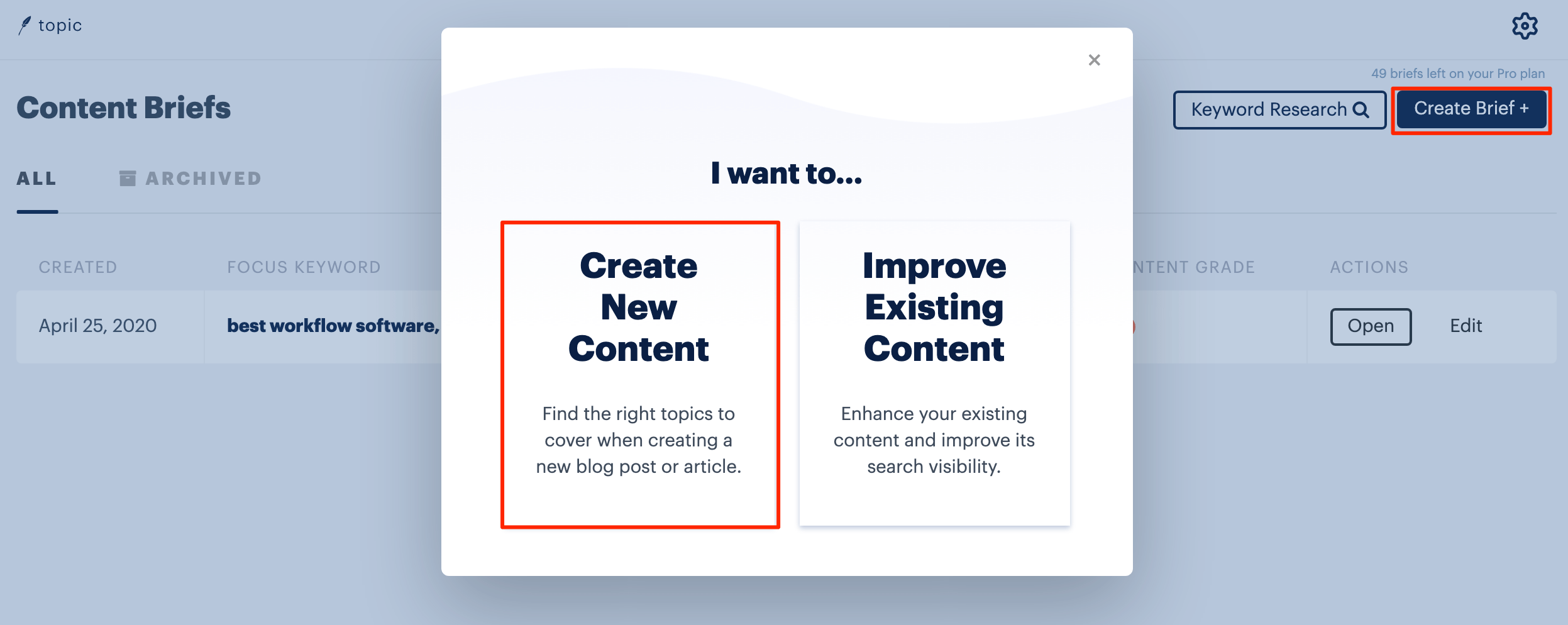
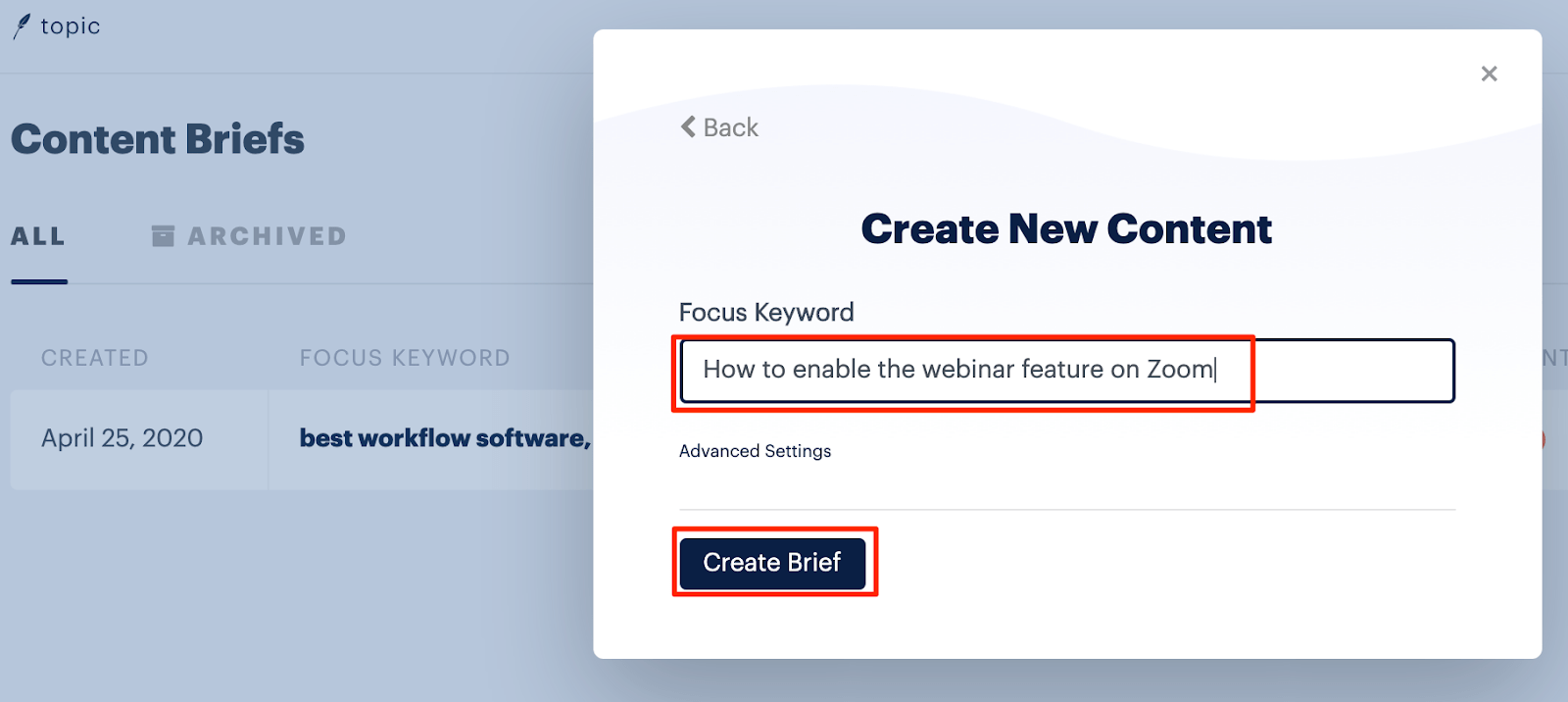
Wait for the Brief to load.
Check Page Type
We will publish a new blog post only for the most amazing SOPs.. or if we find a good keyword to target, and we’re not sure the landing page will show up well in Google search for that keyword.
If we’re planning on writing a blog post for this keyword, we also want to be sure that an article is the type of content a searcher would want. Check the Page Type, looking for a high percentage (at least 50%).
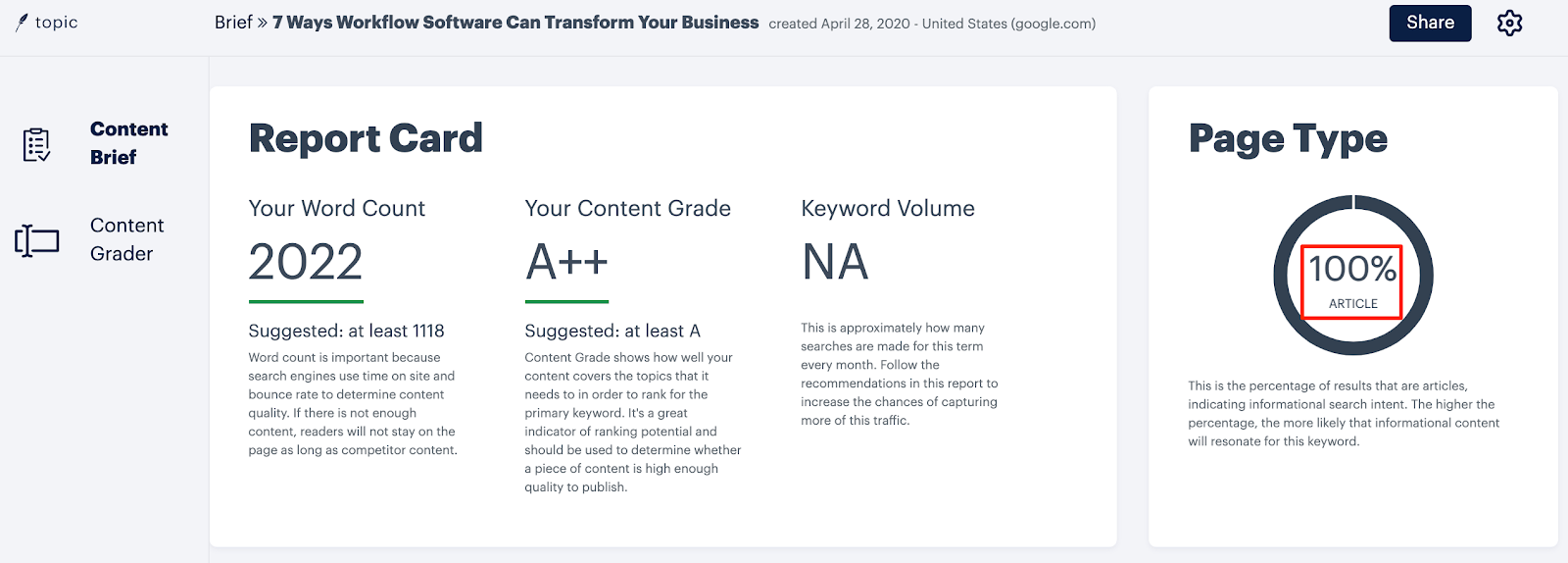
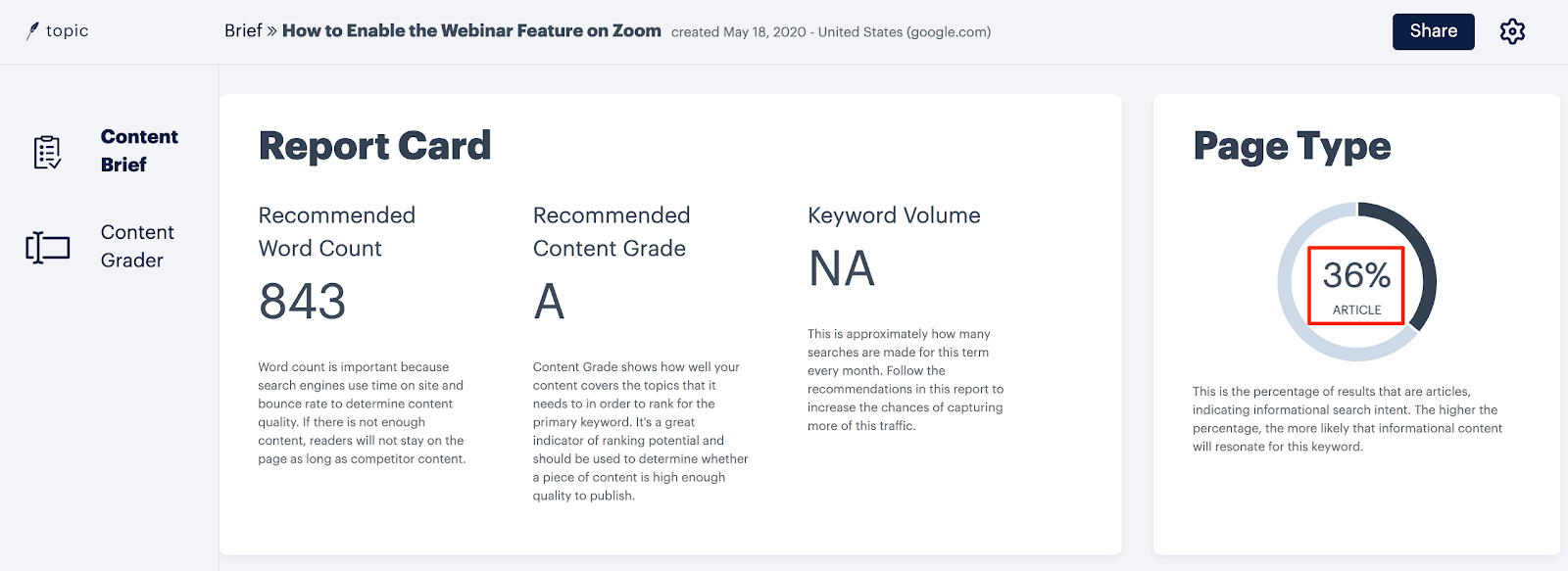
If you see a lower percentage, as shown in the image below, before continuing, bring it to the rest of your team to ask whether it makes sense to continue with a blog post for this keyword, or whether you should provide content in some other format. For instance, you may instead consider a Zapier-style landing page for it.
Once your content brief report is ready, simply paste the post text into Topic to get your content grade.
When I did this for the draft of this post, our initial score was D+ as shown in the image below.
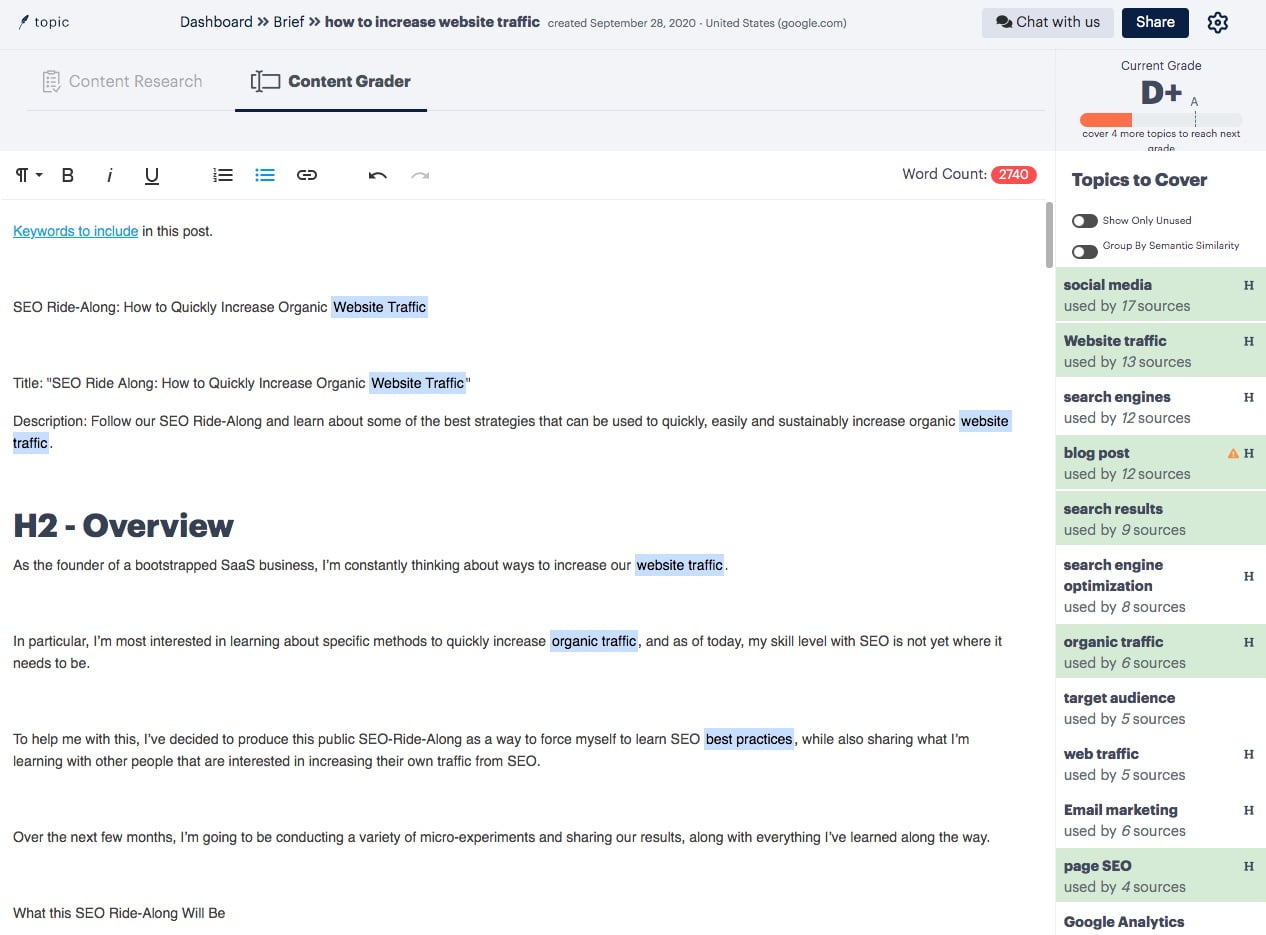
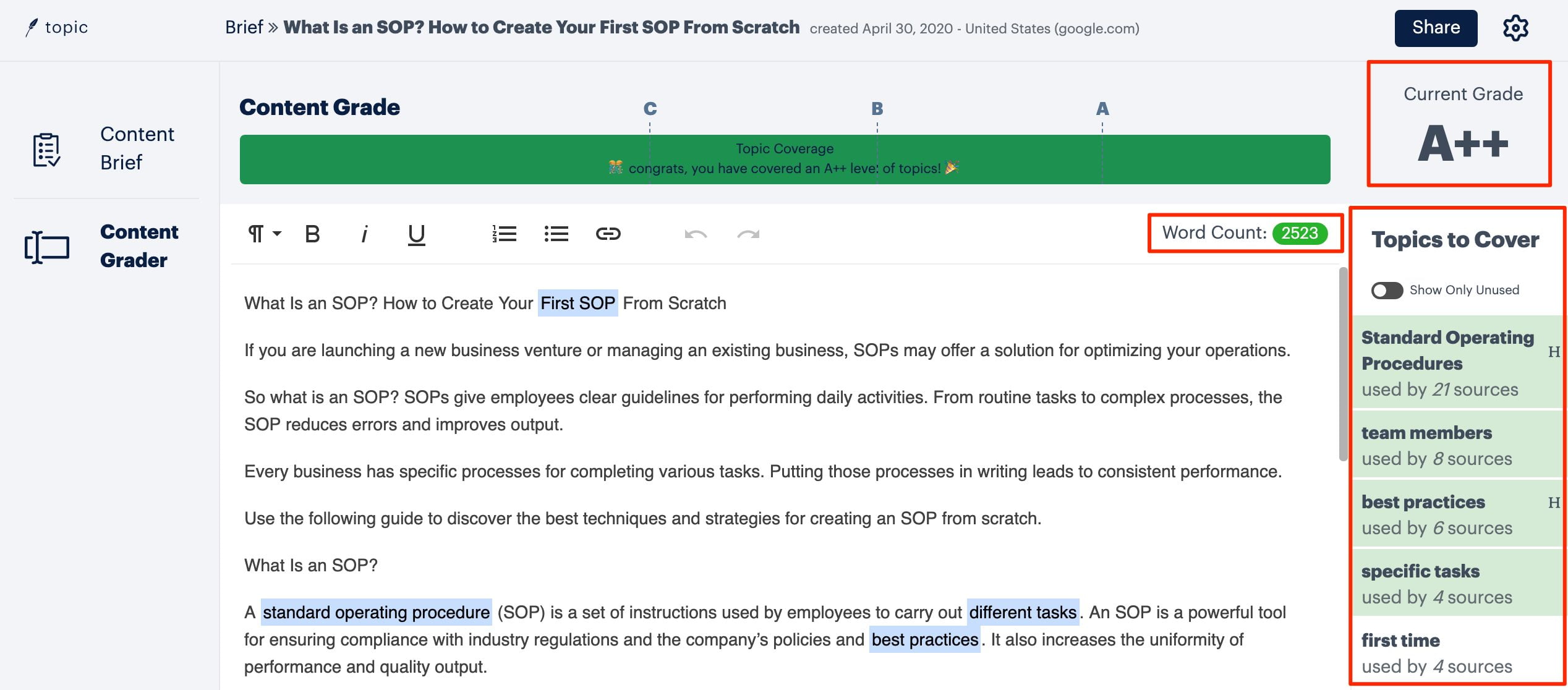
Make use of the recommended phrases shown on the right, and pay attention to the content grade and word count as you write the draft.
In the case of this piece of content, it took me only about 10-15 minutes of additional content creation to increase our score to an A++.
Review Content with SEMRush SEO Writing Assistant
Once I’d added enough keywords to increase our score to an A++, the next step was to paste the post draft into SEMRush’s SEO Writing Assistant.
Unlike the Topic tool which focuses primarily on making use of all the most important long-tail keywords, the writing assistant takes a look at all of the following things:
- Readability
- Tone of voice
- Originality
- SEO
Here’s the initial score we achieved:
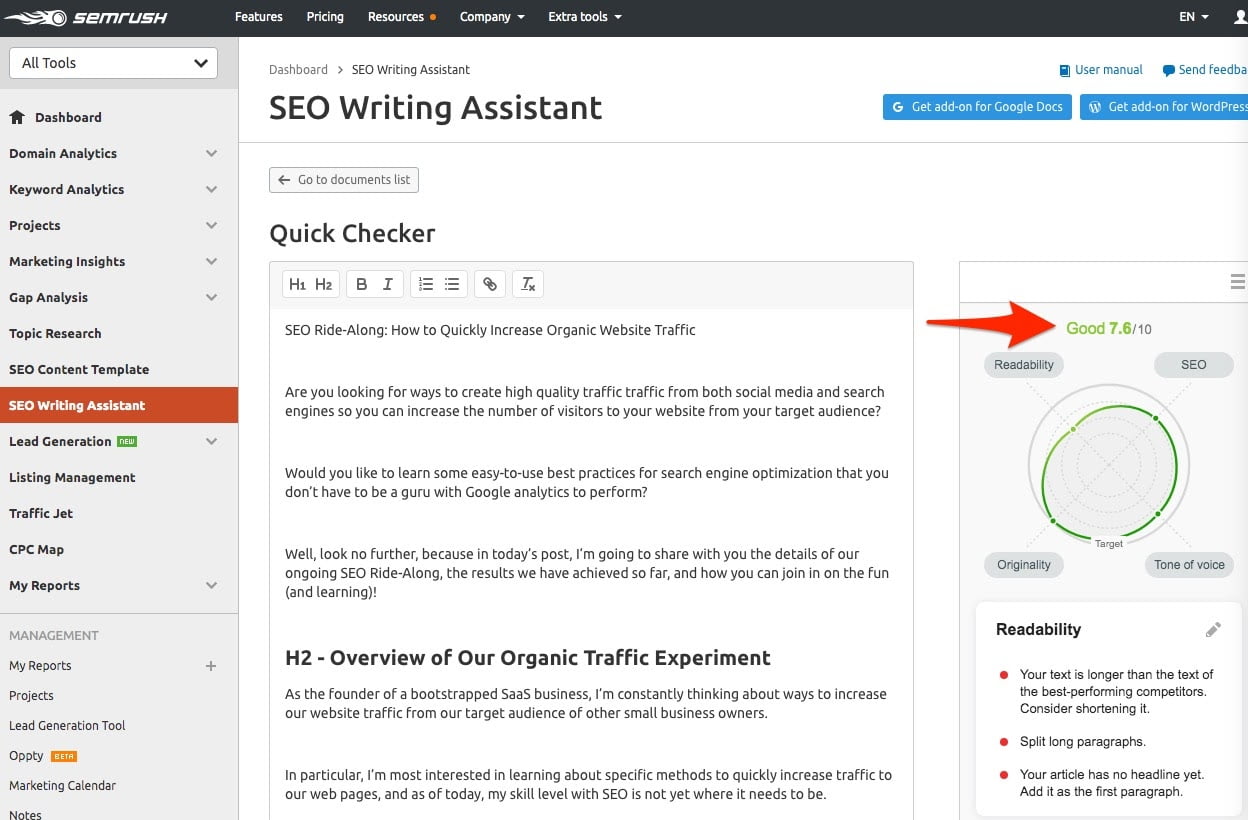
As you can see, the weakest area of the post is readability. According to research, readability should be a maximum 8-9th grade level.
Readability is based on the average syllables of the words used in the post, so if you need to lower readability you can replace words with lower syllable ones.
For example, exchange “theoretically,” which has 5 syllables, for “in theory,” which averages at 1.5 syllables (1 for in and 2 for theory). You can find free syllable counters via Google search.
Given that the target audience for this post are folks that are definitely smarter than the national average, I have decided not to worry too much about the use of slighter longer words in the content.
Candidates for Our Next Experiment
Following Rich’s advice, the first thing we are going to do is identify all the relevant keywords where we have a page two ranking and work to improve those pages.
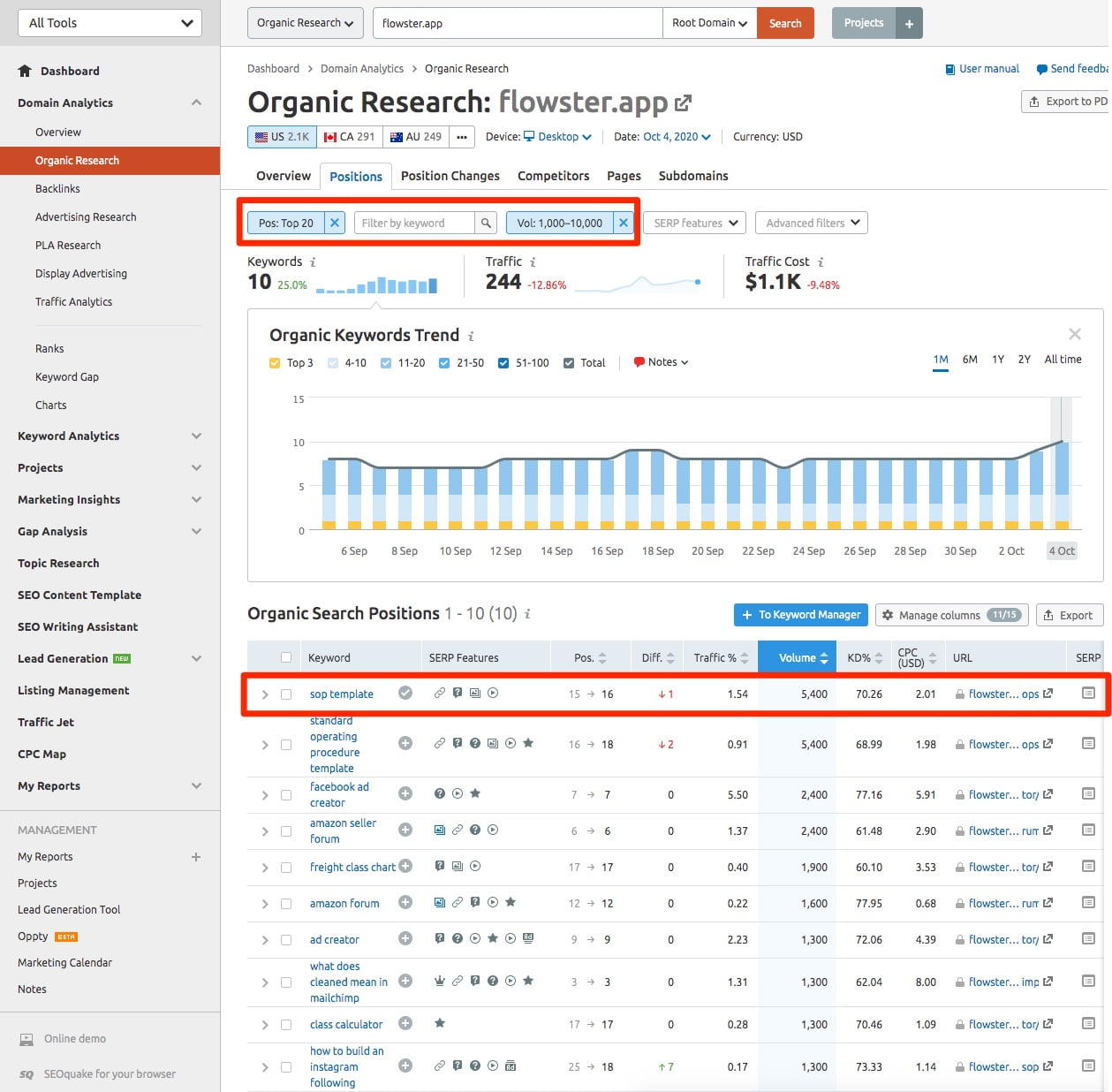
To do this, I took a look at the Organic Research report in SEMRush and applied two filters:
- Pages in top 20
- Keyword search volume of 1,000 to 10,000
As you can see below, when I ranked the results in order of decreasing search volume, the keyword with the highest search volume was sop template, so that is the page I’m going to work on improving next!