
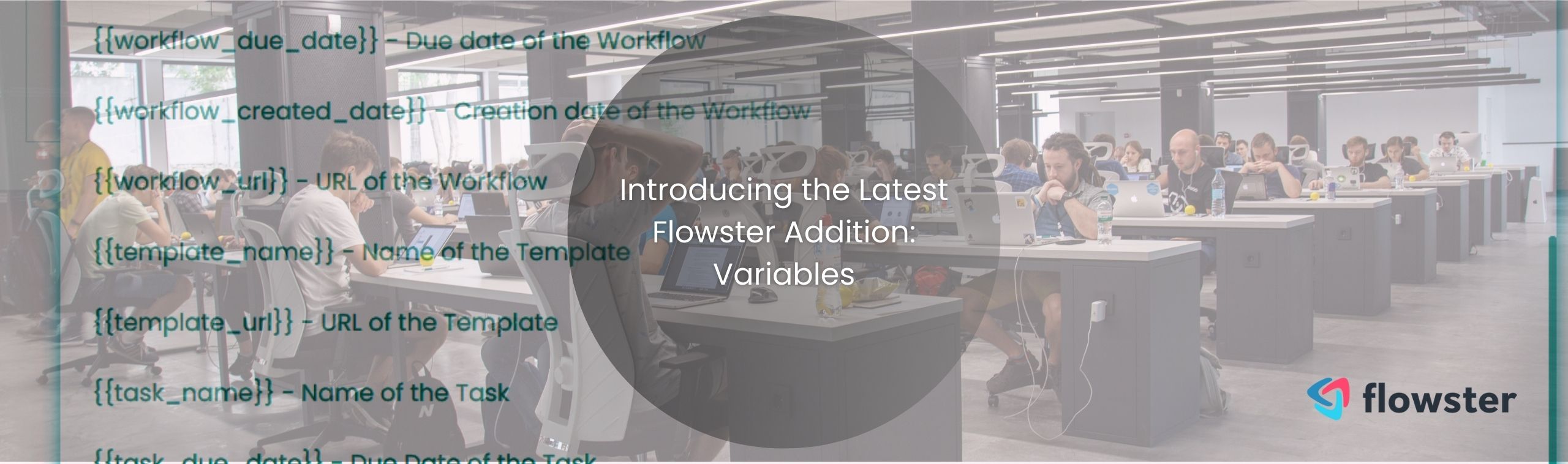

We’re excited to introduce the newest addition to Flowster: the variables feature! This powerful feature is designed to infuse your workflows with dynamic information, enhance personalization, and streamline tasks.
With variables, you can seamlessly incorporate changing data directly into your workflows. This not only elevates the customization aspect of your workflows but also minimizes human errors. Forget the tedious process of copy-pasting; let variables do the magic for you!
Flowster’s variables feature offers a wide array of types, catering to various requirements. Here’s a glimpse of the different types of variables you can integrate into your workflows:
So, keep an eye out for updates as we continue to innovate and improve your Flowster experience. Now, using practical examples, let us delve into the world of variables and watch your workflow processes transform like never before!
Harnessing the capabilities of Flowster’s new Variables feature can seem overwhelming, but we’re here to simplify it for you. Dive into these illustrative examples and see just how transformative variables can be!
Imagine you’re creating a workflow, and you want to engage the person running it. By integrating the user’s name into the checklist, it becomes an interactive experience. Here’s how you can do it:
Scenario: You want to ask the user about their favorite color.
Using Variables: By utilizing the “User’s Name” variable, the checklist might read, “[User’s Name], what is your favorite color?” So, if Alex is running the workflow, he’ll see, “Alex, what is your favorite color?”
How to use it:
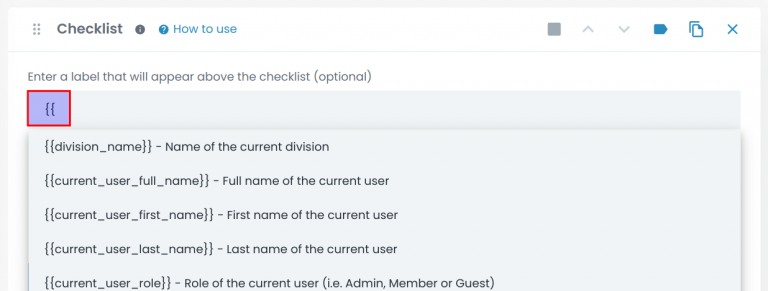
In your template, in the label field for the Checklist section, type {{. This opens a menu that displays all the available variables:
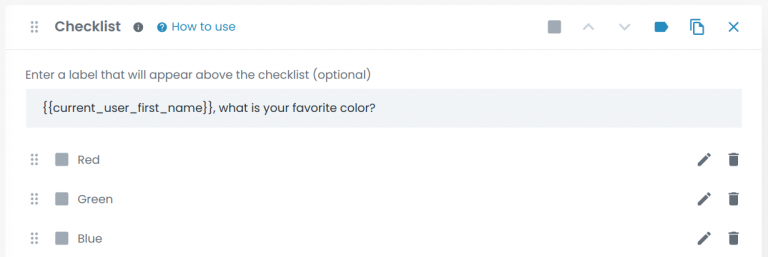
Then, choose the first name of the current user variable. Add some extra text to the label after the variable string, asking what their favorite color is:
Now, when a workflow is run, it will look like this:

Ever wanted to reference information given in earlier tasks without the hassle of scrolling or copy-pasting? Variables make this a breeze. Let us keep our “favorite color” example going.
Scenario: In a previous task, you might have had the user input details about a client’s preferences.
Using Variables: In a subsequent task, you could use the “Input from Previous Task” variable to automatically pull that data. This ensures that information remains consistent and easily accessible throughout the workflow.
How to use it:
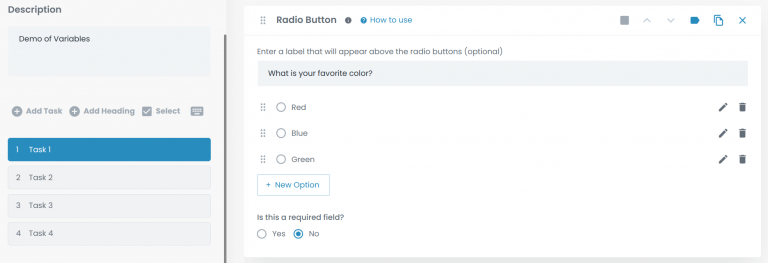
First, we add a radio button section to Task 1 and set its label and options as below:
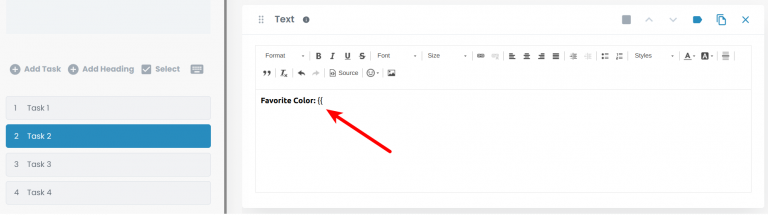
Then, in Task 2, we add a Text section and type “Favorite Color:” followed by {{, which opens the variables menu:
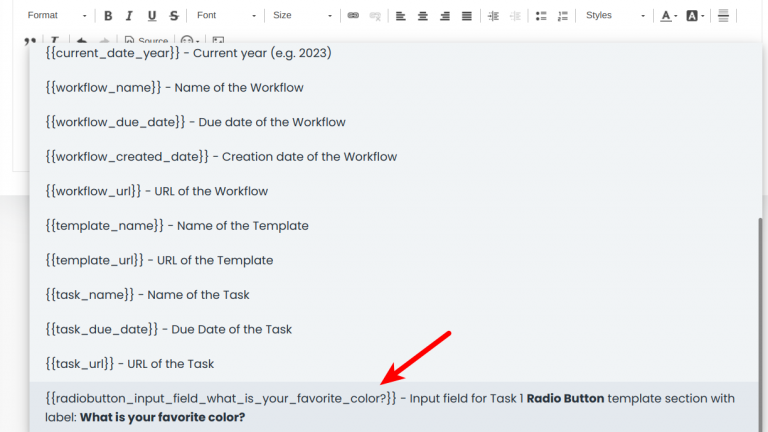
At the bottom of the variables menu, we select the radio button from Task 1:
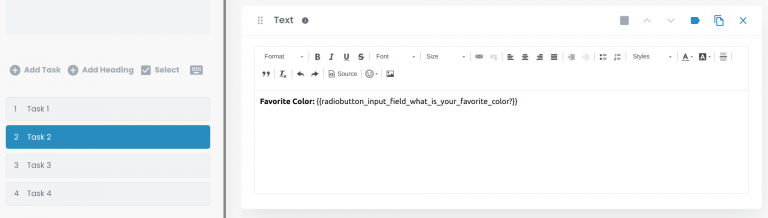
So the final text section looks like this:
Now, we create a new workflow from this template and choose our favorite color:
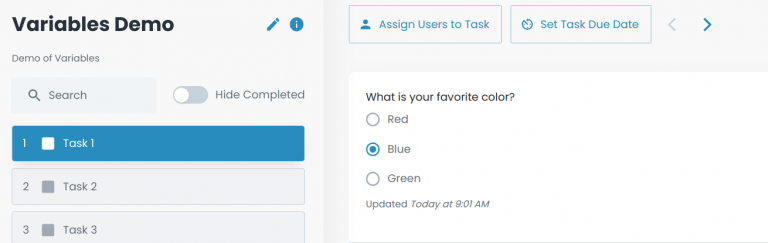
Then we observe that our selection appears in Task 2:
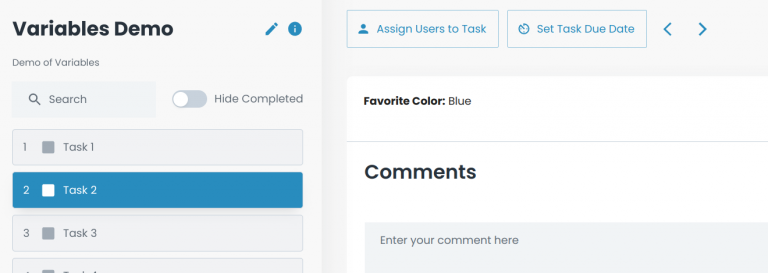
As you delve deeper into Flowster’s variables feature, you’ll discover countless ways to optimize and enhance your workflows. These are just a few basic examples to get you started on the journey!
Lastly, the introduction of the variables feature in Flowster marks a pivotal step in our relentless journey to simplify and optimize your workflow processes.
Whether it’s personalizing tasks, referencing past inputs, or ensuring data consistency, variables provide a dynamic touch, ensuring a seamless and intuitive experience for users.
As we continue to evolve and refine our platform, we’re excited to see the innovative ways you’ll incorporate variables into your daily tasks. Embrace this feature, and let’s redefine what’s possible together in the world of workflow automation!
Discover Flowster’s seamless power, where you can easily create standard operating procedures and workflows that are all AI-powered. Alternatively, you can browse the Flowster Marketplace for our extensive library of pre-designed templates.
Do you require expert advice? Choose our ‘Done for You’ services, in which our team of quality and improvement professionals will create custom workflows tailored to your specific requirements.
| Cookie | Duration | Description |
|---|---|---|
| akavpau_ppsd | session | This cookie is provided by Paypal. The cookie is used in context with transactions on the website. |
| nsid | session | This cookie is set by the provider PayPal. This cookie is used to enable the PayPal payment service in the website. |
| tsrce | 3 days | This cookie is set by the provider PayPal. This cookie is used to enable the PayPal payment service in the website. |
| x-pp-s | session | This cookie is set by the provider PayPal. This cookie is used to process payments from the site. |
| Cookie | Duration | Description |
|---|---|---|
| ac_enable_tracking | 1 month | This cookie is set by the Active Campaign. This cookie is used to keep track of the site usage. |
| YSC | session | This cookies is set by Youtube and is used to track the views of embedded videos. |
| Cookie | Duration | Description |
|---|---|---|
| _ga | 2 years | This cookie is installed by Google Analytics. The cookie is used to calculate visitor, session, campaign data and keep track of site usage for the site's analytics report. The cookies store information anonymously and assign a randomly generated number to identify unique visitors. |
| _gcl_au | 3 months | This cookie is used by Google Analytics to understand user interaction with the website. |
| _gid | 1 day | This cookie is installed by Google Analytics. The cookie is used to store information of how visitors use a website and helps in creating an analytics report of how the website is doing. The data collected including the number visitors, the source where they have come from, and the pages visted in an anonymous form. |
| _hjFirstSeen | 30 minutes | This is set by Hotjar to identify a new user’s first session. It stores a true/false value, indicating whether this was the first time Hotjar saw this user. It is used by Recording filters to identify new user sessions. |
| _omappvp | 11 years | The cookie is set to identify new vs returning users. The cookie is used in conjunction with _omappvs cookie to determine whether a user is new or returning. |
| _omappvs | 20 minutes | The cookie is used to in conjunction with the _omappvp cookies. If the cookies are set, the user is a returning user. If neither of the cookies are set, the user is a new user. |
| _uetsid | 1 day | This cookies are used to collect analytical information about how visitors use the website. This information is used to compile report and improve site. |
| Cookie | Duration | Description |
|---|---|---|
| _fbp | 3 months | This cookie is set by Facebook to deliver advertisement when they are on Facebook or a digital platform powered by Facebook advertising after visiting this website. |
| fr | 3 months | The cookie is set by Facebook to show relevant advertisments to the users and measure and improve the advertisements. The cookie also tracks the behavior of the user across the web on sites that have Facebook pixel or Facebook social plugin. |
| IDE | 1 year 24 days | Used by Google DoubleClick and stores information about how the user uses the website and any other advertisement before visiting the website. This is used to present users with ads that are relevant to them according to the user profile. |
| MUID | 1 year 24 days | Used by Microsoft as a unique identifier. The cookie is set by embedded Microsoft scripts. The purpose of this cookie is to synchronize the ID across many different Microsoft domains to enable user tracking. |
| test_cookie | 15 minutes | This cookie is set by doubleclick.net. The purpose of the cookie is to determine if the user's browser supports cookies. |
| uid | This cookie is used to measure the number and behavior of the visitors to the website anonymously. The data includes the number of visits, average duration of the visit on the website, pages visited, etc. for the purpose of better understanding user preferences for targeted advertisments. | |
| VISITOR_INFO1_LIVE | 5 months 27 days | This cookie is set by Youtube. Used to track the information of the embedded YouTube videos on a website. |
| Cookie | Duration | Description |
|---|---|---|
| _fw_crm_v | 1 year | No description |
| _gat_UA-124464104-1 | 1 minute | No description |
| _gat_UA-182261587-1 | 1 minute | No description |
| _hjAbsoluteSessionInProgress | 30 minutes | No description |
| _hjid | 1 year | This cookie is set by Hotjar. This cookie is set when the customer first lands on a page with the Hotjar script. It is used to persist the random user ID, unique to that site on the browser. This ensures that behavior in subsequent visits to the same site will be attributed to the same user ID. |
| _hjIncludedInPageviewSample | 2 minutes | No description |
| _hjIncludedInSessionSample | 2 minutes | No description |
| _hjTLDTest | session | No description |
| _lfa | 2 years | This cookie is set by the provider Leadfeeder. This cookie is used for identifying the IP address of devices visiting the website. The cookie collects information such as IP addresses, time spent on website and page requests for the visits.This collected information is used for retargeting of multiple users routing from the same IP address. |
| _seg_uid | 1 year | No description |
| _seg_uid_3536 | 1 year | No description |
| _seg_visitor_3536 | 1 year | No description |
| _uetvid | 16 days 6 hours | No description |
| CONSENT | 16 years 8 months 2 days 6 hours | No description |
| cookielawinfo-checkbox-functional | 1 year | The cookie is set by GDPR cookie consent to record the user consent for the cookies in the category "Functional". |
| cookielawinfo-checkbox-others | 1 year | No description |
| DO-LB | No description | |
| enforce_policy | 1 year | No description |
| hyperise_session | 2 hours | No description |
| l7_az | 30 minutes | No description |
| LANG | 9 hours | No description |
| prism_799560831 | 1 month | No description |
| RUL | 1 year | No description |
| whr_nov | 1 year | No description |
| x-cdn | No description |



