


Text to speech software is a tool that turns written text into spoken audio. You type (or send) a sentence, choose a voice and language, and the system generates speech you can download as a file or stream in real time. For businesses, the value isn’t just “making audio” – it’s creating a repeatable, controllable voice workflow that stays consistent across updates, supports pronunciation rules for brand terms, and scales without manual recording sessions.
Below is a clear, B2B-friendly explanation of what TTS software is, what it includes, and how to choose the right type.
What is Text to Speech software?
Text to Speech (TTS) software converts text (words on a screen) into audio (a voice you can play as a file or stream live). You feed it text like:
“Your order has shipped. It arrives Tuesday.”
…and it outputs speech in a chosen voice, language, and style.
That’s the simple definition. The useful definition for business is:
TTS software is a voice-production system that can generate consistent audio on demand, at scale, with controls for pronunciation, pacing, and reliability.
What TTS software is not (common confusion)
It’s not just a “robot voice reader.” Modern TTS is designed to sound natural and usable in customer-facing experiences.
It’s not only for accessibility. Accessibility is a major use case, but businesses also use TTS for product UX, automation, support, learning, and media.
It’s not one single feature. Real TTS “software” is typically a bundle: voices, controls, API or app, monitoring, and quality safeguards.
The 3 main types of Text to Speech software
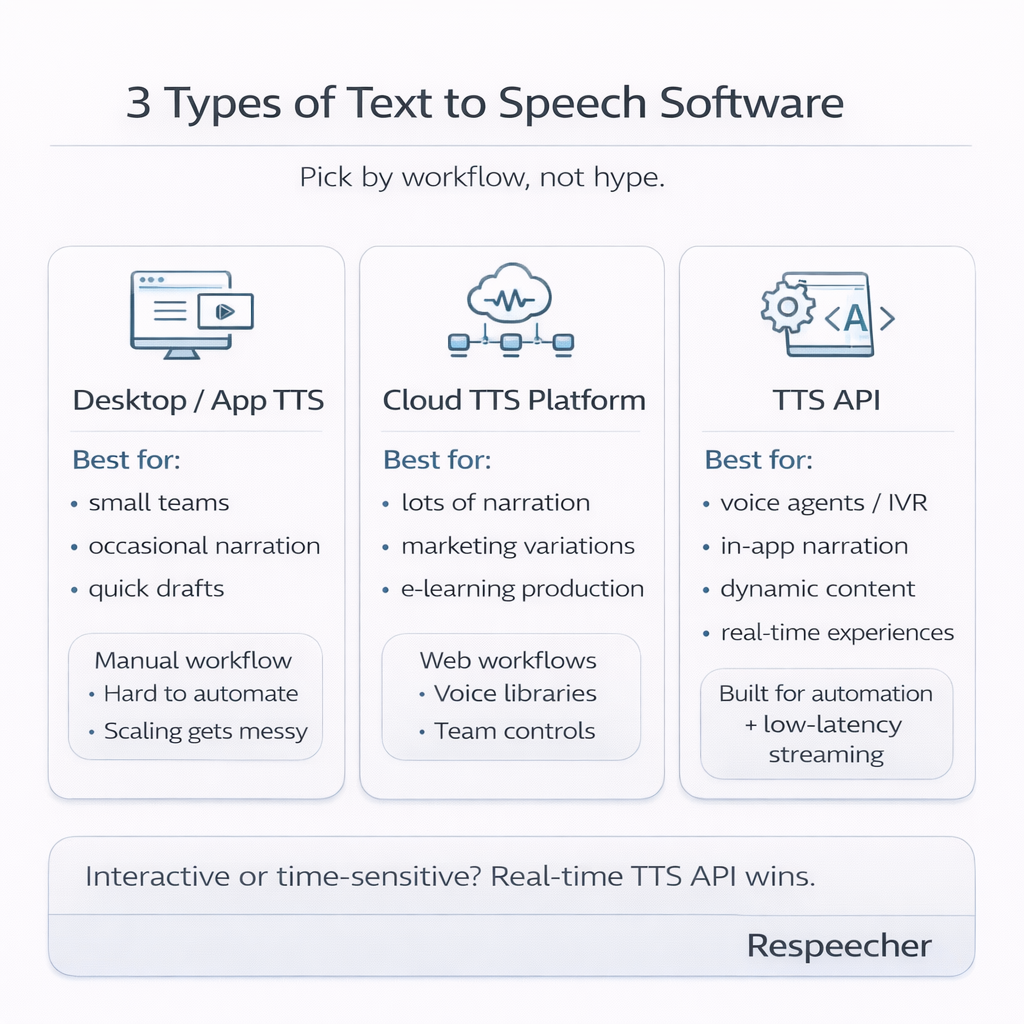
1. Desktop or app-based TTS tools
You type/paste text, click “Generate,” and download audio.
Best for:
- small teams
- occasional narration
- quick drafts
Limitations:
- manual workflow
- hard to automate
- inconsistent scaling (many files, many edits, many versions)
2. Cloud TTS platforms (web + workflows)
A more production-ready interface, often with voice libraries, team collaboration, and better controls.
Best for:
- content teams producing lots of narration
- marketing teams that need repeated variations
- e-learning production
3. TTS API (the “developer” option)
An API is what you use when you want TTS inside your product – automatically.
Best for:
- voice agents / IVR
- in-app narration
- dynamic content (notifications, updates, personalized text)
- real-time experiences
If your use case is interactive or time-sensitive, this is where a real-time TTS API matters, because it’s built for low-latency streaming rather than “generate a file and wait.”
What a good TTS system actually includes
When someone says “TTS software,” they usually mean the output voice. But in real usage, you’re buying a stack.
1. Text handling (the “don’t embarrass us” layer)
Real-world text is messy: acronyms, numbers, dates, product SKUs, names.
Good TTS software provides:
- number/date reading rules
- abbreviation handling
- pronunciation control (custom dictionaries)
This is how you avoid things like “v-two-dot-three-dot-one” in a customer call.
2. Voice controls (the “brand voice” layer)
You often need to control:
- pace (too fast = exhausting)
- pauses (so it’s clear)
- emphasis (so meaning lands correctly)
- tone (neutral vs warm vs serious)
Without these controls, teams end up with audio that’s “fine” but not trustworthy.
3. Delivery (files vs streaming)
Some use cases need:
- MP3/WAV exports (audiobooks, videos, ads)
Others need: - streaming audio in near-real time (agents, IVR, live UX)
Different needs → different software choice.
4. Reliability + scale (the “enterprise” layer)
If the voice is part of a product, you also need:
- uptime consistency
- predictable latency
- monitoring / logging
- rate handling and scaling
This is where “cool demo voice” stops being enough.
Most common business use cases
1. Customer support and voice agents
- order status (“Where is my order?”)
- appointment reminders
- basic troubleshooting scripts
- smart routing
Key requirement: low latency and consistent pronunciation.
2. Product UX
- readouts in apps (finance, logistics, healthcare)
- hands-free instructions
- accessibility features
Key requirement: clear, stable, non-fatiguing voice.
3. Content production
- training modules
- explainer videos
- internal enablement content
Key requirement: speed + easy iteration when scripts change.
4. Media and advertising
- rapid variations for A/B testing
- multiple versions for platforms and regions
- consistent brand voice across campaigns
Key requirement: fast turnaround and voice consistency.
How to choose TTS software (simple checklist)
If you want a fast “buying lens,” use these questions:
- Is this for a product or for content?
Product → API first. Content → platform/app may work. - Do we need real-time audio or generated files?
Real-time experiences → prioritize streaming TTS. - How important is pronunciation control?
If you have brand terms, names, acronyms, compliance language – this matters a lot. - How many revisions will we make?
If scripts change weekly (they do), you need a workflow that makes revisions painless. - What are the constraints: security, rights, governance?
Enterprise teams often need clarity on usage, permissions, and safe deployment.
Why B2B teams often pick an API approach
If you’re building anything dynamic – personalized messages, automated calls, live agents – manual TTS tools don’t scale. You need TTS as infrastructure.
That’s the difference between:
- “We generate audio sometimes”
and - “Voice is part of our product experience”
If that’s your case, a real-time TTS API is the cleanest way to integrate voice generation into your stack.
Where Respeecher fits
If your team needs more than a basic voice tool – especially for product use cases, brand consistency, or scalable output – Respeecher’s text to speech offering is built for production workflows, not one-off experiments.
A practical way to start:
- Use text to speech for evaluating voice quality and controls
- If you need real-time generation inside an app or agent, move to the TTS API
- For broader voice needs and use-case fit, explore Respeecher
If you want, I can adapt this into your exact blog template (intro hook → definition → types → use cases → “how to choose” table → CTA) while keeping it tight and non-watered-down.

