


Want to add AI to your business without wasting time or money? AI used to feel like a future goal. Now, it’s part of how smart companies stay competitive. It helps teams work faster and make better decisions. Still, many companies struggle to get real value from it. Some start too quickly without a clear use case. Others buy tools they can’t fully use. This guide will show you how to integrate AI into your business. We’ll provide a step-by-step strategy that works. You’ll discover what AI can do now. You’ll also learn how to align it with your business needs. Plus, you’ll find out how to avoid common mistakes that slow teams down.
Why businesses turn to AI in 2025
In 2025, businesses use AI not just to cut costs but to adapt faster, serve customers better, and uncover patterns that drive smarter decisions. According to the 2025 McKinsey report, 72% of organizations now use at least one form of AI in their workflows, up from 56% just a few years ago. And the momentum continues: Exploding Topics 2025 report says that the global AI market will grow by 38% in 2025 alone. This rapid acceleration reflects more than just hype—it shows that businesses increasingly see AI as a reliable path to innovation.
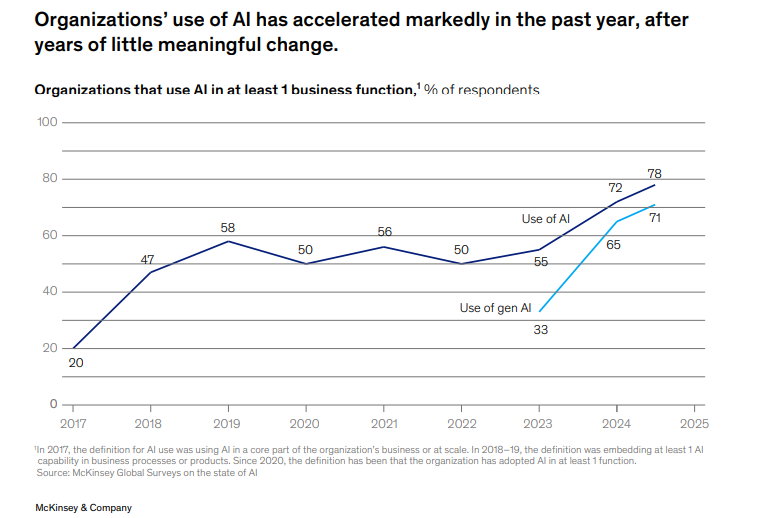
The usage of AI statistics
Source: McKinsey
One reason for the shift is the maturity of machine learning models. These systems no longer require massive teams to deploy or manage. Cloud-based platforms have made them accessible, and businesses can now integrate predictive models, generative tools, or intelligent automation without building everything from scratch. Platforms like WisdomAI offer businesses ai data analytics software that transforms raw information into actionable insights, giving teams a powerful data analytics ai platform that supports faster, more accurate decision-making.
At the same time, customer expectations are rising. Buyers expect fast, personalized, and consistent experiences across every channel. AI enables this by analyzing behavior, predicting intent, and automating support at scale. In retail, finance, healthcare, and logistics, AI delivers measurable improvements in response time, accuracy, and user satisfaction.
How to use AI in your business
AI adoption does not occur overnight. Success demands more than curiosity or a shiny feature inside a CRM. Teams need to follow a clear, step-by-step process that starts with a meaningful use case and ends with long-term adoption that produces measurable value. Skip data preparation or expand too early, and the initiative will almost certainly fall short. Companies that want to move from experimentation to impact often rely on generative AI development services to accelerate results and avoid early missteps.
This section explains how any organization, regardless of size, budget, or industry, can add AI through a structured framework. Each phase builds on the one before it, guiding the shift from exploration to implementation with focus and confidence. The guidance here is practical and ready for immediate use.
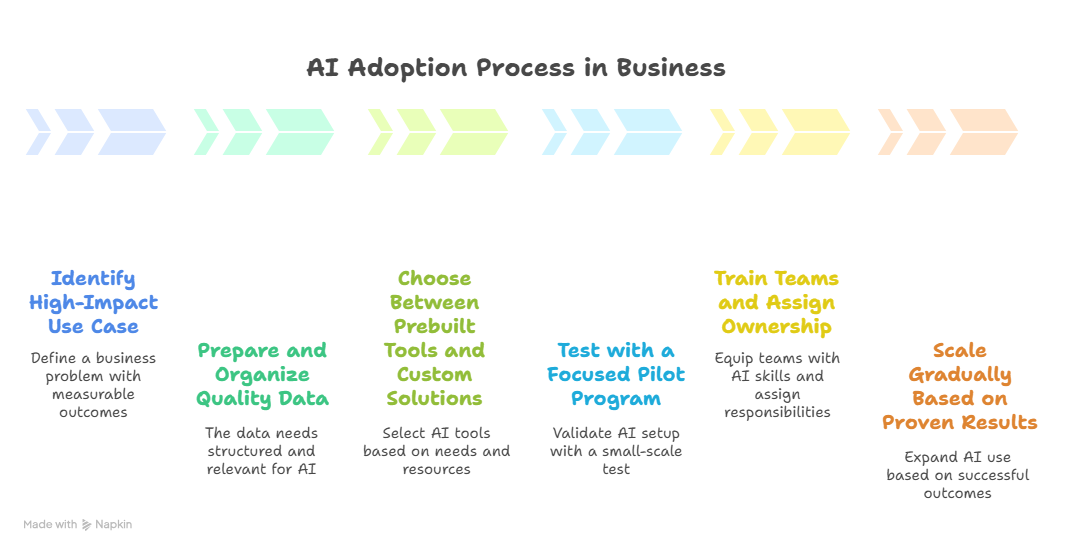
Steps to implement AI
Source: napkin.ai
Step 1. Identify a high-impact use case
Start with a business problem that drains time, slows decisions, or affects growth. Good AI candidates are tasks that slow down work. This includes delays in customer service, problems with inventory, and repetitive tasks like invoice processing and lead scoring. Focus on problems where data already exists and outcomes can be measured. You should identify processes to automate. This first step is key. It sets the stage for your whole AI strategy. Start with a clear, strong use case. This way, you can save resources and avoid vague goals.
You’ll also create a clear path for measuring success. For example, instead of saying “we want to use AI in marketing,” define the need as “we want to reduce the time it takes to segment leads by 60%.” This kind of precision allows you to choose the right tools later.
Step 2. Prepare and organize quality data
Once you define your use case, turn your attention to the data. AI relies on clear, organized, and relevant information. If your CRM has duplicates or your support tickets aren’t tagged well, you’ll face issues later. Now, your goal is to find the data sources linked to your use case. Then, make them usable. This could include making spreadsheets, linking databases, marking training sets, or moving records to the cloud. The quality of your data affects how well your AI system works. You don’t need a perfect data pipeline to begin, but you do need enough structure to let AI learn something meaningful.
Step 3. Choose between prebuilt tools and custom solutions
After you clean and organize your data, it’s time to select the tool or system that fits your use case. Businesses often choose between a prebuilt AI platform or a custom solution. Prebuilt tools like ChatGPT, Salesforce Einstein, HubSpot’s AI, or WordPress AI website builders features are fast to deploy and require less technical setup. They work best when your goal fits a common need, like email automation, customer support chatbots, or basic forecasting. For complex or industry-specific needs, you might need a custom AI model. This can be developed in-house or by a consultant. This route gives you more control. However, it needs a bigger budget and more internal expertise. In many cases, companies that require scalable, production-ready AI systems collaborate with experienced development partners such as Anadea’s services to ensure their solutions are built for long-term reliability, integration, and measurable business impact rather than limited to short-term experimentation.
Step 4. Test with a focused pilot program
A pilot allows you to prove that your AI setup works before committing to a larger rollout. Choose a single team, department, or process tied to your original use case. The goal here is not to achieve perfection—it’s to validate that the AI system creates value and doesn’t disrupt your core operations. Set clear metrics: response time improvement, reduced manual workload, or better forecast accuracy. Then, observe how the tool performs under real-world conditions. Does the AI system integrate smoothly? Do employees understand how to interact with it? Are the outcomes improving steadily? Use feedback to refine the tool, adjust settings, or improve data inputs.
Step 5. Train teams and assign ownership
Even the best AI model won’t deliver results if your team doesn’t know how to use it. That’s why training is not optional—it’s a core part of implementation. Emphasize role-based onboarding. Show employees how AI supports their work instead of replacing it. Customer service reps need to work with chatbots. They should also understand AI-suggested responses. Analysts need to know how AI makes forecasts or spots trends. At the same time, designate clear roles for AI maintenance, updates, and performance monitoring. Treat AI like a business function, not a plugin. If no one owns it, the system will degrade over time.
Step 6. Scale gradually based on proven results
AI integration works best when it evolves in steps. Use the insights from your pilot to expand with confidence. Use the same model for similar tasks. For example, a chatbot that helps with customer service can also manage internal IT tickets. Document your metrics, feedback, and outcomes from each rollout. Then, create templates and guidelines to make the next deployment smoother. Avoid the temptation to push AI into unrelated areas just to expand. Instead, follow the pattern: use case → data → tool → pilot → adoption → scale. This approach keeps quality high while spreading benefits across the company. Over time, you’ll build internal expertise, standard processes, and measurable impact.
You do not need a huge budget or a large engineering team to add AI to your business. Success relies on clear goals, a strong plan, and disciplined actions taken step by step. Start with a small project. Use the data you have. Give your team the right tools. Every successful rollout gains momentum. This makes the next implementation faster, simpler, and better.
Is your business ready for AI?
Before you invest time, money, and people in an AI project, pause to assess your readiness. Many businesses want to use AI. But, not many are prepared to use it well for steady results. You don’t need perfect systems or a team of data scientists. However, you do need some key elements in place. Check the list below to see if your business is ready for AI integration. The more boxes you can check, the smoother your implementation will go.
- ✅You’ve identified at least one clear use case. You know where AI can boost your operations. It can automate tasks, personalize customer experiences, and speed up forecasting.
- ✅ You have access to relevant, structured data. AI runs on data. You don’t need millions of records, but you do need organized, accurate information related to your use case.
- ✅ Your team has basic digital maturity. Your systems are cloud-connected, your teams are used to digital tools, and your workflows aren’t dependent on outdated software or paper-based processes.
- ✅You’ve secured leadership buy-in. Management understands why you’re adopting AI and supports the process. You’ve aligned AI goals with broader business objectives.
- ✅You can assign internal ownership. Someone on your team is responsible for leading the AI initiative, coordinating vendors or developers, and measuring results.
- ✅You have a budget for tools, training, or consulting. Even if you’re starting small, AI adoption often involves new platforms, integration work, or outside expertise.
- ✅You’re open to process change. You’re willing to redesign parts of your operations to make AI work, rather than forcing AI to fit your existing systems.
- ✅ You’ve considered data privacy and compliance.
If you handle customer or sensitive data, you know your responsibilities under regulations like GDPR, HIPAA, or local laws.
If you can check most of these boxes, your business is in a strong position to begin AI integration. If not, start by filling the gaps—organize your data, define a use case, and get internal alignment. A well-prepared foundation makes everything that follows faster.
Conclusion
AI is no longer a future goal—it’s a present-day advantage. The real value comes from integrating AI into business processes in a way that supports decisions, automates what slows you down, and opens new space for growth. In this guide, we’ve shown how to move from strategy to execution. You don’t need to reinvent your business on day one—you just need to start in the right place, with the right plan. AI works best when it fits the business, not the other way around. With the right structure in place, you can move from testing ideas to achieving results, one step at a time.
FAQ
How can I calculate the cost of AI implementation?
To calculate the cost of AI implementation, break it down into four key areas: software tools, infrastructure, development or integration services, and ongoing support. Begin with your use case. Decide if you want a prebuilt solution, which costs less, or a custom build, which costs more. Add infrastructure costs—this may include cloud services, data storage, or API usage. Include prep time or third-party services if your data needs cleaning or labeling. Don’t forget to budget for training, compliance, and system monitoring. A small project might cost a few thousand dollars; more complex systems can reach six figures. Cost depends on scope, not just the technology.
Can I integrate AI without changing my legacy software?
Yes, in many cases, you can integrate AI without replacing your existing systems. The key is to connect AI tools to your legacy software through APIs or automation platforms. For example, an AI model can pull data from your CRM and return insights without rewriting the CRM itself. Cloud-based AI services are especially helpful here; they can process information externally and feed results back into your system. In more complex cases, you may need middleware or light modernization to handle integration, but you don’t have to overhaul everything to get started.
How can I use AI in my business without technical expertise?
You can use AI even if you lack technical skills. Just focus on no-code or low-code platforms made for business users. These tools help you create automations, generate content, analyze customer behavior, or manage support tasks. They do this through easy-to-use interfaces. Start with a clear business need, like reducing email response time or improving sales forecasts, and choose a platform built for that use case. If needed, partner with an AI consultant for setup or vendor selection. Many modern AI systems have built-in guidance and templates. This helps non-technical teams use them easily without needing to write code.
What industries benefit most from AI?
AI adds value in almost every sector, but some industries see quicker returns. Retail and e-commerce use AI for three main things: personalization, inventory planning, and recommendation engines. Finance gains from fraud detection, risk analysis, and automated customer service. In healthcare, AI supports diagnostics, scheduling, and data processing for clinical research. Manufacturing applies AI in quality control and predictive maintenance. Logistics firms rely on it to better their routing and make forecasts. Industries that use a lot of data, have repetitive tasks, or interact with customers can benefit from smart AI adoption.

