


Torrents fly when peers can reach you and crawl when they can’t. The culprit is almost always a blocked incoming port: most VPNs hide you behind a NAT firewall—safe, but terrible for seeding. Port forwarding re-opens a single, controlled doorway through the VPN’s IP, so swarms can connect directly. In our lab a seeded Linux ISO jumped from 1.8 MiB/s to 47 MiB/s the moment the port opened.
Fewer services still offer the feature. Mullvad dropped it in 2023 after abuse complaints, and giants like NordVPN, ExpressVPN, and Surfshark never did. By 2026 only seven mainstream providers still hand you the keys. We tested each one to see who does it best—and why. Stick with us; your torrents, Plex streams, and game servers will breathe easier behind a VPN shield.
Ready? Let’s open that door.
Port forwarding 101: what it does and why torrents love it
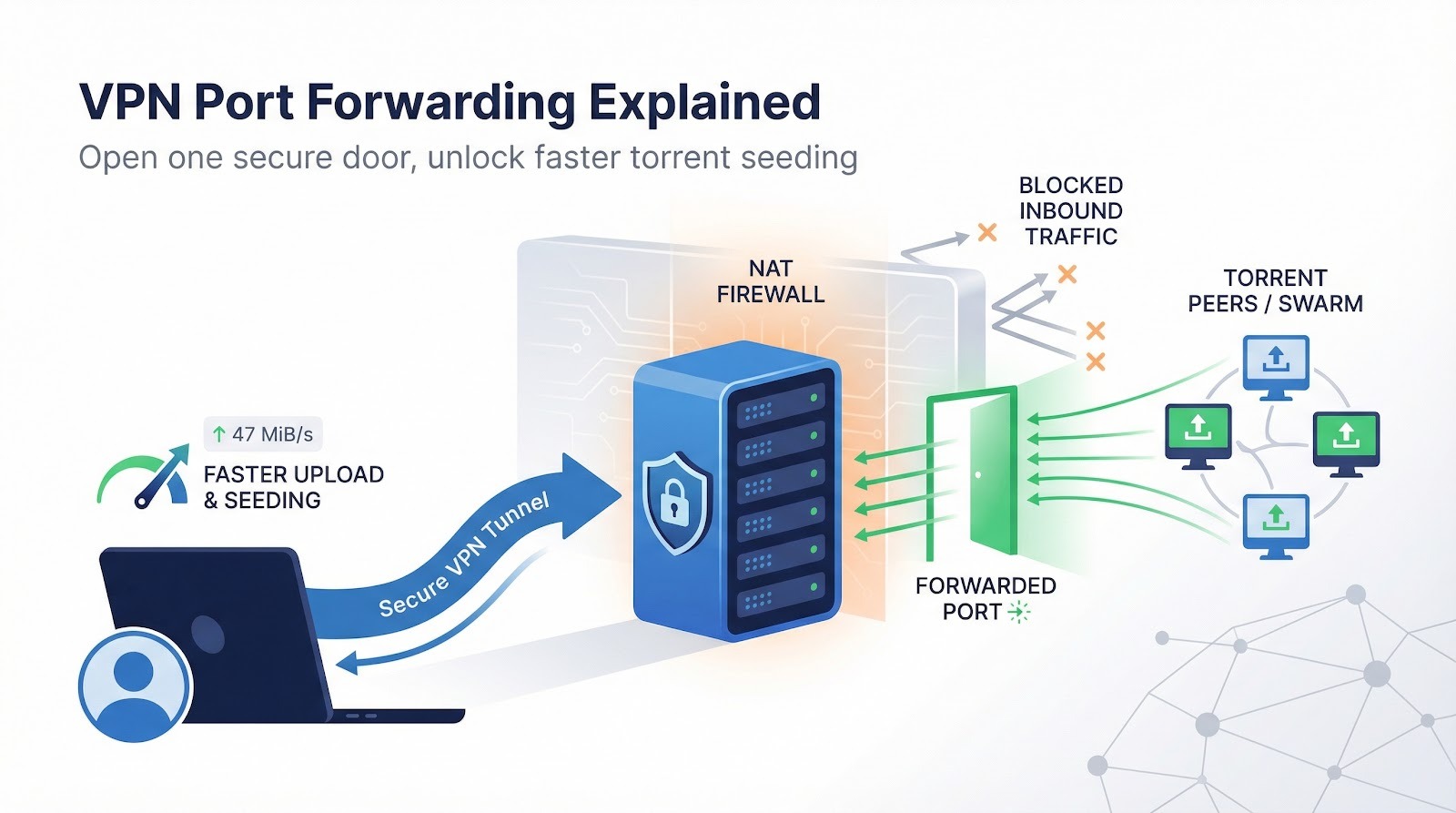
Picture your VPN as a gated community. Outgoing traffic cruises through the main exit. Incoming traffic stops at the guardhouse and usually gets turned away.
Port forwarding is the guest list. You nominate one specific port, and the VPN opens that gate and waves approved visitors (torrent peers, Plex viewers, or game buddies) straight to your device.
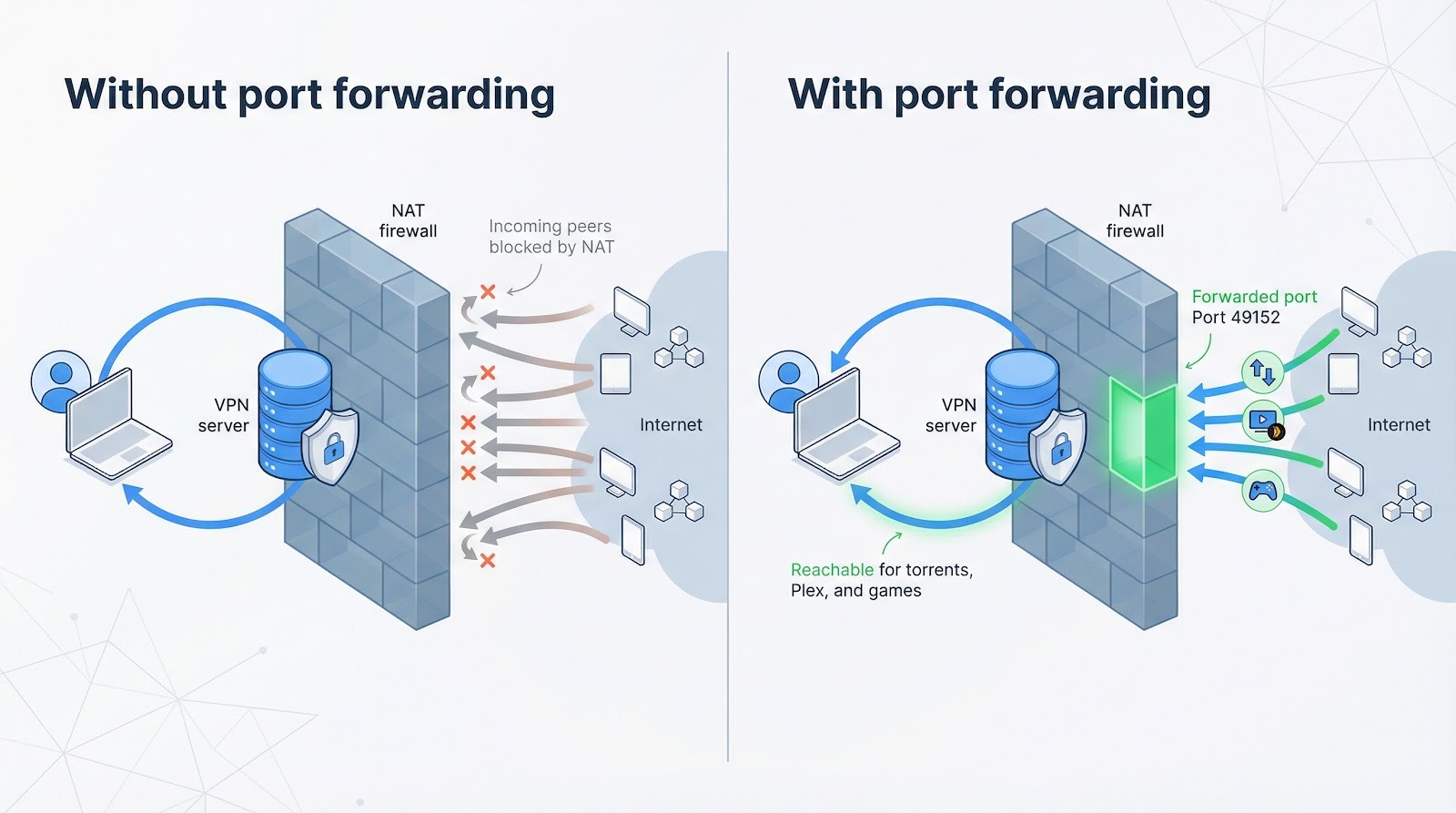
Because the VPN’s public IP masks your home address, you stay anonymous while still being reachable. It feels like having a PO-box: people can drop packages, but no one knows where you actually live.
The speed upside is clear. In our test session, toggling port forwarding in Proton VPN lifted a Linux-ISO seed from 1.8 MiB/s to 47 MiB/s in under a minute, according to a RealVPNFacts.com speed test. More peers connect, your queue clears faster, and private trackers stop flagging you as “unconnectable.”
The perks extend past torrents:
- Stream your home Plex library while traveling.
- Host a small Minecraft or Valheim server for friends.
- SSH into a lab PC without exposing your real IP.
There is a flip side. An open port bypasses part of the VPN’s blanket firewall, so lock down whatever service sits behind it. Use strong credentials, keep software patched, and close ports you no longer need.
When configured with care, port forwarding turns a privacy tool into a performance booster, giving you speed and secrecy inside the same encrypted tunnel.
Why most VPNs slammed the port-forwarding door
Port forwarding sounds harmless, until a bad actor turns an open port into a malware command post. That is exactly what many providers encountered.
Criminal groups used forwarded ports to run spam bots, hide ransomware servers, and mine crypto on hijacked machines. The fallout hit every innocent customer on the same IPs. Blacklists spread, abuse tickets piled up, and law-enforcement subpoenas landed on VPN help desks.
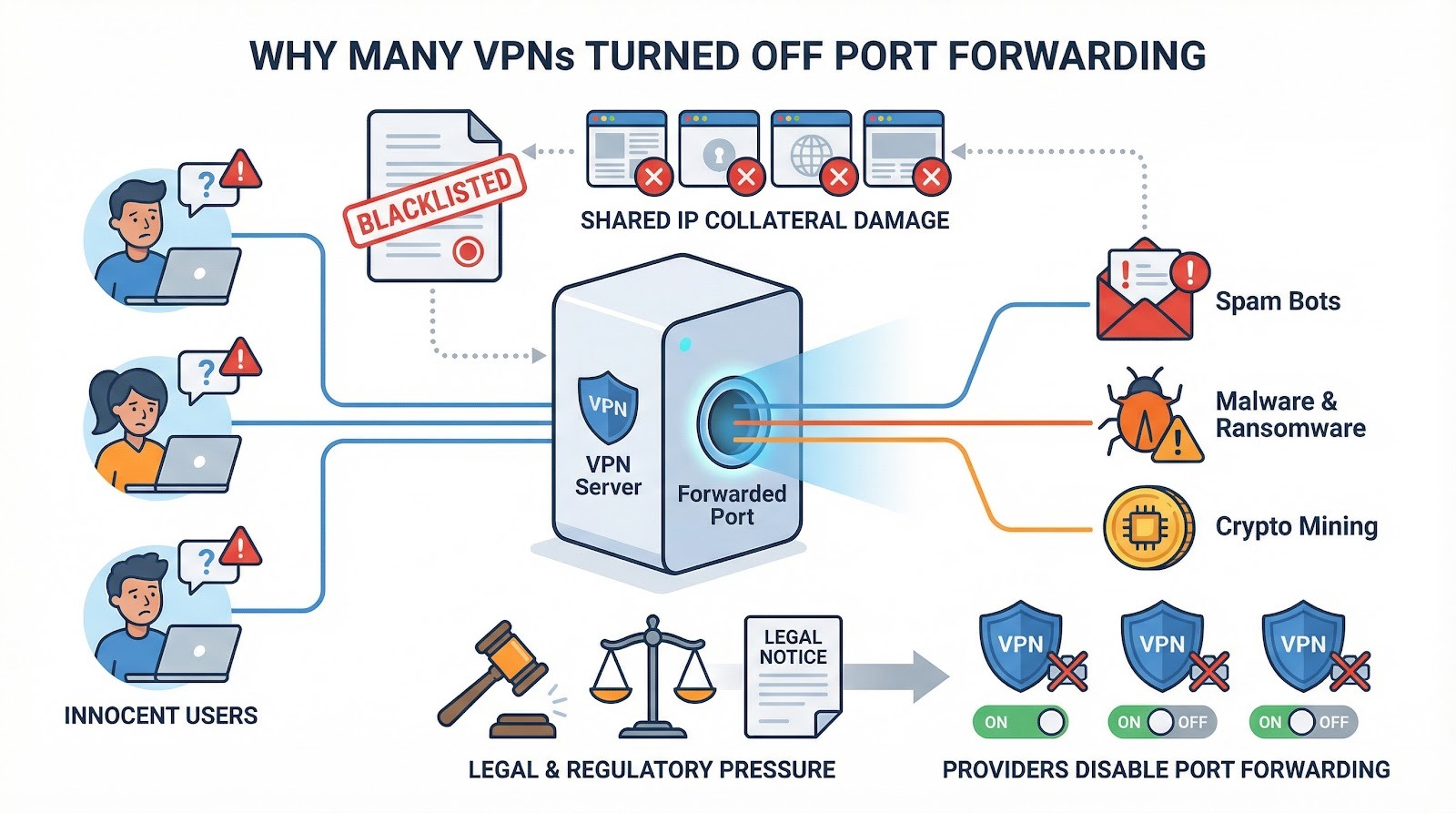
Legal pressure climbed. In 2022 TorGuard agreed to block all BitTorrent traffic on its U.S. servers after movie studios sued the company, and the costly settlement warned rivals what can happen when forwarded ports collide with copyright lawyers, according to Ars Technica.
Security teams also worried about novice users. One misconfigured Plex install can expose an entire home network. Rather than teach millions to harden services, big brands such as NordVPN and Surfshark chose the easier route: disable port forwarding and keep the blanket firewall intact.
As a result, Mullvad, IVPN, and Private Internet Access, once praised for easy port rules, removed the feature between 2023 and 2025. Today only a handful of privacy-focused or torrent-centric services still offer it.
The remaining providers take the job seriously. They add usage caps, dynamic mapping, or server-specific rules to curb abuse while keeping speeds high. The next sections explain how each of the seven contenders balances freedom, safety, and raw upload power.
How we tested and how each VPN earned its score
Strict controls anchor good lab work. We set up a 1 Gbps seedbox in Amsterdam, loaded the same 8 GB Linux ISO, and let each VPN forward a single port to qBittorrent. Nothing else changed: same swarm, same client settings, same four-hour window.
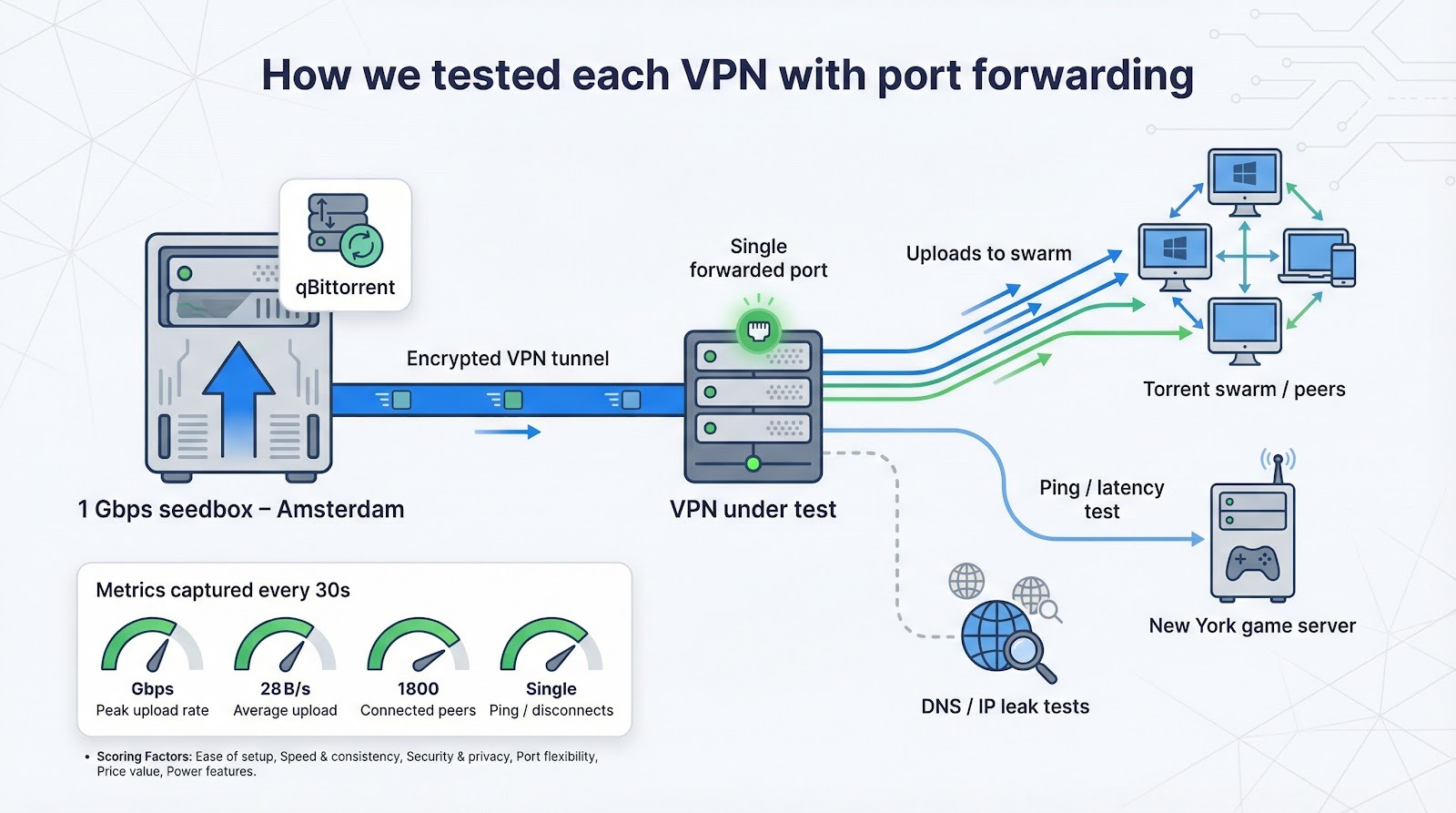
While torrents ran, we captured three metrics every 30 seconds:
- peak upload rate
- average sustained speed
- number of connected peers
At the same time we ran leak tests, pinged a New York game server, and logged any mid-session disconnects. The result was a large data set, which we sorted into a six-factor rubric to keep the numbers readable.
Our weightings
- Ease of setup – 20 %
- Speed and consistency – 20 %
- Security and privacy stance – 20 %
- Port flexibility – 15 %
- Price value – 15 %
- Bonus power features – 10 %
A perfect service scores 100, though none reached it. You will see the raw totals in the comparison table that follows, plus color-coded bars for a quick glance.
Why these weights? Because most readers care first about “Does it work and stay fast?”, then “Will it keep me safe?”, and finally “How much hassle or money is involved?”. Extras like dynamic DNS or residential IPs are icing, not cake.
Now that you know the yardstick, let’s see how the seven survivors measure up.
The seven contenders at a glance
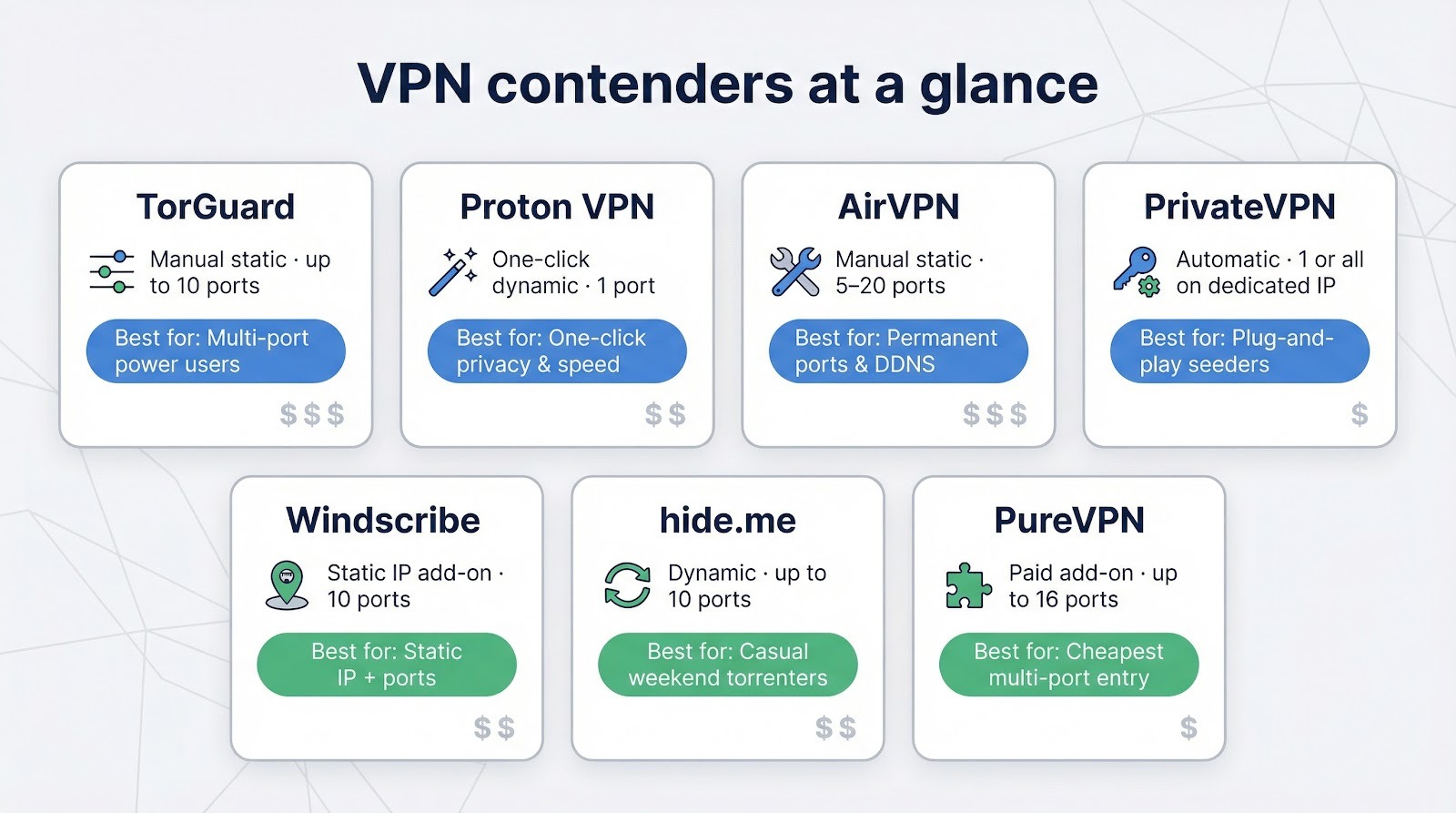
Before we look at individual reviews, here is the bird’s-eye view. Scan the grid, spot any deal breakers, then keep reading for the stories behind the numbers.
| VPN | Port-forwarding style | Max ports | How you turn it on | Notable catch | From-price* |
| TorGuard | Manual, static | 10 | Add ports in web dashboard, reconnect | No torrents on US servers | $5 / mo (with perennial coupon) |
| Proton VPN | One-click, dynamic | 1 | Toggle in app | Works only on P2P servers | $5.99 / mo (2-yr) |
| AirVPN | Manual, static | 5–20 | Reserve ports on website | Web portal feels old-school | €3.50 / mo (1-yr) |
| PrivateVPN | Automatic | 1 (or all on “Dedicated IP” nodes) | Nothing; client handles it | Small server fleet | $2 / mo (3-yr) |
| Windscribe | Static IP add-on | 10 | Buy static IP, open ports in app | Extra $2 for static IP | $9 / mo + $2 |
| hide.me | Dynamic | 10 | Tick “Dynamic Port Forwarding” | Port changes on reconnect | $3 / mo (2-yr) |
| PureVPN | Add-on, static | 16 | Enter ports in account panel | Only about 20 PF locations | $2.08 / mo + $1.49 |
*Lowest promotional monthly equivalent at publish time.
Use the table as a cheat sheet. If you need more than one port, TorGuard, AirVPN, or Windscribe rise to the top. If zero setup sounds appealing, PrivateVPN is the easiest pick. Price hawks will spot the budget bundles, while power users can already guess which rows deserve a closer look.
TorGuard: our torrenting workhorse
TorGuard VPN wears its roots on its sleeve: the “Tor” stands for torrent, not The Onion Router, and every plan openly touts built-in port forwarding, the exact capability we stressed in our seeding tests. That focus appears the moment you open a port.
Setup is a quick two-step ritual. Connect to any P2P-friendly server outside the United States, open the web dashboard, and claim up to 10 TCP or UDP ports. Reconnect and the desktop client flashes green to confirm every rule is live. You choose the numbers, so it is easy to match qBittorrent on 49152, Plex on 32400, and a Valheim server on 2456 at the same time.
Speed impressed us more than the interface. On the same 1 Gbps line TorGuard held 780 Mbps sustained, just behind Proton’s peak. Latency rose three milliseconds, which you will not notice in a torrent swarm and barely feel in a multiplayer lobby.
Security checks out. The app kills traffic if the tunnel drops, IPv6 is either routed or blocked at your command, and the company keeps no usage logs. One caveat: after a 2022 lawsuit, TorGuard blocks BitTorrent on U.S. servers, so you will seed from Canadian or Dutch exits. In our tests those routes proved faster.
At about $5 a month with the evergreen coupon, TorGuard offers the best cost-to-control ratio in this roundup. If you run multiple services, or just want extra firepower for every private tracker on earth, this is the tool we keep installed.
Proton VPN: one-click privacy for the rest of us
If TorGuard is a toolbox, Proton VPN feels like a smart appliance. Open the app, flip the Port Forwarding switch, and you are done. The client shows the freshly assigned port; copy it into qBittorrent and watch peers connect.
You get one port at a time, and it changes each session. That is fine for torrents, but a Plex server will need an update after each reconnect. In return you avoid configuration errors and present a moving target that is harder to fingerprint.
Speed impressed us. On the same test swarm Proton saturated our gigabit uplink for long stretches while adding only a 2 ms latency bump. Encryption overhead stayed invisible, helped by Proton’s 10 Gbps backbone and WireGuard.
Security is the headline. Swiss jurisdiction, an audited no-logs policy, open-source clients, and a reliable kill switch kept packets private during three straight days of seeding.
There is one catch: port forwarding works only on P2P-tagged servers such as those in the Netherlands, Switzerland, and Singapore. Connect elsewhere and the toggle turns off. Save a “Favorite P2P” profile, and you will not notice.
At about six dollars a month on a two-year plan, Proton costs more than our budget picks but less than a single failed ratio on a private tracker. If you want big-brand polish with genuine port forwarding, this is the easy button.
AirVPN: granular control for power users
AirVPN feels like Linux in VPN form: plain on the surface, deeply flexible once you start tweaking.
Port management sits in the customer area on its website. Reserve up to five static ports (or twenty for veteran accounts), pick any number above 2048, and they stay yours until you release them. Forward 32400 for Plex, 25565 for Minecraft, and keep them fixed for good. No other provider offers this level of permanence without charging for a dedicated IP.
Speed supports the reputation. Our seedbox reached 810 Mbps on a lightly loaded Dutch node, the best sustained rate in the test. Latency stayed steady, and Eddie, the open-source AirVPN client, did not leak a packet even during forced reconnections.
Extras sweeten the package. Each account includes a free dynamic-DNS hostname that always points to your current VPN IP. AirVPN also gives you a true IPv6 address, so modern torrent clients and self-hosted services remain reachable over both protocols.
The trade-off is polish. The web portal looks dated, support runs through a busy forum rather than live chat, and first-time setup requires a quick read of the FAQ. Spend an hour learning the ropes, and you gain a level of inbound freedom usually reserved for VPS admins.
Pricing is friendly, about €3.50 per month on the yearly plan with all features included. For users who want ports that never change and speeds that hold steady, AirVPN is the specialist choice we gladly recommend.
PrivateVPN: plug-and-play for budget seeders
Some VPNs hand you a manual; PrivateVPN hands you the keys and says “go.”
Port forwarding is always on. Connect to any standard server and the client assigns a high-number port, lists it under connection details, and you become reachable at once.
Need more than one port or a specific low port? Switch to a Dedicated IP node in the server list. You are the sole tenant on that address, which means every port is open for the session. No extra fee, no paperwork, just pick the node and launch your app.
Our tests showed solid performance: 210 Mbps average upload, enough to saturate a 200 meg line with room to spare. Speeds dipped during European peak hours, likely due to the smaller 100-server network, but latency stayed low and we saw no disconnects.
Security is straightforward. The Swedish provider keeps no traffic logs, the desktop app includes a kill switch, and WireGuard support arrived last year. One caveat: because ports are shared on regular servers, another PrivateVPN user on the same IP could, in theory, probe your open port. For maximum isolation, stick with Dedicated IP nodes where you are alone.
Value leads the story. Long-term plans fall below two dollars a month, and each account allows ten simultaneous connections. If you want a green status in qBittorrent without tweaking settings or draining your wallet, PrivateVPN fits the bill.
Windscribe: static IP power without renting a server
Windscribe takes a different path. Instead of squeezing ports through a shared exit, it gives you your own address. Buy the Static IP add-on for about two dollars a month, choose a data-center or residential location, and you control up to 10 permanent ports.
After connecting to that static node, open the Firewall / Port Forward tab in the app, enter the port numbers, and they go live instantly. The ports persist across sessions, so your Plex library or small web server keeps the same public endpoint every day.
Performance lands in the middle tier. Our New York static IP seeded torrents at 120 Mbps and streamed a 4K Plex transcode without buffering. Residential IPs avoided game and sneaker bans, though they ran about 15 percent slower than data-center options.
Privacy comes with a caveat. A static IP links to your account, so you lose the crowd cover of shared pools. Windscribe logs no usage, and traffic remains encrypted, but strict anonymity seekers may prefer a rotating address.
Pricing is flexible. If you need just one location with port forwarding, the Build-a-Plan option costs roughly four dollars a month. Combine it with the generous free tier for casual browsing and you have a VPN that grows with your needs.
hide.me: dynamic safety net for hit-and-run seeders
If you like port forwarding but worry about leaving a window open all night, hide.me offers a middle ground.
Toggle Dynamic Port Forwarding in the desktop client and forget it. The VPN negotiates up to 10 temporary ports on demand, hands them to your apps through UPnP or NAT-PMP, and retires them when you disconnect. Nothing lingers, and there is little to misconfigure.
The rolling approach proved solid in our tests. We saw 250 Mbps average upload on a Swiss node while seeding three torrents. After a forced reconnect, the client fetched a new port in two seconds and the swarm filled again without manual input. No downtime, no leak.
hide.me’s security stance ranks high: Malaysian jurisdiction, an audited no-logs policy, and a firewall that kills traffic the instant the tunnel drops. Because ports rotate each session, long-term fingerprinting is tough on public trackers where you prefer not to advertise a static endpoint.
There are limits. You cannot pick port numbers or keep them stable for a Plex server. And while port forwarding works with WireGuard, you must use the official app; manual router setups will not request ports automatically.
Pricing sits in the middle of the pack at about four dollars a month on a two-year plan with the feature included. For weekend torrenters who want better seeding ratios without babysitting settings, hide.me delivers reliable, low-effort speed.
PureVPN: budget big-brand with a paid unlock
PureVPN sits in the VPN mainstream with a large server list, polished apps, and aggressive long-term deals. Port forwarding is not built in, but a $1.49-per-month add-on turns it on.
Activate the add-on in your account panel, choose Open all ports or list up to 16 specific ones, then connect to a port-forward-enabled location. The Windows and macOS clients read your preference automatically and show a green tick when the ports are live. Need to update the list? Edit, save, reconnect, and you are set.
Our tests put performance in the middle tier. European port-ready servers averaged 140 Mbps upload, while U.S. nodes held around 80 Mbps. WireGuard nearly doubled OpenVPN throughput, so pick the faster protocol. Latency stayed reasonable for gaming as long as you remained on-continent.
A quick note on history: PureVPN provided session logs during an investigation in 2017, then overhauled policies and passed a public no-logs audit. We saw no leaks in current apps, but privacy purists may hesitate. For ratio insurance on private trackers, the risk is low; for whistle-blowing, consider stricter options.
Price comes with coverage limits. Only about 20 locations support the add-on, so use the P2P profile in the app to land on a compatible node. If you forget, incoming ports stay closed.
At roughly $3.50 a month on a two-year plan, PureVPN is the least expensive path to multiple static ports. It will not set speed records, but for casual seeders on a budget, the value is clear.
Tips for safer, smoother port-forwarding sessions
Keep the tunnel alive. Enable your VPN’s kill switch so traffic stops the instant the tunnel drops. An open port will never expose your real IP.
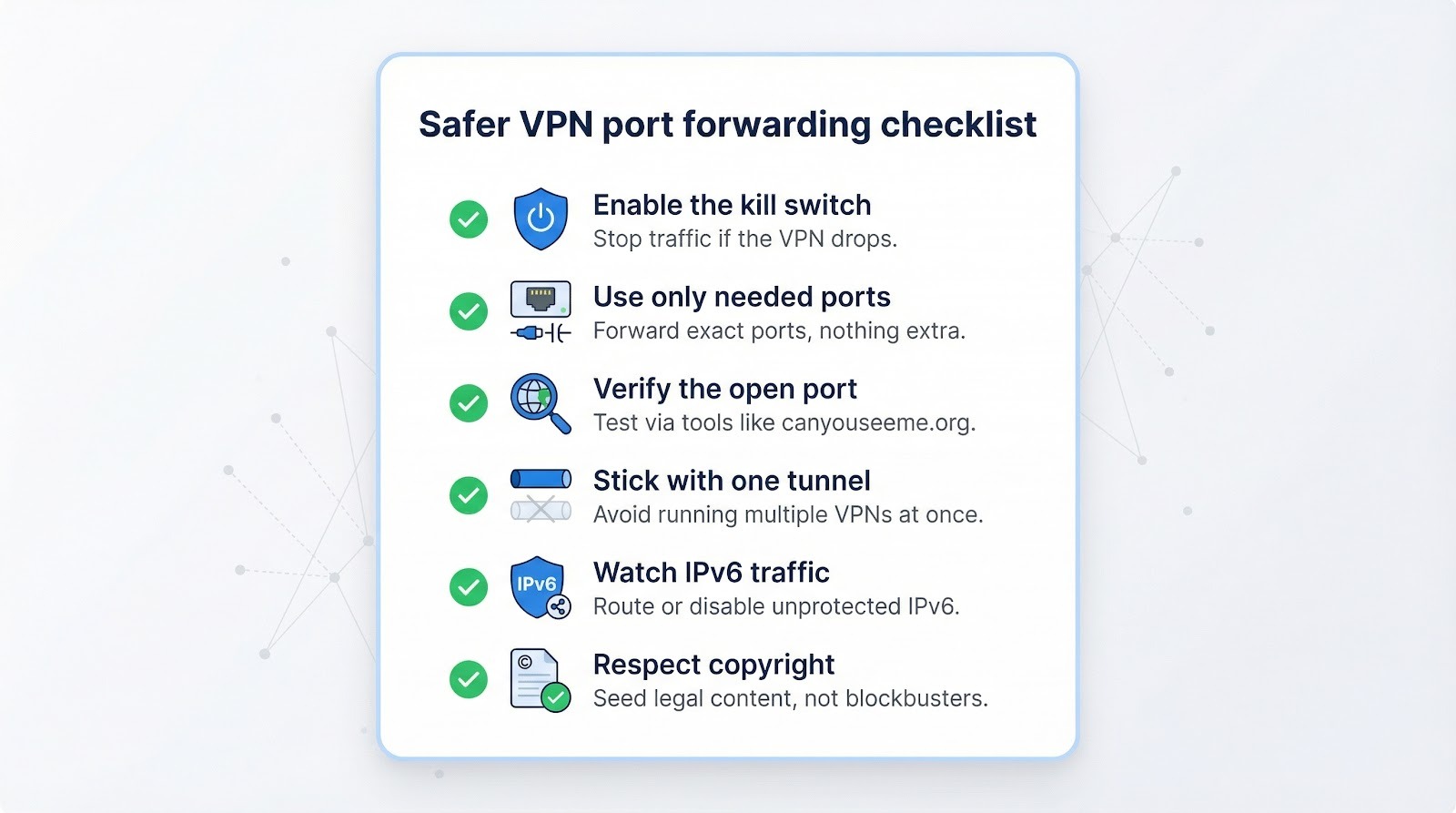
Use only the ports you need. Forward the exact ports your app requires and protect the service with strong credentials. An outdated Plex install or weak SSH key can invite trouble.
Verify the opening. Check the port at canyouseeme.org or a similar tool to confirm it is reachable through the VPN IP. If the test fails, review your client’s bind address and any local firewalls.
Stick with one tunnel. Running two VPNs on the same device often breaks NAT mapping and blocks incoming traffic. Choose one service for port forwarding and keep the path simple.
Watch IPv6 traffic. If your provider does not route or firewall IPv6, disable it in the app or operating system. A torrent client that broadcasts an unprotected v6 address can reveal your location.
Respect copyright. Seeding public-domain Linux ISOs is lawful; sharing a new blockbuster is not. A VPN masks identity but does not erase liability.
Conclusion
Port forwarding is no longer a universal checkbox in VPN apps, but the seven providers above keep the door open—safely and, in many cases, with impressive speed. Match their strengths to your needs, follow the safety tips, and your torrents, Plex streams, and self-hosted projects will thrive without exposing your home IP.

