
Skip to content
  • Next Steps
    • What is Flowster?
    • Process Management vs Project Management
    • Why Flowster vs MS or Google Docs?
    • Flowster vs Flowcharts
    • Customer Stories
    • Browse our Template Marketplace
    • 3 Minute Demo
    • Visit our Blog
  • Products
    • Capture Chrome Extension
    • Flowster Unlimited
    • Flowster Connect: LinkedIn Automation
    • Flowster Agency Success Tactics (FAST) Playbook
    • Amazon Seller Playbook
  • Marketplace
  • Pricing
  • Next Steps
    • What is Flowster?
    • Process Management vs Project Management
    • Why Flowster vs MS or Google Docs?
    • Flowster vs Flowcharts
    • Customer Stories
    • Browse our Template Marketplace
    • 3 Minute Demo
    • Visit our Blog
  • Products
    • Capture Chrome Extension
    • Flowster Unlimited
    • Flowster Connect: LinkedIn Automation
    • Flowster Agency Success Tactics (FAST) Playbook
    • Amazon Seller Playbook
  • Marketplace
  • Pricing
Log In
Get started for free

Flowster’s Template Style Guide

Please adhere to the following style guide when submitting a template for use in the Flowster marketplace.​

Overall Layout of Template

Include more tasks with fewer details per task.
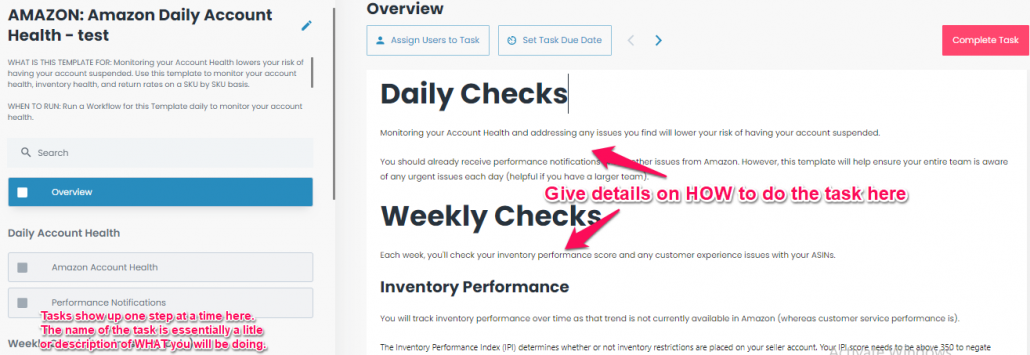
  • Tasks show up on on the left hand side of the screen as steps within the checklist (as shown in the image below).
  • The content within the task (which shows up on the right hand side of the screen) should have plenty of images to go along with descriptive text. When realistic, you will be able to see the entire content of that on your screen at one time.
1

Headlines/Titles

Guidelines
  • Titles do NOT start with “How To”.
  • Headings are size H1.
  • Subheadings are H3.
  • Neither headings or subheadings are bolded.
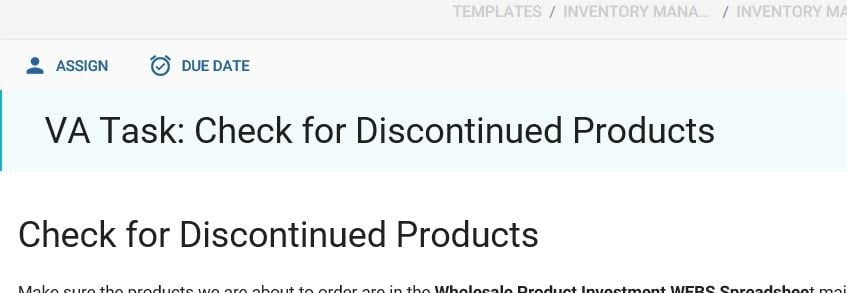
  • Make sure that the headings are NOT doubled up like the image below:
2

Font

Normal, size 14.
  • Bold and Italics are used sparingly. Typically a word or sentence is bolded here or there. An entire paragraph should only ever be bolded when it is of utmost importance, e.g., a warning that you don’t want checklist users to miss.

Explanations/ Directions

Explanations/ Directions
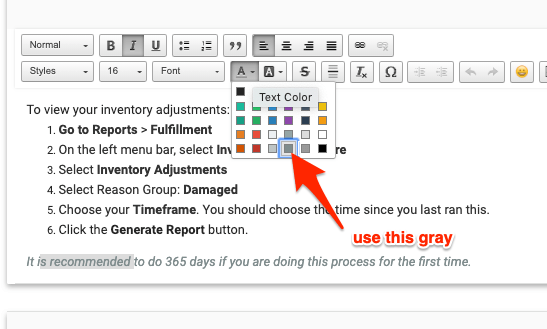
  • Gray italicized text to be used for explanatory notes, we will also need to add a legend. (Where will we add this?)
3 1

Description

The description section should be populated for each checklist. Each description should include, at a minimum, a brief description of what task is done within the template, and a version number.
  • Version numbers:
    • Start at 1.0
    • For major updates, especially those that impact the usability of the templates, increase the integer, i.e., 2.0, 3.0, 4.0
    • For minor updates, where helpful updates have been made but the template is still very usable as is, increase the decimal, i.e., 1.1, 1.2, 1.3
    • For very minor changes, where a user might not even notice the difference at all, increase the hundredths position, i.e., 1.0.1

WEBS Descriptions

For Wholesale eCommerce Business System templates, include the following in the description section:
  • WHAT IS THIS TEMPLATE FOR: 
  • WHEN TO RUN IT:
  • WHO TO RUN IT:
  • SOFTWARE USED:
  • SPREADSHEETS & DOCUMENTS USED: 
  • VERSION:

ASP Descriptions

For Amazon Seller Playbook templates, include the following in the description section:
  • WHAT IS THIS TEMPLATE FOR: 
  • WHEN TO RUN IT:
  • WHO TO RUN IT: 
  • SOFTWARE USED: (only include this section if there is software needed, other than a web browser).
  • SOFTWARE USED: (only include this section if there is software needed, other than a web browser).
  • SPREADSHEETS & DOCUMENTS USED: (only include this section if there are spreadsheets or documents needed).
  • VERSION:

Widgets

Short text vs Long text Widgets
  • Use short text when the desired input is one sentence or less.
Checklist Widgets
  • The item being checked off should already be explained in the prior text/images, so the checklist text should be one sentence or less. Do not end checklist text with a period.
Making Checklist Widgets Required
  • When a user is trying to complete a workflow, they will have to check off any required checklist widgets before doing so. This can be cumbersome if the “required” item isn’t truly necessary. Only the most important checklist items should be marked Required. You may have to break a single checklist into two so that you can separate out required items from those that are optional.

Images

Naming convention
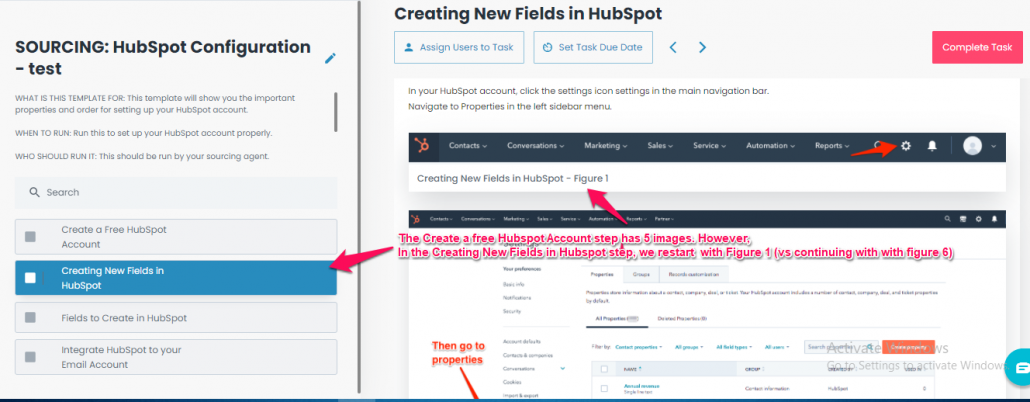
  • Images are named with the name of the task that the image is in, versus a description of the image itself. Each section starts with Figure 1, as shown in the image below (versus image numbering increasing throughout the template).
1 1

Task Headings

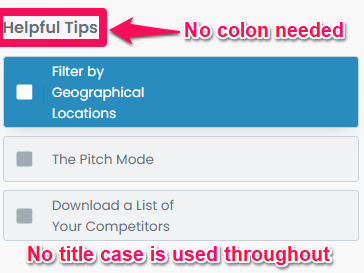
Do not include colons
  • Task headings and task names use title case (e.g., “Categories & Revenue” vs “CATEGORIES & revenue”). Note that you will need to be in edit mode to confirm title case.
2

Terminology

Templates and Workflows
  • In Flowster, a template is the word we use to describe an outline of a process that you create for a task that is likely to be repeated. When you are creating or modifying a process in Flowster (working in edit mode), you are modifying a template.
  • A workflow is the name we use to describe when you want to run an instance of that template, and assign it to yourself or a member of your team, so actual work gets done.
  • For example, if you are issuing a purchase order, you would create a template to cover the specific steps your company does whenever it issues a purchase order.
  • Avoid the use of the term Standard Operating Procedures (SOPs), and instead use the terms templates, workflows, processes, or procedures.
References to Google Spreadsheets & Documents
  • Use bold font and no hyperlinks.
  • Google Docs: DOC NAME Document
  • Google Sheets: SPREADSHEET NAME Spreadsheet
  • Other Flowster templates: FOLDER_NAME: Template name workflow
  • Tabs within Google Sheets: Tab Name SPREADSHEET NAME Spreadsheet
Other
  • Use the variation eCommerce (not e-commerce or other).
  • Capitalize the first and last letter of SaaS.
  • Use startup vs start-up.
  • Do not use the term SOP; instead, use template or workflow, and occasionally checklist.
  • Names and capitalization of software tools match the convention the tool uses (e.g. not Youtube but YouTube).

Lists

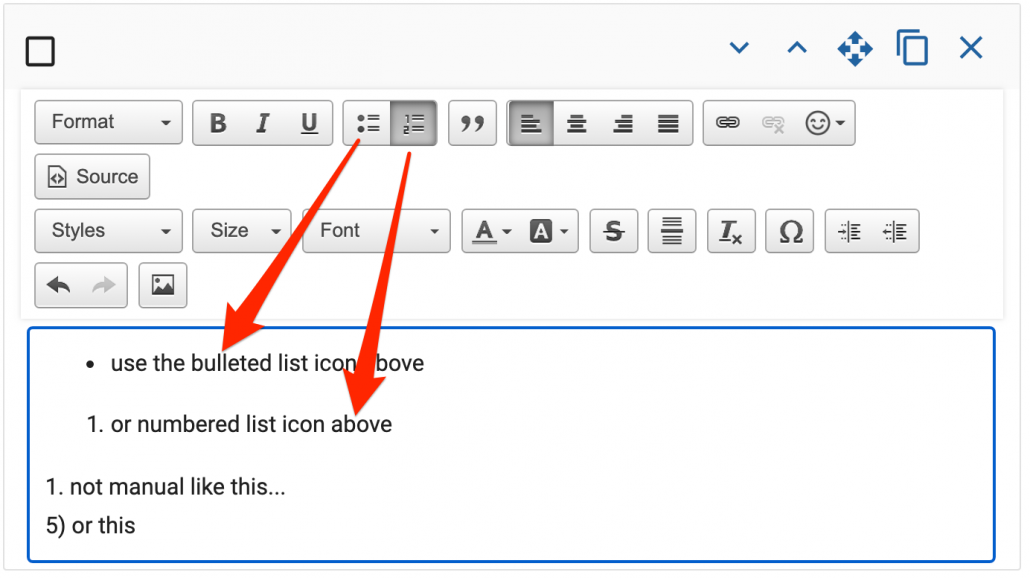
Use the bulleted or numbered lists available within Flowster’s text editor. (Don’t manually number your numbered lists.)
11

Call to Action

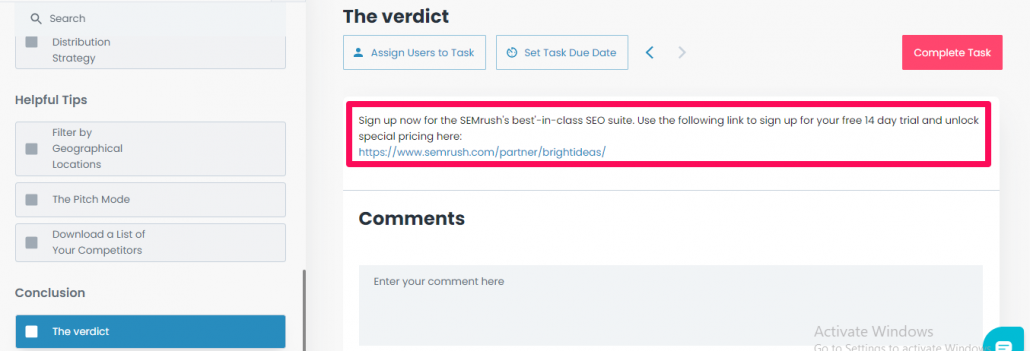
Each template should have a single Call to Action, or link back to the creator’s website. Typically this will be the last task in the workflow (not the first and last tasks). See example below.

3

3827 S Carson St, 505-25 Unit #3040
Carson City, NV 89701, USA

© Copyright – Flowster, LLC

Linkedin Twitter Youtube Facebook Instagram
  • About
  • Careers
  • Blog
  • Contact Us
  • About
  • Careers
  • Blog
  • Contact Us
1% For The Planet

RESOURCES

  • Help Docs
  • Integrations
  • Affiliates
  • Virtual Assistant Placement Program
  • Training Videos
  • Partner Webinars
  • Content Partner Program

LEGAL

  • Privacy Policy
  • Terms of Service

Stay up to date on the latest from Flowster

We use cookies on our website to give you the most relevant experience by remembering your preferences and repeat visits. By clicking “Accept”, you consent to the use of ALL the cookies.
Do not sell my personal information.
Cookie settingsACCEPT
Manage consent

Privacy Overview

This website uses cookies to improve your experience while you navigate through the website. Out of these, the cookies that are categorized as necessary are stored on your browser as they are essential for the working of basic functionalities of the website. We also use third-party cookies that help us analyze and understand how you use this website. These cookies will be stored in your browser only with your consent. You also have the option to opt-out of these cookies. But opting out of some of these cookies may affect your browsing experience.
Necessary
Always Enabled
Necessary cookies are absolutely essential for the website to function properly. This category only includes cookies that ensures basic functionalities and security features of the website. These cookies do not store any personal information.
Functional
Functional cookies help to perform certain functionalities like sharing the content of the website on social media platforms, collect feedbacks, and other third-party features.
CookieDurationDescription
akavpau_ppsdsessionThis cookie is provided by Paypal. The cookie is used in context with transactions on the website.
nsidsessionThis cookie is set by the provider PayPal. This cookie is used to enable the PayPal payment service in the website.
tsrce3 daysThis cookie is set by the provider PayPal. This cookie is used to enable the PayPal payment service in the website.
x-pp-ssessionThis cookie is set by the provider PayPal. This cookie is used to process payments from the site.
Performance
Performance cookies are used to understand and analyze the key performance indexes of the website which helps in delivering a better user experience for the visitors.
CookieDurationDescription
ac_enable_tracking1 monthThis cookie is set by the Active Campaign. This cookie is used to keep track of the site usage.
YSCsessionThis cookies is set by Youtube and is used to track the views of embedded videos.
Analytics
Analytical cookies are used to understand how visitors interact with the website. These cookies help provide information on metrics the number of visitors, bounce rate, traffic source, etc.
CookieDurationDescription
_ga2 yearsThis cookie is installed by Google Analytics. The cookie is used to calculate visitor, session, campaign data and keep track of site usage for the site's analytics report. The cookies store information anonymously and assign a randomly generated number to identify unique visitors.
_gcl_au3 monthsThis cookie is used by Google Analytics to understand user interaction with the website.
_gid1 dayThis cookie is installed by Google Analytics. The cookie is used to store information of how visitors use a website and helps in creating an analytics report of how the website is doing. The data collected including the number visitors, the source where they have come from, and the pages visted in an anonymous form.
_hjFirstSeen30 minutesThis is set by Hotjar to identify a new user’s first session. It stores a true/false value, indicating whether this was the first time Hotjar saw this user. It is used by Recording filters to identify new user sessions.
_omappvp11 yearsThe cookie is set to identify new vs returning users. The cookie is used in conjunction with _omappvs cookie to determine whether a user is new or returning.
_omappvs20 minutesThe cookie is used to in conjunction with the _omappvp cookies. If the cookies are set, the user is a returning user. If neither of the cookies are set, the user is a new user.
_uetsid1 dayThis cookies are used to collect analytical information about how visitors use the website. This information is used to compile report and improve site.
Advertisement
Advertisement cookies are used to provide visitors with relevant ads and marketing campaigns. These cookies track visitors across websites and collect information to provide customized ads.
CookieDurationDescription
_fbp3 monthsThis cookie is set by Facebook to deliver advertisement when they are on Facebook or a digital platform powered by Facebook advertising after visiting this website.
fr3 monthsThe cookie is set by Facebook to show relevant advertisments to the users and measure and improve the advertisements. The cookie also tracks the behavior of the user across the web on sites that have Facebook pixel or Facebook social plugin.
IDE1 year 24 daysUsed by Google DoubleClick and stores information about how the user uses the website and any other advertisement before visiting the website. This is used to present users with ads that are relevant to them according to the user profile.
MUID1 year 24 daysUsed by Microsoft as a unique identifier. The cookie is set by embedded Microsoft scripts. The purpose of this cookie is to synchronize the ID across many different Microsoft domains to enable user tracking.
test_cookie15 minutesThis cookie is set by doubleclick.net. The purpose of the cookie is to determine if the user's browser supports cookies.
uidThis cookie is used to measure the number and behavior of the visitors to the website anonymously. The data includes the number of visits, average duration of the visit on the website, pages visited, etc. for the purpose of better understanding user preferences for targeted advertisments.
VISITOR_INFO1_LIVE5 months 27 daysThis cookie is set by Youtube. Used to track the information of the embedded YouTube videos on a website.
Others
Other uncategorized cookies are those that are being analyzed and have not been classified into a category as yet.
CookieDurationDescription
_fw_crm_v1 yearNo description
_gat_UA-124464104-11 minuteNo description
_gat_UA-182261587-11 minuteNo description
_hjAbsoluteSessionInProgress30 minutesNo description
_hjid1 yearThis cookie is set by Hotjar. This cookie is set when the customer first lands on a page with the Hotjar script. It is used to persist the random user ID, unique to that site on the browser. This ensures that behavior in subsequent visits to the same site will be attributed to the same user ID.
_hjIncludedInPageviewSample2 minutesNo description
_hjIncludedInSessionSample2 minutesNo description
_hjTLDTestsessionNo description
_lfa2 yearsThis cookie is set by the provider Leadfeeder. This cookie is used for identifying the IP address of devices visiting the website. The cookie collects information such as IP addresses, time spent on website and page requests for the visits.This collected information is used for retargeting of multiple users routing from the same IP address.
_seg_uid1 yearNo description
_seg_uid_35361 yearNo description
_seg_visitor_35361 yearNo description
_uetvid16 days 6 hoursNo description
CONSENT16 years 8 months 2 days 6 hoursNo description
cookielawinfo-checkbox-functional1 yearThe cookie is set by GDPR cookie consent to record the user consent for the cookies in the category "Functional".
cookielawinfo-checkbox-others1 yearNo description
DO-LBNo description
enforce_policy1 yearNo description
hyperise_session2 hoursNo description
l7_az30 minutesNo description
LANG9 hoursNo description
prism_7995608311 monthNo description
RUL1 yearNo description
whr_nov1 yearNo description
x-cdnNo description
SAVE & ACCEPT
Powered by CookieYes Logo
  • Next Steps
    • What is Flowster?
    • Process Management vs Project Management
    • Why Flowster vs MS or Google Docs?
    • Flowster vs Flowcharts
    • Customer Stories
    • Browse our Template Marketplace
    • 3 Minute Demo
    • Visit our Blog
  • Products
    • Capture Chrome Extension
    • Flowster Unlimited
    • Flowster Connect: LinkedIn Automation
    • Flowster Agency Success Tactics (FAST) Playbook
    • Amazon Seller Playbook
  • Marketplace
  • Pricing
Login
Get started for free