
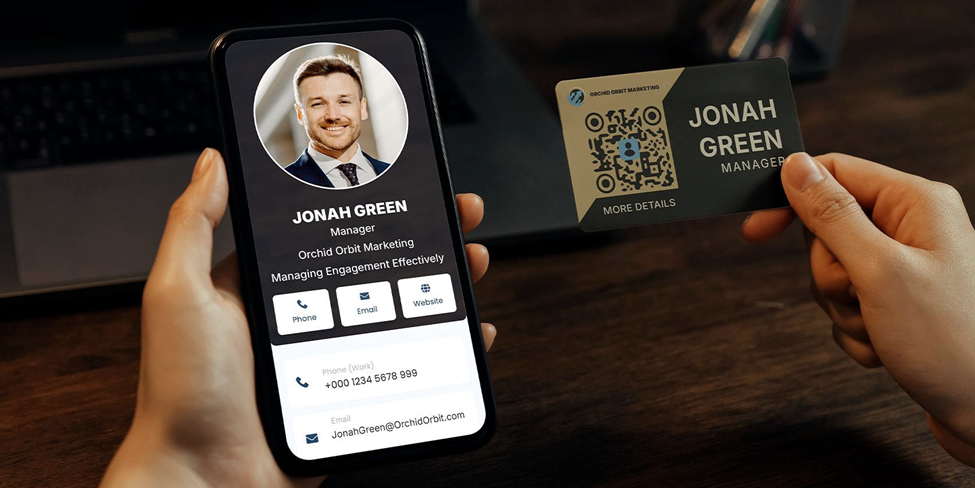

A vCard QR code makes sharing contact details faster, easier, and much more professional. Anyone who scans it can instantly save your details, no need to type them.
Today, more professionals and businesses are modernizing how they share contact information across business cards, email signatures, resumes, and portfolios. By 2024, 37% of businesses and 23% of individuals were already using digital business card apps, highlighting the clear shift toward QR-enabled contact sharing. And as reported by QR TIGER, 15.1% of the dynamic QR codes generated online were intended for business card use. For those looking to streamline this process even further, using the best business card scanner apps can complement QR codes by instantly scanning and saving contact details with ease.
In this guide, we’ll walk you through practical ways to utilize it in your professional and business endeavors, allowing you to share your contact details in a modern and professional manner.
How a vCard QR code works
A vCard QR code is a two-dimensional barcode that stores all your essential contact information, which is viewable in a mobile-friendly format.
When scanned, the user’s phone or device is automatically populated with your details, including your name, phone number, email address, company, website, and even social media profiles.
Unlike the traditional method, a digital business card QR code makes sharing your contact details easy, keeps your information accurate, and allows you to include more elements than a standard card can hold.
Popular vCard uses
These examples show how you can connect, network, and share information more efficiently by using digital business cards equipped with QR codes.
On printed business cards
Place the code on your physical business cards so people can save your complete contact details instantly. It keeps your card clean and ensures accurate information capture.
In email signatures
Add it to your email signature to help recipients save your phone number and email without typing. It’s one of the simplest and most effective uses for professionals.
On resumes and portfolios
Include it on your CV, digital portfolio, or presentation slides. Recruiters and clients can store your contact information with one scan, making follow-ups easier.
On product packaging
Use it on packaging to give customers quick access to support, sales contacts, or partnership inquiries, an increasingly common use for businesses.
On digital profiles and landing pages
Embed it on your website, social media headers or cover images, or online portfolio so visitors can instantly save your details directly to their phone.
On event badges and name tags
Place it on conference badges or IDs to streamline networking. Attendees can connect with you quickly without exchanging physical cards.
On flyers, brochures, or posters
Add it to printed marketing materials to make it easy for interested prospects to save your contact information on the spot.
How to get a vCard QR code
A typical vCard QR code generator allows you to input your essential contact details, such as your name, phone number, email, and other professional information, and convert them into a scannable vCard format.
Since each vCard QR code creator offers different levels of customization, flexibility, and file formats, it helps to choose one that fits your specific purpose, whether you want a simple static code or a dynamic version that you can update later.
Tip: Finding the right tool makes the rest of the process smooth and stress-free, so choose the best QR code generator for vCard that meets your needs.
Once you’ve created and downloaded your code, you can add it to digital profiles, printed materials, or business channels to make sharing your contact information effortless.
Why you’ll love using a vCard
A vCard QR code offers advantages that go beyond a regular business card. Here are the top reasons to use it in your professional endeavors.
1. Quick to access: Your information goes straight into your recipient’s contact apps, email address book, or CRM.
2. Eliminates manual entry: A single scan lets anyone save your QR code contact information. No need to type in the details anymore.
3. Easy to store and organize. You can save it as a wallet pass (Apple or Google), keeping everything organized and easily accessible.
4. Ideal for digital-first networking: With more professionals shifting to digital exchanges, vCards let you share your details instantly across devices. A 2024 Ipsos survey found that 20% of adults prefer digital business cards, with this preference rising to 37% among younger professionals.
5. Better engagement and interactivity: It contains clickable links that drive actions, such as booking a meeting, visiting your store, or checking your portfolio.
6. Space-saving when printed: A QR code fits neatly on business cards, brochures, or badges without taking up much space. You can include complete contact details without cluttering your design.
7. Allows contact update anytime: If you use a dynamic vCard QR code, you can update your information anytime without creating another QR and reprinting your card. The code remains the same, but the information it displays stays up to date.
8. Trackable and measurable: You can also see views, scans, clicks, and interactions, helping you measure networking effectiveness.
9. Eco-friendly: Using a QR code reduces the need for printed business cards, helping cut down on paper waste while keeping your networking modern and sustainable.
How to use your vCard QR effectively
To get the most out of your digital business card QR codes, follow these simple tips to keep them reliable, professional, and easy to use.
● Keep your contact details up to date. Double-check all information to make sure it’s current.
● Ensure a clean, scannable design. Avoid cluttered designs or low-contrast colors. A simple, clear, well-sized QR code is easier to scan and looks more professional.
● Test on multiple devices. Scan your QR code on various devices and apps to confirm it works correctly and that all information appears accurately.
● Place them where they matter most. Make sure your QR code is easy for people to notice and scan. Positioning it thoughtfully ensures that anyone who wants to access your contact information can do so without a problem.
Connect faster with vCards
vCard QR codes are a simple yet powerful way to modernize the way you share contact information.
Embracing this technology not only smoothens how you connect with others but also leaves a lasting professional impression.

