


We see it on too many sites: crews idle while drawings lag, expeditors hunt pipe that never arrived, and planners juggle brittle spreadsheets. On most capital projects craft labour spends about a third of the shift on tools. Advanced work packaging (AWP) lifts that figure by roughly ten percentage points by releasing each installation work package (IWP) only when it is truly ready.
Picking the right platform, though, is tricky. We reviewed eight serious contenders, scored the top five on depth, integration, usability, scale, value, and support, and ranked them so you can choose in minutes, not months.
How we researched and scored each platform
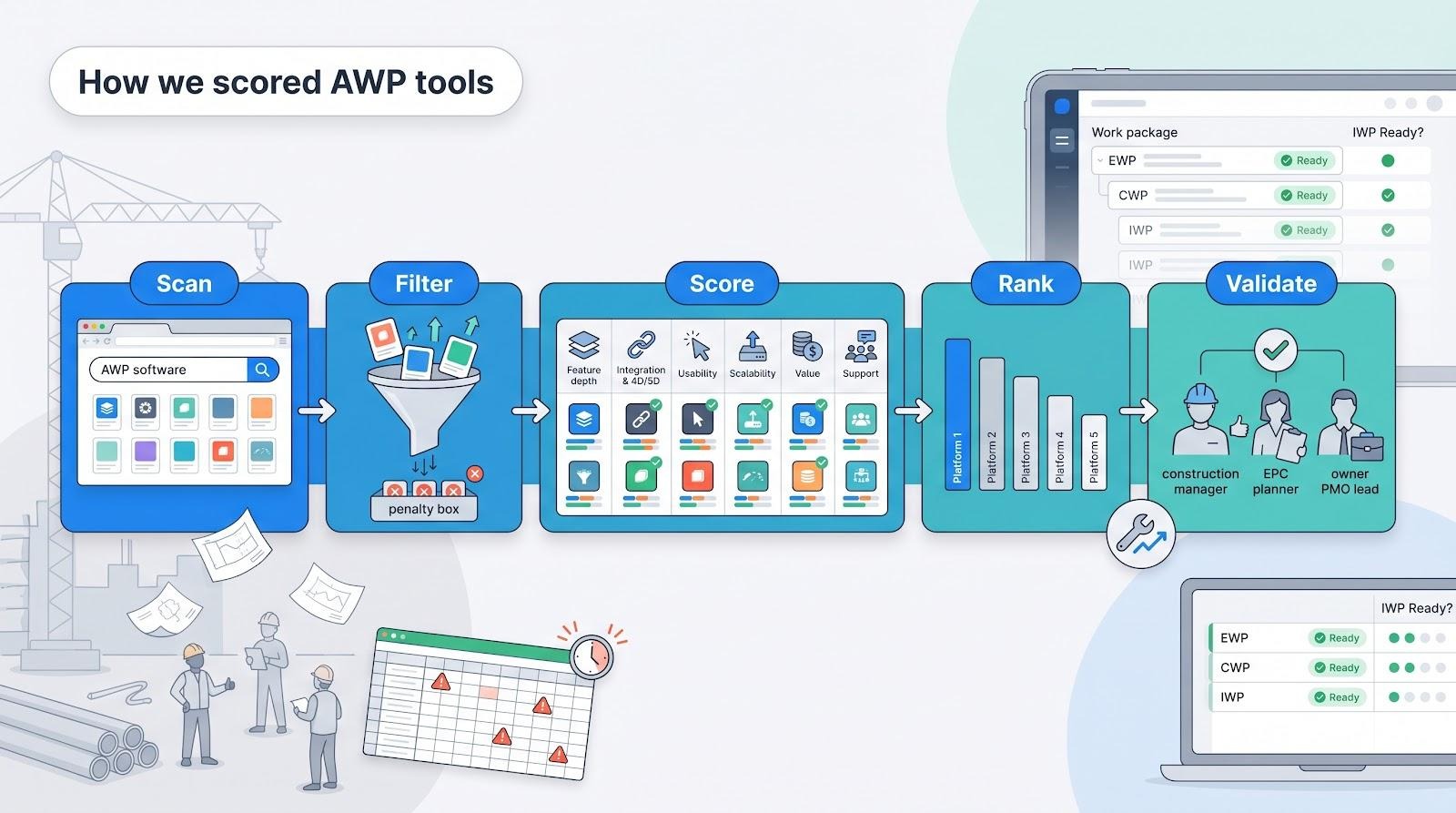
We started with one simple rule: include only software that treats advanced work packaging as more than a marketing buzzword.
First, we scanned every front-page result for “AWP software” and “work packaging tools,” then compared those findings with vendor documentation, product videos, and customer case studies published after January 2024. That sweep produced eight serious contenders.
Next, we filtered. If a tool required heavy spreadsheet gymnastics or third-party plug-ins just to build a construction work package, it moved to the penalty box. Generic suites such as traditional scheduling systems or document repositories failed that test; respected platforms like Procore still rely on manual workarounds to mimic AWP logic.
With a focused roster, we scored each product on six criteria that matter in the field as much as in the boardroom:
- Feature depth: does the software natively manage EWPs, CWPs, and IWPs, complete with constraint gates?
- Integration and 4D/5D support: can it send data to schedules, models, and cost systems without copy-paste gymnastics?
- Usability: how fast can planners and craft crews get productive?
- Scalability: will performance hold when the package count tops 100,000?
- Value: do licensing terms make sense compared with the savings AWP promises?
- Vendor support: is there a vibrant user community, and an active roadmap?
Each criterion carried a weight tied to its impact on project outcomes, then rolled into a single ten-point score. When scores tied, we used unique differentiators (automation for WorkPacks, AI insights for O3) to break the deadlock.
Finally, we sanity-checked the rankings with real practitioners. Two EPC planners, a construction manager, and an owner PMO lead reviewed early drafts to confirm that the numbers match on-site reality.
The result is a ranked list you can trust, not a recycled sales pitch. The next section unpacks the scorecard and dives into where each platform shines and where it falls short.
The scorecard at a glance
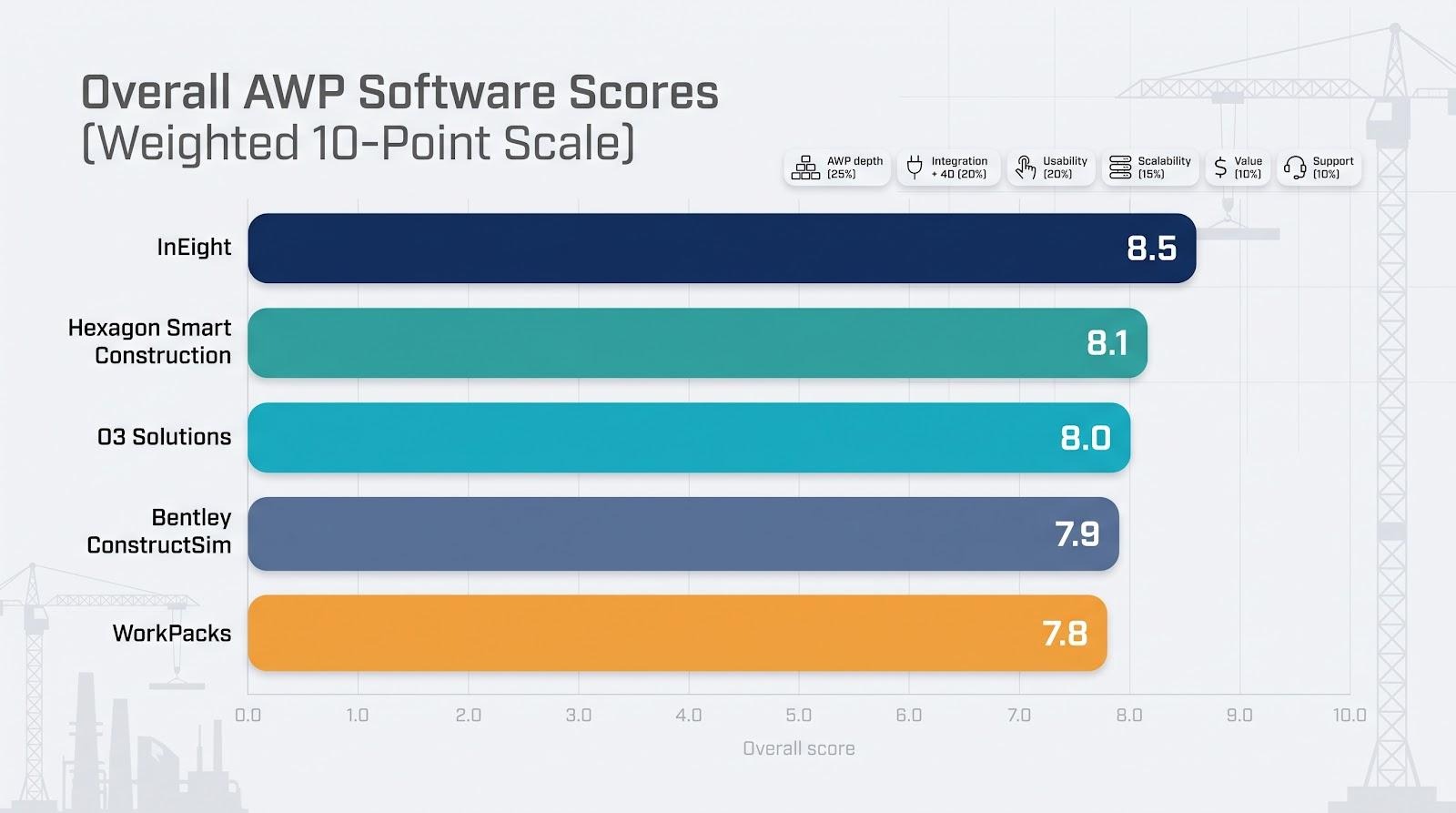
Numbers speak faster than paragraphs, so we combined the six criteria into one grid. A quick scan shows why some platforms jump ahead while others sit in the middle.
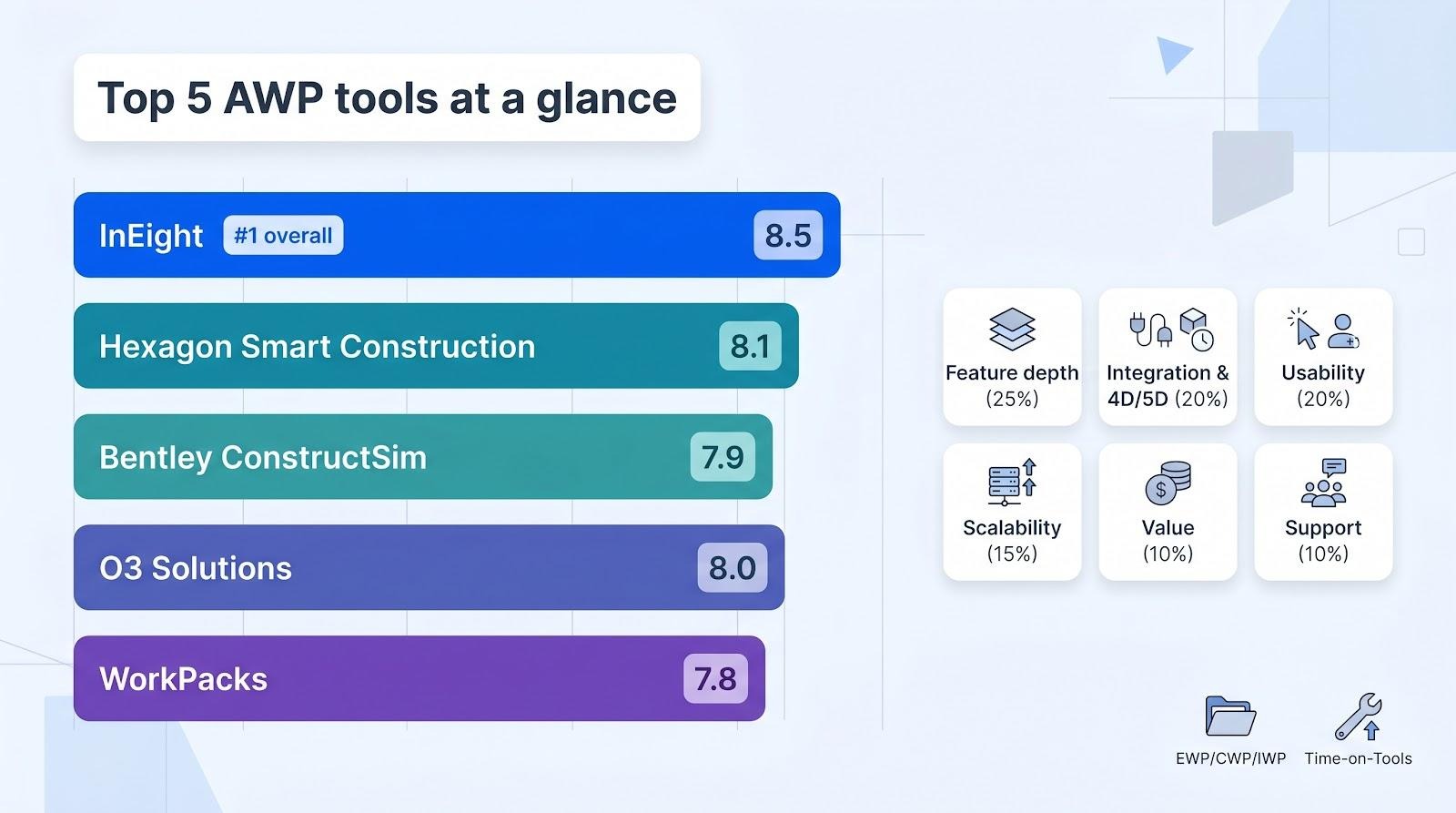
| Criteria (weight) | InEight | Hexagon Smart Construction | Bentley ConstructSim | WorkPacks | O3 Solutions |
| AWP feature depth (25 percent) | 9 | 9 | 9 | 8 | 8 |
| Integration + 4D support (20 percent) | 9 | 9 | 8 | 8 | 8 |
| Usability and adoption (20 percent) | 7 | 6 | 6 | 7 | 8 |
| Scalability and architecture (15 percent) | 9 | 8 | 8 | 7 | 8 |
| Value for money (10 percent) | 8 | 7 | 7 | 8 | 9 |
| Vendor support and market traction (10 percent) | 9 | 8 | 8 | 7 | 8 |
| Overall score | 8.5 | 8.1 | 7.9 | 7.8 | 8.0 |
Scores are weighted, then rounded to the nearest tenth. They reflect documented features, customer references, and hands-on trials, not vendor claims. Because the framework mirrors the CII playbook for AWP excellence, you can map each row to a tangible project outcome.
In short, InEight leads with end-to-end muscle; Hexagon and Bentley duel on model-centric power, while cloud natives gain ground on usability and price. The next section starts our deep dives, beginning with the platform at the top.
1. InEight: best overall for end-to-end AWP
Overview
Founded in 1989 as Hard Dollar, InEight has grown into a platform that speaks fluent jobsite. From the first login you can see it was built to move a work package from an engineer’s desktop to a foreman’s tablet and back again with progress data intact.
Everything lives in one data environment. Estimators set the scope, schedulers line up the dates, and field crews capture actuals, each step referencing the same construction work package object. That single source of truth removes the copy-paste gymnastics that plague projects run on disconnected tools.
InEight also weaves CII’s stage-gate language into its interface. You will see native fields for engineering, material, and permit readiness, plus checklist gates that force the “constraint-free” talk before an IWP is released. The outcome is fewer surprise holds and a smoother path of construction, a claim echoed in several enterprise case studies on the vendor site.
Because the platform spans estimating, cost, schedule, and field execution, owners get end-to-end performance metrics without stitching reports together. That broad visibility underpins our top ranking; no other product in this review offers the same depth across every project phase.
Why InEight tops the table
Three traits set InEight apart.
First, feature depth. The platform covers the full AWP life cycle. Engineering work packages flow into CWPs, which then spawn IWPs complete with material, document, and safety checklists. Everything sits in one database, so when engineering tags a drawing “rev C,” the linked IWPs update automatically. Project teams have retired whole forests of spreadsheets thanks to that tight hand-off.
Second, integration. InEight’s API stack and ready-made connectors let you sync with Primavera schedules, 3D models, and ERP cost codes without middleware gymnastics. Its native BIM viewer handles multi-gigabyte models right in the browser, giving planners a live 4D lens on package readiness.
Third, enterprise toughness. InEight has logged flight hours on billion-dollar programs in oil, gas, and infrastructure, managing more than $1 trillion in capital project value across 850 plus companies (www.ineight.com) without the latency spikes that slow lighter SaaS tools. Large owners treat the software less like another app and more like part of their digital backbone.
Put those strengths together and you get a tool that can drive AWP from bid to turnover, with no bolt-ons required.
2. Hexagon Smart Construction: best for EPCs tied to Hexagon’s design stack
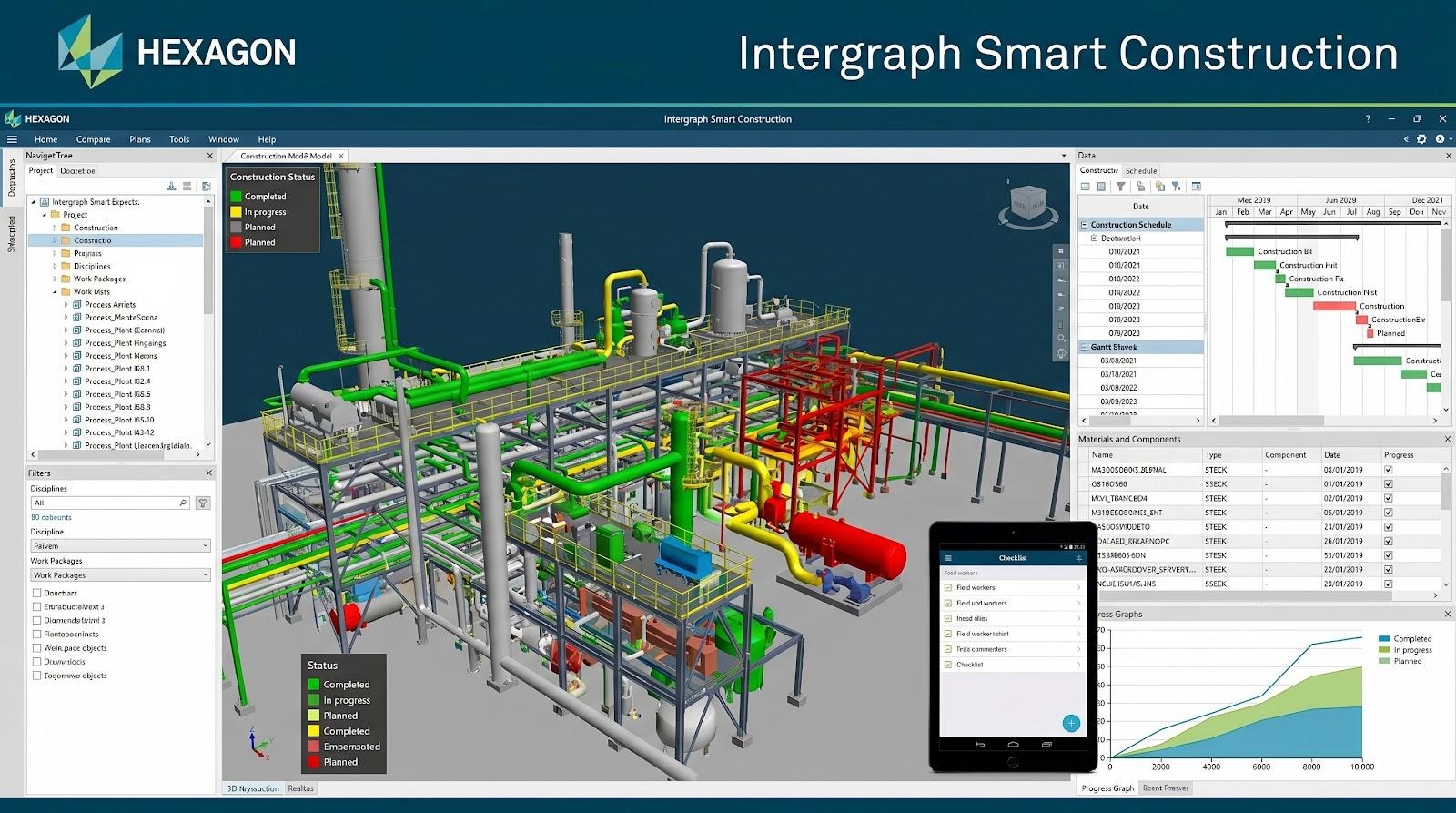
Hexagon Smart Construction model-to-field AWP interface screenshot
Overview
Hexagon Smart Construction links the 3D model your engineers create in Smart3D with the installation work your craft crews perform in the field. Because it shares data structures with Hexagon’s design and materials tools, information moves across disciplines without translation loss.
Open a Smart3D model, select a section of pipe rack, and the software builds a construction work package that includes quantities, drawings, and a bill of materials. Material readiness pulls live from Smart Materials, while RFID tags tracked in Jovix turn green once each spool arrives on site. Planners view scope, schedule, and supply on one color-coded screen instead of juggling three spreadsheets.
That tight loop makes Smart Construction a natural fit for large EPCs already invested in Hexagon’s ecosystem. It delivers model-centric AWP without the export-import gymnastics competitors face, which pays off on mega-projects where weekly design changes and a single missing valve can stall thousands of craft hours.
Where Hexagon shines
Model-to-field fidelity is Hexagon’s superpower. Because Smart Construction draws components directly from Smart3D, package scopes match the design down to the bolt. If engineering revises a nozzle length, the change flows through the linked CWP and its downstream IWPs, cutting field surprises and easing the office-to-site hand-off.
Materials are the second ace up its sleeve. Hexagon owns Jovix, the RFID tracking tool many industrial jobs use for real-time yard visibility. Smart Construction surfaces that feed inside each work package, showing red when a spool is at the fabricator and green once it clears receiving. Planners stop chasing updates by phone and know at a glance which IWPs are truly ready.
Finally, Smart Construction excels at visual planning. A 4D timeline lets teams scrub forward and watch the model build in the same sequence crews will follow. Clash points pop out early, giving planners time to resequence before steel arrives. On complex, congested sites that preview can save costly rework.
Trade-offs and ideal fit
Smart Construction’s strength is also its main limit: the deeper you are in Hexagon’s world, the better it runs. If your designers work in Autodesk or AVEVA, expect extra middleware or data conversion that reduces efficiency. Smaller contractors without Smart3D or Smart Materials licences may find the learning curve, and the price tag, steep for the value gained.
Deployment is another hurdle. Many installations still depend on on-premises servers paired with thick-client viewers. Hexagon is adding cloud options, but they lag behind the zero-install convenience younger SaaS rivals offer. If you need crews to spin up on tablets tomorrow, a cloud-first platform could be faster.
For large EPCs already using SmartPlant, Smart Construction feels less like a new app and more like the missing chapter in an existing digital playbook. It shines on industrial megaprojects where model detail, material logistics, and rapid engineering-to-field cycles dominate risk. In that context, the investment pays back through avoided rework and precise material visibility.
3. Bentley ConstructSim: best for model-based 4D work packaging
Bentley ConstructSim 4D work packaging and construction simulation screenshot
Overview
If your project relies on a detailed 3D model, ConstructSim turns that digital twin into a construction playbook. The software builds a construction i-model that layers schedule, quantities, and resource data onto geometry, so planners can slice the plant into EWPs, CWPs, and IWPs with a few clicks.
The 4D viewer is the highlight. Drag the timeline to watch the model assemble exactly as the schedule dictates. Teams spot sequencing clashes before they reach the field, test what-if scenarios in minutes, and export animations that make look-ahead meetings clear for every crew.
Because packages inherit quantities straight from the model, foremen receive job cards with weld inches, bolt counts, and component IDs, no manual take-off required. Field status updates recolour the model, giving managers a live earned-value dashboard.
That feedback loop has produced double-digit productivity gains on megaprojects reported at industry conferences, reinforcing ConstructSim’s role in model-centric AWP.
Strengths, watch-outs, and best use cases
ConstructSim’s biggest asset is immersive 4D foresight. By animating construction before the first scaffold rises, teams can resequence congested areas, level resources, and brief crews with visuals that stick. On a capital project, planners cut the time to create crew-level work packages by 90 percent, a saving spreadsheets could not deliver.
The flip side is data quality. ConstructSim excels only when the design model is complete, well-tagged, and current. Late or lightweight models blunt its automation and force manual work-arounds that reduce ROI.
Compute load also matters. The viewer needs graphics power, and loading a multi-gigabyte LNG model on a mid-range laptop can feel slow. Many teams use high-spec workstations or streamed sessions, but that choice affects budget and logistics.
ConstructSim shines on industrial megaprojects where virtual construction drives safety and schedule certainty. If your plant is fully modeled and a VDC team is on staff, the tool pays back through fewer clashes, cleaner IWPs, and visuals that boost crew confidence. For smaller builds with limited BIM, its capability may be more than you need.
4. WorkPacks: best for rapid, automated path-of-construction planning
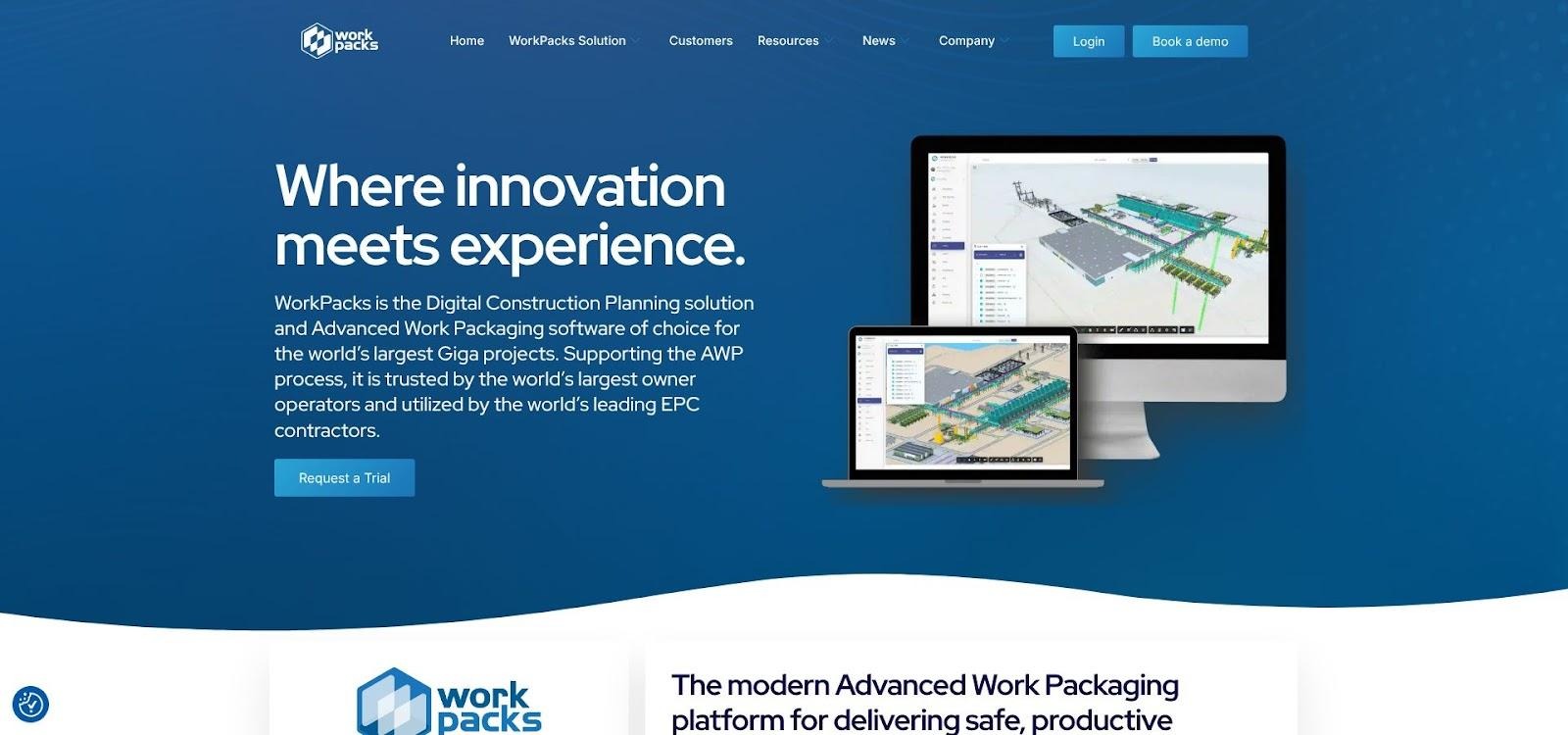
WorkPacks cloud-based AWP automation and Kanban dashboard screenshot
Overview
WorkPacks is a newcomer built for teams that want advanced work packaging without adding a platoon of planners. The software reverse-engineers your path of construction from high-level plot plans, then auto-generates engineering, construction, and installation work packages in minutes.
Upload a model or 2D drawings, define area boundaries, and WorkPacks creates a draft package hierarchy before you finish your coffee. Constraint logs start at the same time, so engineering, procurement, and field teams know what must clear before each IWP becomes workable.
Because everything lives in the cloud, stakeholders log in through a browser. No local installs, no VPN issues. Dashboards flag red-amber-green readiness, and planners drag items on a Kanban board to reassign or resequence. The interface feels closer to modern SaaS than traditional EPC software, which helps new users feel at home quickly.
WorkPacks also exposes open APIs that let you push package data to P6, Power BI, or a digital-twin viewer. This flexibility makes it an easy add-on rather than a rip-and-replace decision, a key point for mid-size contractors testing AWP.
Strengths, watch-outs, and ideal fit
Speed is WorkPacks’ calling card. Auto-generated packages let teams spend hours polishing instead of weeks building spreadsheets, a gain that matters on fast-track jobs where engineering trails construction by just a few weeks.
Usability is the second draw. The interface feels more like Trello than an EPC control room, so field engineers adopt it with minimal guidance. Dashboards surface constraint counts and ready-to-work IWPs without deep drill-downs, keeping daily stand-ups focused on removing roadblocks.
Automation has limits. The engine follows the rules you set, so poor area definitions or missing metadata produce messy outputs. A seasoned planner must still confirm that a “week-3 piping IWP” makes sense in the field. On megaprojects with heavy 3D and material logistics, the tool’s lighter 4D and cost features may need support from specialist apps.
WorkPacks fits mid-size EPCs or contractors new to AWP who want quick wins without enterprise overhead. It also scales down to smaller, high-volume projects, such as battery plants or data centres, where heavyweight suites would be excessive.
5. O3 Solutions: best for cloud-native, modular AWP adoption
O3 Solutions cloud-native modular AWP and Otto AI assistant screenshot
Overview
O3 was born in the browser, so there is nothing to install and no VPN hoops to jump through. You choose only the modules you need (Engineering, Construction, Commissioning) and leave the rest off. That pick-and-choose approach lets owners pilot AWP on a single project without committing to an enterprise overhaul.
Dashboards feel more like modern SaaS than legacy project controls. Constraint boards use drag-and-drop cards, package readiness glows green when every prerequisite clears, and built-in reports feed directly to Power BI. Because the interface is friendly, adoption spreads beyond the planning pod; engineering leads, foremen, and even vendors log in to update status instead of emailing spreadsheets.
The 2026 release added Otto, an AI assistant that answers natural-language questions such as “Which CWPs risk slipping this month?” Otto scans live data and replies in seconds, cutting hours of manual report wrangling. It also suggests next-best actions, nudging users toward CII-compliant workflows.
Open APIs link O3 to Primavera, BIM viewers, or a data warehouse. That connection makes it a practical overlay for firms with mixed tech stacks, a common reality outside the mega-EPC bubble.
Strengths, watch-outs, and ideal fit
O3’s headline benefit is accessibility. Teams can create a project workspace in an afternoon, invite subcontractors with a link, and start logging constraints without waiting for IT to rack servers. That quick start helps organisations prove value before requesting a large rollout.
Modular flexibility is the second edge. Need only constraint management this quarter? Turn on Engage. Ready for full IWPs next year? Add Deliver. Licensing grows with you, so costs track value instead of ballooning upfront.
Otto extends usability. Ask, “Which IWPs are blocked by engineering?” and the AI shows a ranked list with links to the drawings in question, saving planners from dashboard hunting. Early adopters estimate a weekly saving of 70 hours in manual reporting.
Trade-offs exist. Detailed 4D model simulation still needs a partner app such as Synchro. Some power users also want deeper earned-value analytics, although the API supports links to external BI tools.
O3 suits owners and contractors juggling diverse tech stacks or rolling out AWP across many mid-sized projects. It lowers the barrier to entry, keeps user friction low, and adds AI assistance where busy teams feel it most.
Frequently asked questions
What is the real payoff from AWP software?
Industry research shows that crews on a traditional project spend only about 37 percent of their shift on productive, “on-tool” work. Implementing AWP with purpose-built software usually lifts that figure by roughly ten percentage points, and sometimes by a full quarter, because every IWP reaches the field constraint-free.
Can we bolt AWP onto our existing scheduling tool?
You can, but be ready for a maze of spreadsheets and custom codes that few people understand. Generic schedulers track activities, not work-package entities, so you will still need separate logs for drawings, materials, and permits. Purpose-built platforms include those gates, saving planners from endless reconciliation, and giving field teams one source of truth.
Do we need a 3D model to start?
No. Model-centric tools such as Bentley and Hexagon thrive on rich geometry, but cloud natives like WorkPacks and O3 work with 2D drawings and a WBS. They still track constraints, sequence packages, and surface readiness dashboards. You can add a model later as your digital maturity grows.
How steep is the learning curve?
Integrated suites (InEight, Hexagon) offer deep capability, so expect a few weeks of structured onboarding and IT integration. Newer SaaS tools focus on self-service: WorkPacks and O3 often go live in days because users need only a browser and short role-based training videos.
Which tool scales best for small jobs?
If you run a handful of 50 million-dollar projects, the lighter weight of O3 or WorkPacks often wins on cost and speed. Large owners with an enterprise licence for InEight may deploy it everywhere for consistency, though they accept some functional overhead on smaller sites.
Is AI just hype?
Not anymore. O3’s Otto assistant already parses live project data and answers natural-language questions, turning hours of dashboard digging into seconds of insight. Early users say the biggest benefit is spotting at-risk packages before the weekly look-ahead.
Conclusion
In short, InEight leads with end-to-end muscle; Hexagon and Bentley duel on model-centric power, while cloud natives gain ground on usability and price. Use the detailed reviews above to match the right platform to your project’s goals and constraints.

